Join us at FabCon Atlanta from March 16 - 20, 2026, for the ultimate Fabric, Power BI, AI and SQL community-led event. Save $200 with code FABCOMM.
Register now!The Power BI Data Visualization World Championships is back! Get ahead of the game and start preparing now! Learn more
Hi,
I'm sort of new to power query and while adding a new column I used the below function which works, however I wanted to ask if their was a way to also replace more than one value.
= [#"DestinationType"] & " | " & Text.Replace([#Destination Name], "Spend", "Facts")
Would need to be
= [#"DestinationType"] & " | " & Text.Replace([#Destination Name], "Spend" OR "App" OR "Card" , "Facts")
Is this possible to do in one step?
Solved! Go to Solution.
Hi @OsmanEmi
I suggest you to build a replacement table then try my M code. Currently, you will replace all words by the same word "Fact". This way will still work if you want to replace multiple words by different words.
My Sample:
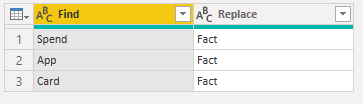
Replacement Table:
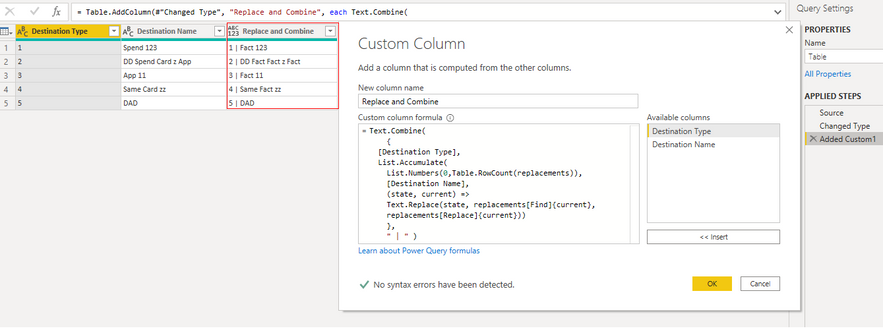
Use M Code to add a custom column:
Text.Combine(
{
[Destination Type],
List.Accumulate(
List.Numbers(0,Table.RowCount(replacements)),
[Destination Name],
(state, current) =>
Text.Replace(state, replacements[Find]{current},
replacements[Replace]{current}))
},
" | " )
Result is as below.
Best Regards,
Rico Zhou
If this post helps, then please consider Accept it as the solution to help the other members find it more quickly.
Hi @OsmanEmi
I suggest you to build a replacement table then try my M code. Currently, you will replace all words by the same word "Fact". This way will still work if you want to replace multiple words by different words.
My Sample:
Replacement Table:
Use M Code to add a custom column:
Text.Combine(
{
[Destination Type],
List.Accumulate(
List.Numbers(0,Table.RowCount(replacements)),
[Destination Name],
(state, current) =>
Text.Replace(state, replacements[Find]{current},
replacements[Replace]{current}))
},
" | " )
Result is as below.
Best Regards,
Rico Zhou
If this post helps, then please consider Accept it as the solution to help the other members find it more quickly.
Here's an alternative solution:
let
Source = Table.FromRows(Json.Document(Binary.Decompress(Binary.FromText("i45WMlTSUQrOz00tycjMS1cILkjNS1EwNDJWitWByDk6OcPZSfn5BQpJqakFCo4FBSiqnBOLULW5uLopxcYCAA==", BinaryEncoding.Base64), Compression.Deflate)), let _t = ((type nullable text) meta [Serialized.Text = true]) in type table [DestinationType = _t, #"Destination Name" = _t]),
ConcatCol = Table.AddColumn(Source, "MyNewColumn",
each
[DestinationType] & " | " &
Text.Combine(
List.ReplaceMatchingItems(Text.Split([Destination Name], " "), {{"APP", "Facts"}, {"SPEND", "Facts"}, {"CARD", "Facts"}}, Comparer.OrdinalIgnoreCase),
" ")
)
in
ConcatCol
Hello there @OsmanEmi ! Try this and see if it works for your case:
= [#"DestinationType"] & " | " & Table.ReplaceValue([Your table name], each if Text.Contains([#Destination Name], {"Spend", "App", "Card"} then "Facts" else [Destination Name], Replacer.ReplaceValue, {"Destination Name"})
Alternatively, you can check this thread for a similar solution! Or this one!
Hope this answer solves your problem! If you need any additional help please tag me in your reply.
If my reply provided you with a solution, pleased mark it as a solution ✔️ or give it a kudoe 👍
Thanks!
Best regards,
Gonçalo Geraldes
The Power BI Data Visualization World Championships is back! Get ahead of the game and start preparing now!
| User | Count |
|---|---|
| 161 | |
| 132 | |
| 117 | |
| 79 | |
| 54 |