Get Fabric or SQL Certified for Free.
Get certified for free when you join Fabric Data Days 2026 and dive into Fabric, Power BI, SQL, AI, and other essential data skills.
Join now- Power BI forums
- Get Help with Power BI
- Desktop
- Service
- Report Server
- Power Query
- Mobile Apps
- Developer
- DAX Commands and Tips
- Custom Visuals Development Discussion
- Health and Life Sciences
- Power BI Spanish forums
- Translated Spanish Desktop
- Training and Consulting
- Instructor Led Training
- Dashboard in a Day for Women, by Women
- Galleries
- Data Stories Gallery
- Themes Gallery
- Contests Gallery
- QuickViz Gallery
- Quick Measures Gallery
- Visual Calculations Gallery
- Notebook Gallery
- Translytical Task Flow Gallery
- TMDL Gallery
- R Script Showcase
- Webinars and Video Gallery
- Ideas
- Custom Visuals Ideas (read-only)
- Issues
- Issues
- Events
- Upcoming Events
July 7 - July 17 | Round 2 of the Power BI Dataviz World Championships. Don't miss your chance! Learn more
- Power BI forums
- Forums
- Get Help with Power BI
- Desktop
- Using Microsoft Form Data
- Subscribe to RSS Feed
- Mark Topic as New
- Mark Topic as Read
- Float this Topic for Current User
- Bookmark
- Subscribe
- Printer Friendly Page

- Mark as New
- Bookmark
- Subscribe
- Mute
- Subscribe to RSS Feed
- Permalink
- Report Inappropriate Content
Using Microsoft Form Data
I was wondering if I could get a clever solution from you guys.
I have data being collected from a Microsoft form. I was wondering if you guys had a more elegant way of capturing the data as it comes through.
Right now I use a 'Conditional Column' and look for the entire string. If it is there it sets a new column to true. I have to create a new column for each answer with this method 😞 . This is becoming cumbersome.
My overall desire is to have the data be used easily in graphs and charts.
Below is an example dump of data.
| Attribute | Value |
| Detail on Urgency Failure | Did Not Capture Answers to Urgency Questions in Description; |
| Detail on Urgency Failure | Did Not Document Information About the Work-Around; |
| Detail on Urgency Failure | Did Not Capture Answers to Urgency Questions in Description; |
| Detail on Urgency Failure | Did Not Capture Answers to Urgency Questions in Description; |
| Detail on Urgency Failure | Did Not Capture Answers to Urgency Questions in Description; |
| Detail on Urgency Failure | Did Not Capture Answers to Urgency Questions in Description; |
| Detail on Urgency Failure | Did Not Document in the Description Why the Urgency was Changed;Did Not Capture Answers to Urgency Questions in Description; |
| Detail on Urgency Failure | Urgency Does Not Match Description; |
| Detail on Urgency Failure | Did Not Capture Answers to Urgency Questions in Description; |
| Detail on Urgency Failure | Did Not Capture Answers to Urgency Questions in Description; |
| Detail on Urgency Failure | Did Not Capture Answers to Urgency Questions in Description; |
| Detail on Urgency Failure | Did Not Capture Answers to Urgency Questions in Description; |
| Detail on Urgency Failure | Did Not Capture Answers to Urgency Questions in Description; |
| Detail on Urgency Failure | Did Not Capture Answers to Urgency Questions in Description; |
| Detail on Urgency Failure | Did Not Capture Answers to Urgency Questions in Description; |
| Detail on Urgency Failure | Did Not Capture Answers to Urgency Questions in Description; |
| Detail on Urgency Failure | Did Not Capture Answers to Urgency Questions in Description; |
| Detail on Urgency Failure | Did Not Capture Answers to Urgency Questions in Description; |
| Detail on Urgency Failure | Did Not Capture Answers to Urgency Questions in Description; |
| Detail on Urgency Failure | Did Not Capture Answers to Urgency Questions in Description; |
| Detail on Urgency Failure | Did Not Capture Answers to Urgency Questions in Description; |
| Detail on Urgency Failure | Did Not Capture Answers to Urgency Questions in Description; |
| Detail on Urgency Failure | Did Not Capture Answers to Urgency Questions in Description; |
| Detail on Urgency Failure | Did Not Document Information About the Work-Around;Did Not Capture Answers to Urgency Questions in Description; |
| Detail on Urgency Failure | Urgency Does Not Match Description; |
| Detail on Urgency Failure | Did Not Document Information About the Work-Around; |
| Detail on Urgency Failure | Did Not Document in the Description Why the Urgency was Changed;Did Not Document Information About the Work-Around;Did Not Capture Answers to Urgency Questions in Description; |
| Detail on Urgency Failure | Did Not Capture Answers to Urgency Questions in Description; |
| Detail on Urgency Failure | Did Not Document Information About the Work-Around;Did Not Capture Answers to Urgency Questions in Description; |
| Detail on Urgency Failure | Did Not Capture Answers to Urgency Questions in Description; |
| Detail on Urgency Failure | Urgency Does Not Match Description; |
| Detail on Urgency Failure | Did Not Capture Answers to Urgency Questions in Description; |
| Detail on Urgency Failure | Did Not Capture Answers to Urgency Questions in Description; |
| Detail on Urgency Failure | Urgency Does Not Match Description; |
| Detail on Urgency Failure | Did Not Document Information About the Work-Around; |
| Detail on Urgency Failure | Did Not Document Information About the Work-Around; |
| Detail on Urgency Failure | Urgency Does Not Match Description; |
| Detail on Urgency Failure | Did Not Document in the Description Why the Urgency was Changed;Did Not Capture Answers to Urgency Questions in Description; |
| Detail on Urgency Failure | Did Not Capture Answers to Urgency Questions in Description; |
| Detail on Urgency Failure | Did Not Capture Answers to Urgency Questions in Description; |
| Detail on Urgency Failure | Did Not Document in the Description Why the Urgency was Changed;Did Not Capture Answers to Urgency Questions in Description; |
| Detail on Urgency Failure | Urgency Does Not Match Description; |
| Detail on Urgency Failure | Did Not Capture Answers to Urgency Questions in Description; |
| Detail on Urgency Failure | Did Not Capture Answers to Urgency Questions in Description; |
| Detail on Urgency Failure | Did Not Capture Answers to Urgency Questions in Description; |
| Detail on Urgency Failure | Did Not Document Information About the Work-Around;Did Not Capture Answers to Urgency Questions in Description;Urgency Does Not Match Description; |
| Detail on Urgency Failure | Urgency Does Not Match Description; |
| Detail on Urgency Failure | Did Not Capture Answers to Urgency Questions in Description; |
| Detail on Urgency Failure | Did Not Document Information About the Work-Around;Did Not Capture Answers to Urgency Questions in Description;Urgency Does Not Match Description; |
Solved! Go to Solution.


- Mark as New
- Bookmark
- Subscribe
- Mute
- Subscribe to RSS Feed
- Permalink
- Report Inappropriate Content
Thank you, @Anonymous. It's quite clear now.
We can split the [Value] in the Query Editor. Then we can create a Matrix easily. Please check out the demo in the attachment.
Best Regards,
Dale
If this post helps, then please consider Accept it as the solution to help the other members find it more quickly.
- Mark as New
- Bookmark
- Subscribe
- Mute
- Subscribe to RSS Feed
- Permalink
- Report Inappropriate Content
Hi,
I find difficulties in reaching a Forms source I did not created.You seems OK with source : for me Forms https URL is not aknoloedge as a web source apparently : how did you got your Forms source from PBI Desktop ?
thx in advance
- Mark as New
- Bookmark
- Subscribe
- Mute
- Subscribe to RSS Feed
- Permalink
- Report Inappropriate Content
Since you did not create the source it will be difficult to import.
https://davidlozzi.com/2018/02/06/use-microsoft-forms-to-collect-data-right-into-your-excel-file/
I used this guide previously to create a form with an excel file. I would then import that file into power bi.
- Mark as New
- Bookmark
- Subscribe
- Mute
- Subscribe to RSS Feed
- Permalink
- Report Inappropriate Content
Hi @Anonymous,
I'm afraid I'm not quite clear about your scenario.
1. Why didn't you have to create a new column? How?
2. Just look at the visual, we can easily get it with the visual "Matrix".
3. I don't see any "sets a new column to true".
Best Regards,
Dale
If this post helps, then please consider Accept it as the solution to help the other members find it more quickly.
- Mark as New
- Bookmark
- Subscribe
- Mute
- Subscribe to RSS Feed
- Permalink
- Report Inappropriate Content
@v-jiascu-msftSure!
Ok sorry if I was not clear....
So let me start with what Power BI does automatically. I will use the data I have posted in the earlier reply.
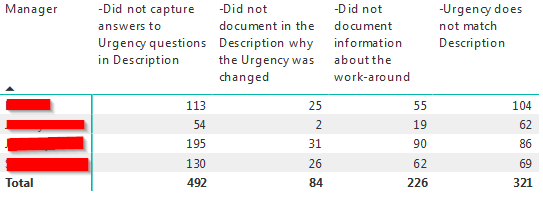
If you just add that data to a matrix you will get this...

The problem is that the answers that feature 2 or more answers in the cell is treated as a unique reply.
This is what the data entry side looks like for the form....
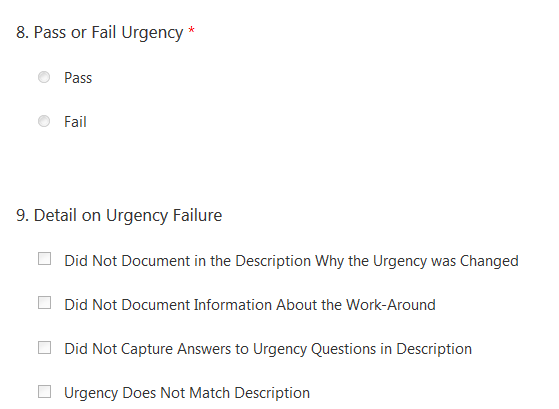
-------------------------------------
What I was doing to seperate out the answer was to use a conditional column.

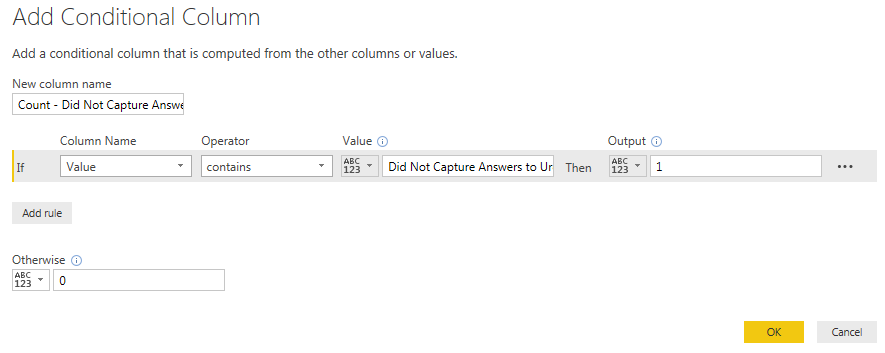
The statement looks for just part of the string and will make the new column get a value of 1 (true) if it is present in that cell.
I used "Did not capture answers to urgency question in description" for this example.
I can then sum or use the columns to make an accuracte representation of when those options are selected. Everything between a ; in the demo data are seperate selections.

I hope this cleared things up! Let me know if it is still confusing.
I really wish there was a way to let Power BI know the data in seperated by a ;
- Mark as New
- Bookmark
- Subscribe
- Mute
- Subscribe to RSS Feed
- Permalink
- Report Inappropriate Content
Thank you, @Anonymous. It's quite clear now.
We can split the [Value] in the Query Editor. Then we can create a Matrix easily. Please check out the demo in the attachment.
Best Regards,
Dale
If this post helps, then please consider Accept it as the solution to help the other members find it more quickly.
- Mark as New
- Bookmark
- Subscribe
- Mute
- Subscribe to RSS Feed
- Permalink
- Report Inappropriate Content
Was able to use that method in both excel and power bi, thank you!
Helpful resources

FabCon & SQLCon – Barcelona 2026
Join us in Barcelona for FabCon and SQLCon, the Fabric, Power BI, SQL, and AI community event. Save €200 with code FABCMTY200.

Data Days 2026
Join Data Days 2026: 60 days of free live/on-demand sessions, challenges, study groups, and certification opportunities.

Power BI DataViz World Championships - June 2026
A new Power BI DataViz World Championship is coming this June! Don't miss out on submitting your entry.

| User | Count |
|---|---|
| 26 | |
| 23 | |
| 19 | |
| 18 | |
| 15 |


| User | Count |
|---|---|
| 47 | |
| 44 | |
| 43 | |
| 35 | |
| 31 |


