cancel
Showing results for 
Search instead for 
Did you mean: 

The Power BI Data Visualization World Championships is back! Get ahead of the game and start preparing now! Learn more

Reply
HishamAT
Helper II
Helper II

Using IF statements

Hi

I am new to DAX , can you please help to write down an IF statement that described by the below : 


Using IF statements to decide if the year is 2022, month is 36 else 48


Thanks

1 ACCEPTED SOLUTION
Mikelytics
Resident Rockstar
Resident Rockstar

Hi @HishamAT 


Tis is not the end result right? But I can give you some ideas based on your input.


This i my base data with the table called BaseTable:
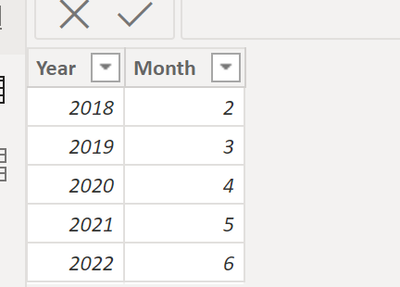
Mikelytics_0-1673267038780.png


1) Example with calculated column

Calculated Column Example = IF([Year]=2022,36,48)
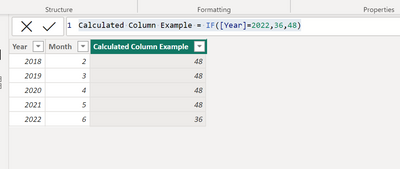
 

Mikelytics_2-1673267130853.png


Now with a measure:


Measure Example = 
IF(MAX(BaseTable[Year])=2022,36,48)
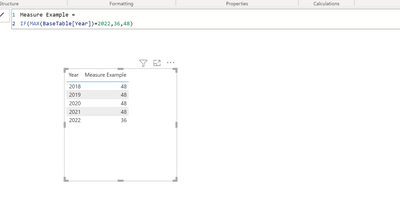
Mikelytics_3-1673267250872.png

Is this what you are looking for? If not please provide an end-2-end problem startement from data source to calculation to visual.


Best regards
Michael
-----------------------------------------------------
If this post helps, then please consider Accept it as the solution to help the other members find it more quickly.
Appreciate your thumbs up!
@ me in replies or I'll lose your thread.


------------------------------------------------------------------
Visit my blog datenhungrig which I recently started with content about business intelligence and Power BI in German and English or follow me on LinkedIn!

View solution in original post

3 REPLIES 3
Mikelytics
Resident Rockstar
Resident Rockstar

Hi @HishamAT 


Tis is not the end result right? But I can give you some ideas based on your input.


This i my base data with the table called BaseTable:

Mikelytics_0-1673267038780.png


1) Example with calculated column

Calculated Column Example = IF([Year]=2022,36,48)


Mikelytics_2-1673267130853.png


Now with a measure:


Measure Example = 
IF(MAX(BaseTable[Year])=2022,36,48)

Mikelytics_3-1673267250872.png

Is this what you are looking for? If not please provide an end-2-end problem startement from data source to calculation to visual.


Best regards
Michael
-----------------------------------------------------
If this post helps, then please consider Accept it as the solution to help the other members find it more quickly.
Appreciate your thumbs up!
@ me in replies or I'll lose your thread.


------------------------------------------------------------------
Visit my blog datenhungrig which I recently started with content about business intelligence and Power BI in German and English or follow me on LinkedIn!
Mikelytics
Resident Rockstar
Resident Rockstar

Hi @HishamAT 


Can you please provide more context, e.g. the data model, sample data as well as explanation what you want to have as an output (Do you want the result to be shown in a calculated column? in a visual? what kind of visual?)


if it is a calculate column then it would be IF([year] = 2022,36,48)


But I have the feeling that this will not help you in the end.


Best regards

Michael

------------------------------------------------------------------
Visit my blog datenhungrig which I recently started with content about business intelligence and Power BI in German and English or follow me on LinkedIn!

I have a table of Date, contains a year column:

YearMonth
20182
20193
20204
20215
20226

and i need return a measure field that if have the value of the 2022 = 36

else a measure field that have the value of the 2023 = 48


Thanks 

Helpful resources

Announcements
Power BI DataViz World Championships

Power BI Dataviz World Championships

The Power BI Data Visualization World Championships is back! Get ahead of the game and start preparing now!

December 2025 Power BI Update Carousel

Power BI Monthly Update - December 2025

Check out the December 2025 Power BI Holiday Recap!

FabCon Atlanta 2026 carousel

FabCon Atlanta 2026

Join us at FabCon Atlanta, March 16-20, for the ultimate Fabric, Power BI, AI and SQL community-led event. Save $200 with code FABCOMM.