Get Fabric or SQL Certified for Free.
Get certified for free when you join Fabric Data Days 2026 and dive into Fabric, Power BI, SQL, AI, and other essential data skills.
Join now- Power BI forums
- Get Help with Power BI
- Desktop
- Service
- Report Server
- Power Query
- Mobile Apps
- Developer
- DAX Commands and Tips
- Custom Visuals Development Discussion
- Health and Life Sciences
- Power BI Spanish forums
- Translated Spanish Desktop
- Training and Consulting
- Instructor Led Training
- Dashboard in a Day for Women, by Women
- Galleries
- Data Stories Gallery
- Themes Gallery
- Contests Gallery
- QuickViz Gallery
- Quick Measures Gallery
- Visual Calculations Gallery
- Fabric Apps Gallery
- Notebook Gallery
- Translytical Task Flow Gallery
- TMDL Gallery
- R Script Showcase
- Webinars and Video Gallery
- Ideas
- Custom Visuals Ideas (read-only)
- Issues
- Issues
- Events
- Upcoming Events
July 7 - July 17 | Round 2 of the Power BI Dataviz World Championships. Don't miss your chance! Learn more
- Power BI forums
- Forums
- Get Help with Power BI
- Desktop
- Re: Using IF statement with a Filter
- Subscribe to RSS Feed
- Mark Topic as New
- Mark Topic as Read
- Float this Topic for Current User
- Bookmark
- Subscribe
- Printer Friendly Page


- Mark as New
- Bookmark
- Subscribe
- Mute
- Subscribe to RSS Feed
- Permalink
- Report Inappropriate Content
Using IF statement with a Filter
Hi all,
I hope you are well,
I am doing an analyis which looks at Part Numbers being ordered on 2 order types (ZEO and ZSO) in the same month. Like the image below:

I have a measure ZEO Test which looks to see which part numbers have been ordered simultaneously on both ZEO and ZSO in the same month. If a part number has been ordered on both order types in the same month, it's supposed to say "see". I think the issue is that I would need to add a FILTER in the measure which looks at the month.
Solved! Go to Solution.

- Mark as New
- Bookmark
- Subscribe
- Mute
- Subscribe to RSS Feed
- Permalink
- Report Inappropriate Content
Hi @Asa94 ,
Is your expected output like this:
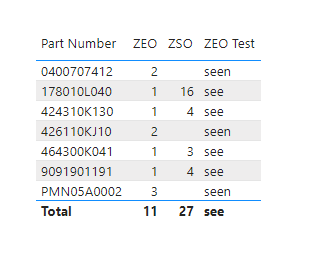
ZEO = CALCULATE(COUNTROWS('Table'),'Table'[SAP Ord Type]="ZEO") ZSO = CALCULATE(COUNTROWS('Table'),'Table'[SAP Ord Type]="ZSO") ZEO Test = IF([ZEO] > 0 && [ZSO] > 0,"see","seen")
Best Regards,
Eyelyn Qin
If this post helps, then please consider Accept it as the solution to help the other members find it more quickly.
- Mark as New
- Bookmark
- Subscribe
- Mute
- Subscribe to RSS Feed
- Permalink
- Report Inappropriate Content
Hi @Asa94 ,
If you could transform the table by pivoting:

please try:
Measure = IF( COUNT(Pivot[ZEO])>0 && COUNT('Pivot'[ZSO])>0,"see","seen") Output:

Best Regards,
Eyelyn Qin
If this post helps, then please consider Accept it as the solution to help the other members find it more quickly.
- Mark as New
- Bookmark
- Subscribe
- Mute
- Subscribe to RSS Feed
- Permalink
- Report Inappropriate Content
Hi @Anonymous ,
Sorry for the delayed reply. I have been getting errors on my Pivot, hence my delay.
But I did find the issue whereby the Order Qty column was not changed from General to Number. Which in turn didn't give me the option to Aggregrate as a sum.
I sorted it out and it works!
Thank you so much for your help. I really do appreciate it 🙂
Kind Regards,
Asa
- Mark as New
- Bookmark
- Subscribe
- Mute
- Subscribe to RSS Feed
- Permalink
- Report Inappropriate Content
Hi @Asa94 ,
Is your expected output like this:
ZEO = CALCULATE(COUNTROWS('Table'),'Table'[SAP Ord Type]="ZEO") ZSO = CALCULATE(COUNTROWS('Table'),'Table'[SAP Ord Type]="ZSO") ZEO Test = IF([ZEO] > 0 && [ZSO] > 0,"see","seen")
Best Regards,
Eyelyn Qin
If this post helps, then please consider Accept it as the solution to help the other members find it more quickly.
- Mark as New
- Bookmark
- Subscribe
- Mute
- Subscribe to RSS Feed
- Permalink
- Report Inappropriate Content
Hi @Anonymous ,
Yes, this is the expected output. Thank you so much. I appreciate it.
I want to ask, you wouldn't recommend that I pivot the Order Qty column with the Order Type column in the query? I'm guessing as @amitchandak has explained, the ZEO Test measure will not work.
Kind Regards,
Asa
- Mark as New
- Bookmark
- Subscribe
- Mute
- Subscribe to RSS Feed
- Permalink
- Report Inappropriate Content
Hi @Anonymous and @amitchandak thank you so much for your patience.
I have uploaded the sample data with the sample output.
Kind Regards,
Asa
- Mark as New
- Bookmark
- Subscribe
- Mute
- Subscribe to RSS Feed
- Permalink
- Report Inappropriate Content
Hi @Asa94 ,
Any updates about your sample?

You may kindly take a look at the blogs to know
How to Get Your Question Answered Quickly - Microsoft Power BI Community
How to provide sample data in the Power BI Forum - Microsoft Power BI Community
Best Regards,
Eyelyn Qin


- Mark as New
- Bookmark
- Subscribe
- Mute
- Subscribe to RSS Feed
- Permalink
- Report Inappropriate Content
@Asa94 , Make sure ZEO Count and ZSO Count are measure and ZEO Test is also a measure
ZEO Test = IF([ZEO Count] > 0 && [ZSO Count] > 0,"see","seen")
If this does not help
Can you share sample data and sample output in table format? Or a sample pbix after removing sensitive data.
- Mark as New
- Bookmark
- Subscribe
- Mute
- Subscribe to RSS Feed
- Permalink
- Report Inappropriate Content
Hi @amitchandak, I see, ZEO and ZSO Count are summarized from another table.
In the meantime, I'm building the sample data and output to share with you.
Helpful resources

FabCon & SQLCon – Barcelona 2026
Join us in Barcelona for FabCon and SQLCon, the Fabric, Power BI, SQL, and AI community event. Save €200 with code FABCMTY200.

Data Days 2026
Join Data Days 2026: 60 days of free live/on-demand sessions, challenges, study groups, and certification opportunities.

Power BI DataViz World Championships - June 2026
A new Power BI DataViz World Championship is coming this June! Don't miss out on submitting your entry.

| User | Count |
|---|---|
| 30 | |
| 28 | |
| 26 | |
| 23 | |
| 17 |


| User | Count |
|---|---|
| 57 | |
| 44 | |
| 39 | |
| 26 | |
| 21 |


