Join us at FabCon Atlanta from March 16 - 20, 2026, for the ultimate Fabric, Power BI, AI and SQL community-led event. Save $200 with code FABCOMM.
Register now!The Power BI Data Visualization World Championships is back! Get ahead of the game and start preparing now! Learn more
How can I enable the Group/Grouping menu? When I select my data in visuals and right click, Group is not part of the available menu. How can I make this field active?
Solved! Go to Solution.
Hi @Rosy_N
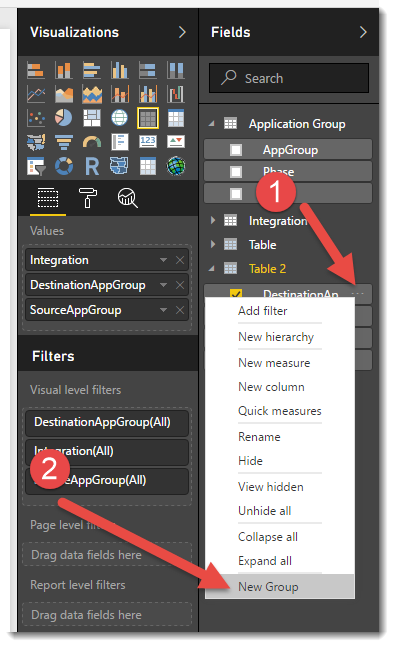
If you click the three dots on the end of a field name as per the image below, a menu should appear with the option to create a new group
Hi @Rosy_N
If you click the three dots on the end of a field name as per the image below, a menu should appear with the option to create a new group
It seems the grouping option is not avalaible when using SSAS tabular with live query. Is that corect?
Yes I'm encountering that issue too. Is anyone able to group tabular data?
Please provide us some sample data and the expected result, so that we can make further analysis.
Here is a blog whidh describe how to use Group in Power BI, please refer to the link below.
http://datachant.com/2016/10/31/column-grouping-power-bi-desktop-october-update/
Regards,
Charlie Liao
Hey @Rosy_N,
"New Group" should be an option for any column in PBI Desktop. Measures can not be grouped.
PBI Service does not support grouping at this time.
Hope this helps,
Alan
The Power BI Data Visualization World Championships is back! Get ahead of the game and start preparing now!
| User | Count |
|---|---|
| 40 | |
| 37 | |
| 35 | |
| 34 | |
| 28 |
| User | Count |
|---|---|
| 136 | |
| 99 | |
| 73 | |
| 66 | |
| 65 |