Get certified for free when you join Fabric Data Days 2026 and dive into Fabric, Power BI, SQL, AI, and other essential data skills.
Join nowData Days is here! Join us now for 60+ days of learning, challenges, and connection. Learn more
Hello,
I have a DAX query that I'm tring to deduplicate values from. Basically, the DAX query is a COUNTAX but I'm unsure how to write the query correctly.
Below is my original query:
= COUNTAX(
FILTER(
RELATEDTABLE('Customer Attributes'),
'Customer Attributes'[Attribute Type] = "IDENTIFIER" &&
'Customer Attributes'[type] = 6
),
'Customer Attributes'[AttributeCnt]
) + 0
I'm trying to GROUPBY one of the columns within the Customer Attributes table.
Any help would be much appreciated.
Thank you
Hi @Anonymous
Could you share some data example and the expected result?
Best Regards
Maggie
Hi Maggie,
Sure, below is what I'm seeing as far as a result set goes:
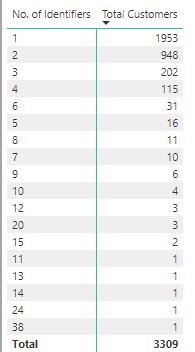
Below is an example of what I should be seeing as we shouldn't have more than 6 No. Of Attributes.
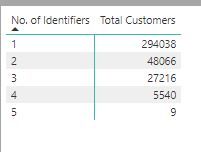
The No. Of Identifiers field is the currently the following DAX query:
No. of Identifiers = COUNTAX(
FILTER(
RELATEDTABLE('Customer Attributes'),
'Customer Attributes'[Attribute Type] = "IDENTIFIER"
),
'Customer Attributes'[AttributeCnt]
) + 0
The query that I'm attempting to write is as follows:
= GROUPBY('Customer Attributes','Customer Attributes'[Attribute],"Distinct No Identifiers",
COUNTAX(CURRENTGROUP(),FILTER('Customer Attributes','Customer Attributes'[Attribute Type] = "Identifier"
)),
'Customer Attributes'[AttributeCnt]
) + 0
The below query is giving me sort of what I want, however I'm looking for the acutal number, not summary:
SUMMARIZE('Customer Attributes','Customer Attributes'[Attribute],"Distinct No. Identifiers",
COUNTAX(
FILTER(
RELATEDTABLE('Customer Attributes'),
'Customer Attributes'[Attribute Type] = "IDENTIFIER" &&
'Customer Attributes'[type] = 6 ),
'Customer Attributes'[AttributeCnt]
) + 0)
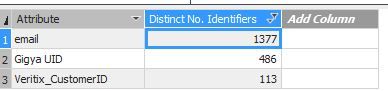
What I would like to see is 1, 2, 3 respectively, not the SUM. I tried GROUPBY but it would only allow 2 arguments.
Thank you again for your help, it is much appreciated as always. I'm getting my feet wet with DAX 🙂
Hi @Anonymous
Sorry for still not understanding your requirement?
"What I would like to see is 1, 2, 3 respectively, not the SUM"
For the picture above this sentence, which column should be 1,2,3 respectively?
when you use 'summarize" or " goupby", you would get a new table using the columns of the original table.
it would be better if i know what's the original table and what's the new table.
Additionally,the No. of Identifiers formula is equal to the following
No. of Identifiers =Calculate(count 'Customer Attributes'[AttributeCnt],filter(all('Customer Attributes'), 'Customer Attributes'[Attribute Type] = "IDENTIFIER"))
Best Reagrds
Maggie
Hello,
I'm looking for the best way to write a GROUPBY with the COUNTAX keyword on the 'Customer Attributes'[Attribute] field.
Original DAX query is as follows:
= COUNTAX(
FILTER(
RELATEDTABLE('Customer Attributes'),
'Customer Attributes'[Attribute Type] = "IDENTIFIER" &&
'Customer Attributes'[type] = 6
),
'Customer Attributes'[AttributeCnt]
) + 0
Sample data is as follows on the table that I'd like to run the GROUPBY on:
Any help would be much appreciated as always.
Don't miss out on Data Days, June 15 through August 7. Learn Fabric, Power BI, SQL, AI and more.
Check out the May 2026 Power BI update to learn about new features.
| User | Count |
|---|---|
| 23 | |
| 23 | |
| 21 | |
| 17 | |
| 14 |
| User | Count |
|---|---|
| 58 | |
| 50 | |
| 37 | |
| 29 | |
| 24 |
