Get Fabric certified for FREE!
Don't miss your chance to take the Fabric Data Engineer (DP-700) exam on us!
Learn more- Power BI forums
- Get Help with Power BI
- Desktop
- Service
- Report Server
- Power Query
- Mobile Apps
- Developer
- DAX Commands and Tips
- Custom Visuals Development Discussion
- Health and Life Sciences
- Power BI Spanish forums
- Translated Spanish Desktop
- Training and Consulting
- Instructor Led Training
- Dashboard in a Day for Women, by Women
- Galleries
- Data Stories Gallery
- Themes Gallery
- Contests Gallery
- QuickViz Gallery
- Quick Measures Gallery
- Visual Calculations Gallery
- Notebook Gallery
- Translytical Task Flow Gallery
- TMDL Gallery
- R Script Showcase
- Webinars and Video Gallery
- Ideas
- Custom Visuals Ideas (read-only)
- Issues
- Issues
- Events
- Upcoming Events
We've captured the moments from FabCon & SQLCon that everyone is talking about, and we are bringing them to the community, live and on-demand. Starts on April 14th. Register now
- Power BI forums
- Forums
- Get Help with Power BI
- Desktop
- Using Dynamic text Narratives
- Subscribe to RSS Feed
- Mark Topic as New
- Mark Topic as Read
- Float this Topic for Current User
- Bookmark
- Subscribe
- Printer Friendly Page


- Mark as New
- Bookmark
- Subscribe
- Mute
- Subscribe to RSS Feed
- Permalink
- Report Inappropriate Content
Using Dynamic text Narratives
Hi All
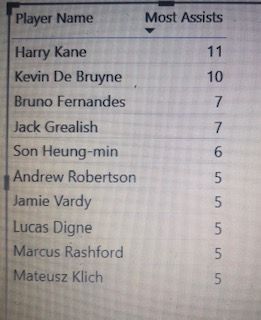
Please see attached an excel report showing the premier league football players . I want to create a dynamic text narrative that tells me the player who has the most assist . e.g Harry Kane has the most assists of 11
The dynamic texts are underlined and in bold from example above (details below)
- Harry Kane
- Most Assists
- 11
How do I go about creating a dynamic text
Many thanks
Solved! Go to Solution.


- Mark as New
- Bookmark
- Subscribe
- Mute
- Subscribe to RSS Feed
- Permalink
- Report Inappropriate Content
Hi @atin
Download this PBIX with sample data and working code/visual
Try this Measure instead
Player With Most Assists =

CALCULATE( MAX('Table'[Player Name]), TOPN(1, ALL('Table'))) & " has the most assists of "  & CALCULATE( MAX('Table'[Most Assists]), TOPN(1, ALL('Table')))
Regards
Phil
Did I answer your question? Then please mark my post as the solution.
If I helped you, click on the Thumbs Up to give Kudos.
Blog :: YouTube Channel :: Connect on Linkedin
Proud to be a Super User!
- Mark as New
- Bookmark
- Subscribe
- Mute
- Subscribe to RSS Feed
- Permalink
- Report Inappropriate Content
Many thanks for the solution. I have one further question relating to this example
If I want to include the team Harry Kane plays for, how do I do this. One of the columns in the data set has the TEAMS included.
I want my narrative to say Harry Kane plays for Tottenham and has the most assists of 11
Many thanks
- Mark as New
- Bookmark
- Subscribe
- Mute
- Subscribe to RSS Feed
- Permalink
- Report Inappropriate Content
Hi @atin
Download this sample PBIX file
If your table looks like this

then use this measure
Player With Most Assists =

CALCULATE( MAX('Table'[Player Name]), TOPN(1, ALL('Table'))) & " plays for " & CALCULATE( MAX('Table'[Teams]), TOPN(1, ALL('Table'))) & " and has the most assists of "  & CALCULATE( MAX('Table'[Most Assists]), TOPN(1, ALL('Table')))
to give this result

Regards
Phil
Did I answer your question? Then please mark my post as the solution.
If I helped you, click on the Thumbs Up to give Kudos.
Blog :: YouTube Channel :: Connect on Linkedin
Proud to be a Super User!
- Mark as New
- Bookmark
- Subscribe
- Mute
- Subscribe to RSS Feed
- Permalink
- Report Inappropriate Content
Hi @atin
Download this PBIX with sample data and working code/visual
Try this Measure instead
Player With Most Assists =

CALCULATE( MAX('Table'[Player Name]), TOPN(1, ALL('Table'))) & " has the most assists of "  & CALCULATE( MAX('Table'[Most Assists]), TOPN(1, ALL('Table')))
Regards
Phil
Did I answer your question? Then please mark my post as the solution.
If I helped you, click on the Thumbs Up to give Kudos.
Blog :: YouTube Channel :: Connect on Linkedin
Proud to be a Super User!
- Mark as New
- Bookmark
- Subscribe
- Mute
- Subscribe to RSS Feed
- Permalink
- Report Inappropriate Content
Many thanks for the solution. I have one further question relating to this example
If I want to include the team Harry Kane plays for, how do I do this. One of the columns in the data set has the TEAMS included.
I want my narrative to say Harry Kane plays for Tottenham and has the most assists of 11
Many thanks
- Mark as New
- Bookmark
- Subscribe
- Mute
- Subscribe to RSS Feed
- Permalink
- Report Inappropriate Content
Hi @atin
Download this sample PBIX file
If your table looks like this
then use this measure
Player With Most Assists =

CALCULATE( MAX('Table'[Player Name]), TOPN(1, ALL('Table'))) & " plays for " & CALCULATE( MAX('Table'[Teams]), TOPN(1, ALL('Table'))) & " and has the most assists of "  & CALCULATE( MAX('Table'[Most Assists]), TOPN(1, ALL('Table')))
to give this result
Regards
Phil
Did I answer your question? Then please mark my post as the solution.
If I helped you, click on the Thumbs Up to give Kudos.
Blog :: YouTube Channel :: Connect on Linkedin
Proud to be a Super User!
- Mark as New
- Bookmark
- Subscribe
- Mute
- Subscribe to RSS Feed
- Permalink
- Report Inappropriate Content
Hi @PhilipTreacy - Many thanks for the solution provided above.
I have another question relating to the solution and example used in the sample pbix file above Where 2 players have the same number of most assists eg Kevin De Bruyne (Man City) & Harry Kane(Tottenham) both have 11.
How do I create a narrative which says
Kevin De Bruyne, Man City player and Harry Kane, Tottenham player have the most assists of 11
Many thanks
- Mark as New
- Bookmark
- Subscribe
- Mute
- Subscribe to RSS Feed
- Permalink
- Report Inappropriate Content
Hi @amitchandak Many thanks for responding back. There appears to be an error when creating the measure. The error says:
The expression refers to multiple columns. Multiple columns cannot be converted to a scalar value.
See measure below:
Player with Most Assists =
VALUES('Table A'[Player Name]) ))

- Mark as New
- Bookmark
- Subscribe
- Mute
- Subscribe to RSS Feed
- Permalink
- Report Inappropriate Content
@atin , a new measure like
meausre =
CALCULATE(Max(Table[player name]),TOPN(1,all(Table[Player Name]),[all Assists],DESC),VALUES(Table[Player Name]))
& " Most assists "
&
CALCULATE([all Assists],TOPN(1,all(Table[Player Name]),[all Assists],DESC),VALUES(Table[Player Name]))

Helpful resources

New to Fabric Survey
If you have recently started exploring Fabric, we'd love to hear how it's going. Your feedback can help with product improvements.

Power BI DataViz World Championships - June 2026
A new Power BI DataViz World Championship is coming this June! Don't miss out on submitting your entry.

Join our Fabric User Panel
Share feedback directly with Fabric product managers, participate in targeted research studies and influence the Fabric roadmap.

Power BI Community Update - March 2026
Check out the March 2026 Power BI update to learn about new features.

| User | Count |
|---|---|
| 55 | |
| 34 | |
| 31 | |
| 19 | |
| 17 |


| User | Count |
|---|---|
| 74 | |
| 71 | |
| 38 | |
| 35 | |
| 25 |


