cancel
Showing results for 
Search instead for 
Did you mean: 

The Power BI Data Visualization World Championships is back! Get ahead of the game and start preparing now! Learn more

Reply
Anonymous
Not applicable

User Defined Aggregations - Possible With Semi-Additive Measures?

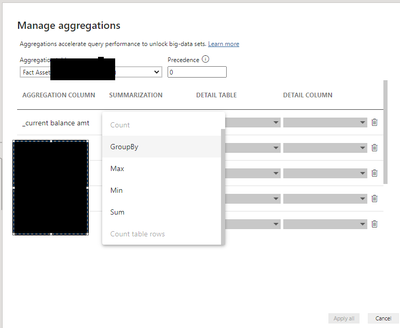
If I have a fact asset bank account type fact table, with semi-additive measure needs (I.E. End User may want to sum current balance amount over customers, but not over time), is there a work around or way to leverage User Defined Aggregations with Semi-Additive measures or are we limited to basic aggs listed below? All documentation I am coming across just shows basic examples of SUM. 

source: https://dax.tips/2021/09/06/intro-to-power-bi-aggregations/

Kevthebandit_0-1649938581721.png


1 ACCEPTED SOLUTION
Anonymous
Not applicable

Thank you for idea. I think it sparked a work around for me and to think through and do some more testing on my end. 

I have my Directquery connection to a fact table with ~ 500 Mil rows. then I have an imported summary same fact table at the following grain ( Date | City | Value)

In the data model view, I can elipsis select the Agg table to 'Manage Aggregations', and set my Aggregation Column of [Value] to SUM on the Directquery detail table same column. 

Even though I am striving to use a semi-additive measure, I could just leverage the feature of user defined aggs with the Aggregation at the basic SUM and be purposeful about the semi-additive part by only creating vizualizations with the appropriate grain and columns displayed on X Axis or not. 

It will work for a specific report use case, but I am not crazy about advanced knowledge tech debt and risk of another developer or user misunderstanding or mis-using column. I suppose I could hide it to help mitigate risk. 

Ah trade-off considerations...

View solution in original post

2 REPLIES 2
amitchandak
Super User
Super User

@Anonymous , Based on what I got


You can create measure like

AverageX(Values(Table[City]), calculate(Sum(Table[Value])))


AverageX(Summarize(Table, Table[City], Table[Month],"_1", calculate(Sum(Table[Value]))), [_1])

Share with Power BI Enthusiasts: Full Power BI Video (20 Hours) YouTube
Microsoft Fabric Series 60+ Videos YouTube
Microsoft Fabric Hindi End to End YouTube
Anonymous
Not applicable

Thank you for idea. I think it sparked a work around for me and to think through and do some more testing on my end. 

I have my Directquery connection to a fact table with ~ 500 Mil rows. then I have an imported summary same fact table at the following grain ( Date | City | Value)

In the data model view, I can elipsis select the Agg table to 'Manage Aggregations', and set my Aggregation Column of [Value] to SUM on the Directquery detail table same column. 

Even though I am striving to use a semi-additive measure, I could just leverage the feature of user defined aggs with the Aggregation at the basic SUM and be purposeful about the semi-additive part by only creating vizualizations with the appropriate grain and columns displayed on X Axis or not. 

It will work for a specific report use case, but I am not crazy about advanced knowledge tech debt and risk of another developer or user misunderstanding or mis-using column. I suppose I could hide it to help mitigate risk. 

Ah trade-off considerations...

Helpful resources

Announcements
Power BI DataViz World Championships

Power BI Dataviz World Championships

The Power BI Data Visualization World Championships is back! Get ahead of the game and start preparing now!

December 2025 Power BI Update Carousel

Power BI Monthly Update - December 2025

Check out the December 2025 Power BI Holiday Recap!

FabCon Atlanta 2026 carousel

FabCon Atlanta 2026

Join us at FabCon Atlanta, March 16-20, for the ultimate Fabric, Power BI, AI and SQL community-led event. Save $200 with code FABCOMM.