cancel
Showing results for 
Search instead for 
Did you mean: 

The Power BI Data Visualization World Championships is back! Get ahead of the game and start preparing now! Learn more

Reply
jfrench
Regular Visitor

User Access for reporting built on Sharepoint List

Hello, I have a Power BI license and I made a report within a Sharepoint List. I created the report by going to Integrate->Power BI-> Visualize the List and created graphs from there. When I published the report back to SP List, I received this pop-up messaging confirming that anyone who had access to view the list would also have access to view my reports. But I'm having an issue because all of my coworkers keep receiving an "upgrade to pro" error message when they try and access the report. I've connected with my internal IT department, they are at a loss of understanding.


Am I missing something that will allow my coworkers-who are not licensed with PowerBI-to gain access to view the report?

Thank you for any help and understanding you can provide me.


Here is the screen shot confirming that any user who has access to the list will be able to see my report

jfrench_0-1679438530943.png


Here is screen shot that my team is receiving when they try and view the report

jfrench_1-1679438623579.png


1 ACCEPTED SOLUTION
Anonymous
Not applicable

Hi @jfrench ,


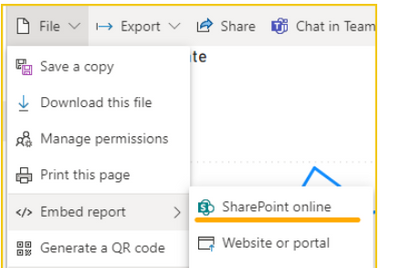
vtangjiemsft_0-1679536877047.png

For Embed in SharePoint Online reports to work, the following is required:

1. The Power BI web part for SharePoint Online requires Modern Pages.

2. To consume an embedded report, users must sign in to Power BI service to activate their Power BI license.

3. Users need a Power BI Pro or Premium Per User (PPU) license, unless the report is hosted in a Power BI Premium capacity (EM or P SKU). In that case, users only need a free Power BI license to view reports embedded in Sharepoint Online.

Embed a report web part in SharePoint Online


Best Regards,

Neeko Tang

If this post  helps, then please consider Accept it as the solution  to help the other members find it more quickly. 

View solution in original post

1 REPLY 1
Anonymous
Not applicable

Hi @jfrench ,


vtangjiemsft_0-1679536877047.png

For Embed in SharePoint Online reports to work, the following is required:

1. The Power BI web part for SharePoint Online requires Modern Pages.

2. To consume an embedded report, users must sign in to Power BI service to activate their Power BI license.

3. Users need a Power BI Pro or Premium Per User (PPU) license, unless the report is hosted in a Power BI Premium capacity (EM or P SKU). In that case, users only need a free Power BI license to view reports embedded in Sharepoint Online.

Embed a report web part in SharePoint Online


Best Regards,

Neeko Tang

If this post  helps, then please consider Accept it as the solution  to help the other members find it more quickly. 

Helpful resources

Announcements
Power BI DataViz World Championships

Power BI Dataviz World Championships

The Power BI Data Visualization World Championships is back! Get ahead of the game and start preparing now!

December 2025 Power BI Update Carousel

Power BI Monthly Update - December 2025

Check out the December 2025 Power BI Holiday Recap!

FabCon Atlanta 2026 carousel

FabCon Atlanta 2026

Join us at FabCon Atlanta, March 16-20, for the ultimate Fabric, Power BI, AI and SQL community-led event. Save $200 with code FABCOMM.