Don't miss your chance to take the Fabric Data Engineer (DP-600) exam for FREE! Find out how by attending the DP-600 session on April 23rd (pacific time), live or on-demand.
Learn moreJoin the FabCon + SQLCon recap series. Up next: Power BI, Real-Time Intelligence, IQ and AI, and Data Factory take center stage. All sessions are available on-demand after the live show. Register now
I'm having a problem to exclude rows based on a slicer. I've read other topics but none of them solves the issue.
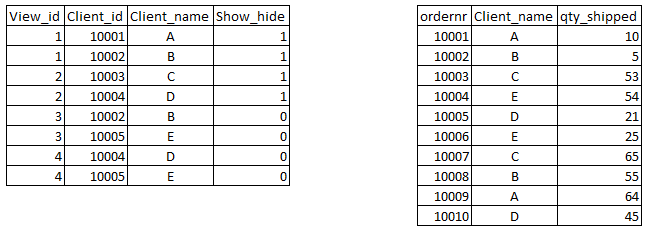
I want to exclude rows in an order table based on Client_id. I have a seperate table with "Client views". In these specific views you can exclude the Client_id or show the client_id. See example below.
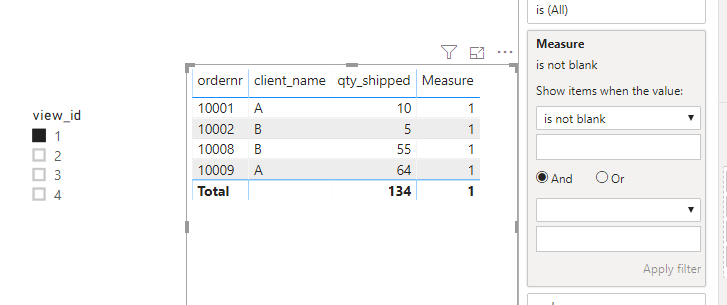
When using a slicer and select for example view_id 1, it shows all the orders with clients A and B.
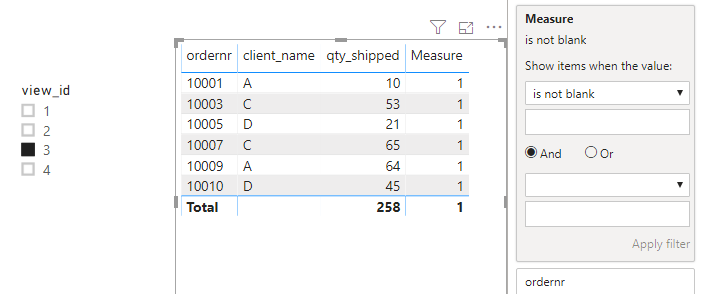
When selecting view_id 3 in the slicer I want to see all orders except for clients B and E. Anybody able to assist?
Solved! Go to Solution.
hi @rkouwenhoven ,
Please check following steps as below:
1. Create Measure =
var s_h = MAX(Table1[show_hide])
return
IF(s_h = "1" &&
MAX(Table2[client_name]) in VALUES(Table1[client_name]),
1,
IF(s_h = "0"&&
NOT(MAX(Table2[client_name])) in VALUES(Table1[client_name]),
1,
BLANK()))
2. Filters on visual measure is not blank.
Results would be shown as below:
BTW, PBIX file as attached, hopefully works for you.
Community Support Team _ Jay Wang
If this post helps, then please consider Accept it as the solution to help the other members find it more quickly.
hi @rkouwenhoven ,
Please check following steps as below:
1. Create Measure =
var s_h = MAX(Table1[show_hide])
return
IF(s_h = "1" &&
MAX(Table2[client_name]) in VALUES(Table1[client_name]),
1,
IF(s_h = "0"&&
NOT(MAX(Table2[client_name])) in VALUES(Table1[client_name]),
1,
BLANK()))
2. Filters on visual measure is not blank.
Results would be shown as below:
BTW, PBIX file as attached, hopefully works for you.
Community Support Team _ Jay Wang
If this post helps, then please consider Accept it as the solution to help the other members find it more quickly.
@Anonymous ,
I can't seem to get this reproduced. I followed your steps but the measure is not allowed as a filter, neither as a value in the visual. it gives me a failure message. Do I need to have a specific relationship between the 2 tables?
@Anonymous ,
After some testing it is doing the magic. The 0 and 1 were set up as a whole number in the table but had to change it to a text field. No relation in tables, so now it is working.
Thanks a lot for your help.
Check out the April 2026 Power BI update to learn about new features.
If you have recently started exploring Fabric, we'd love to hear how it's going. Your feedback can help with product improvements.
A new Power BI DataViz World Championship is coming this June! Don't miss out on submitting your entry.
| User | Count |
|---|---|
| 48 | |
| 40 | |
| 37 | |
| 20 | |
| 16 |
| User | Count |
|---|---|
| 69 | |
| 67 | |
| 32 | |
| 27 | |
| 26 |