Join us at FabCon Atlanta from March 16 - 20, 2026, for the ultimate Fabric, Power BI, AI and SQL community-led event. Save $200 with code FABCOMM.
Register now!The Power BI Data Visualization World Championships is back! Get ahead of the game and start preparing now! Learn more
Hi,
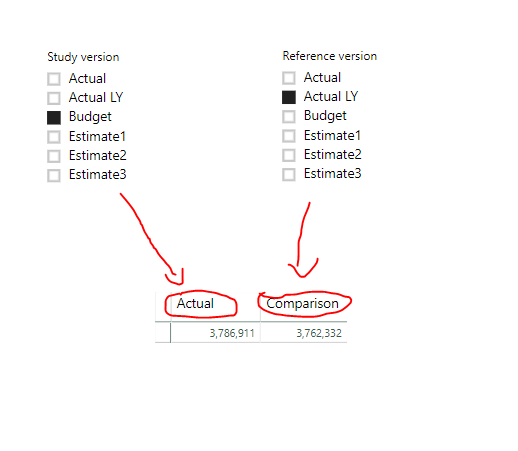
How do I use a slicer in which it only filters me a specific column? For example have the "study version filter" filter the column of the "Actual" value and have the "reference version" filter the value of the comparison.
Here's an example:
Best regards
Solved! Go to Solution.
@Anonymous & @Anonymous
The solution;
Create two tables: One table with Study Version and other table with Reference version.
After use this measure [example]:
Measure= SWITCH(SELECTEDVALUE('Scenario'[Study Version]), "Actual", CALCULATE(SUM(FactFinance[STU])), "Actual LY", CALCULATE(SUM(FactFinance[STU]............
Measure= SWITCH(SELECTEDVALUE('Scenario2'[Reference Version]), "Actual", CALCULATE(SUM(FactFinance[REF)), "Actual LY", CALCULATE(SUM(FactFinance[REF]............
@Anonymous & @Anonymous
The solution;
Create two tables: One table with Study Version and other table with Reference version.
After use this measure [example]:
Measure= SWITCH(SELECTEDVALUE('Scenario'[Study Version]), "Actual", CALCULATE(SUM(FactFinance[STU])), "Actual LY", CALCULATE(SUM(FactFinance[STU]............
Measure= SWITCH(SELECTEDVALUE('Scenario2'[Reference Version]), "Actual", CALCULATE(SUM(FactFinance[REF)), "Actual LY", CALCULATE(SUM(FactFinance[REF]............
Dont know if this a viable solution but can you split out the table into seperate charts/tables/cards and edit the interactions between the filter and the chart? So only that filter, interacts with that specific chart?
Hi @Anonymous
You cant filter values just for one column in the visual based on slicer selection. Any contex alteration you can do in the DAX measure. I agree with @Anonymous suggestion on this.
Thanks
Raj
The Power BI Data Visualization World Championships is back! Get ahead of the game and start preparing now!
| User | Count |
|---|---|
| 38 | |
| 37 | |
| 33 | |
| 32 | |
| 29 |
| User | Count |
|---|---|
| 132 | |
| 88 | |
| 82 | |
| 68 | |
| 64 |