cancel
Showing results for 
Search instead for 
Did you mean: 

The Power BI Data Visualization World Championships is back! Get ahead of the game and start preparing now! Learn more

Reply
PaulBethancourt
Frequent Visitor

Use a Measure as a Slicer

Seems like this should be simple but no.  I wasn't able to apply the suggestions in this forum so I attached a link to a simple Power BI that shows what I'm trying to do.

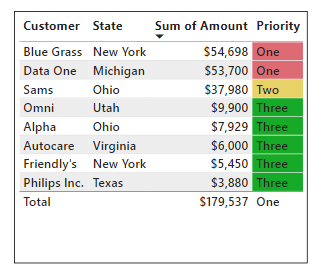
I have a table with Customer, State and Amount and a Measure that catogorizes the Priority:

PaulBethancourt_0-1690041530412.png

I need a slicer for the Priority, 

Any help will be greatly appreciated.

Measure as a Slicer 

https://www.dropbox.com/scl/fi/5bjgnv4htsi8n4u4xgmnp/Measure-as-a-Slicer.pbix?rlkey=surjd8sy5ab4vvk9...

2 ACCEPTED SOLUTIONS
Ritaf1983
Super User
Super User

Hi @PaulBethancourt 

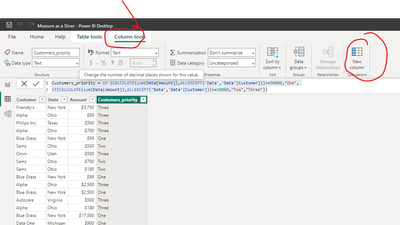
As you can't use the measure as a slicer you need to add the segmentation as a calculated column.

From your sample, I understood that this segmentation is on the customer level.
So you can use dax formula :

Customers_priority = if (CALCULATE(sum(Data[Amount]),ALLEXCEPT('Data','Data'[Customer]))>=50000,"One",
if(CALCULATE(sum(Data[Amount]),ALLEXCEPT('Data','Data'[Customer]))>=10000,"Two","Three"))
 
Ritaf1983_0-1690045093409.png

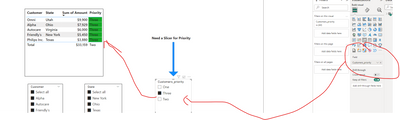
And then use it on your slicer

Ritaf1983_1-1690045168199.png


Link to your updated file 

If this post helps, then please consider Accepting it as the solution to help the other members find it more quickly

Regards,
Rita Fainshtein | Microsoft MVP
https://www.linkedin.com/in/rita-fainshtein/
Blog : https://www.madeiradata.com/profile/ritaf/profile

View solution in original post

Ashish_Mathur
Super User
Super User

Hi,

Please download the attached PBI file.

Hope this helps.

Untitled.png


Regards,
Ashish Mathur
http://www.ashishmathur.com
https://www.linkedin.com/in/excelenthusiasts/

View solution in original post

2 REPLIES 2
Ashish_Mathur
Super User
Super User

Hi,

Please download the attached PBI file.

Hope this helps.

Untitled.png


Regards,
Ashish Mathur
http://www.ashishmathur.com
https://www.linkedin.com/in/excelenthusiasts/
Ritaf1983
Super User
Super User

Hi @PaulBethancourt 

As you can't use the measure as a slicer you need to add the segmentation as a calculated column.

From your sample, I understood that this segmentation is on the customer level.
So you can use dax formula :

Customers_priority = if (CALCULATE(sum(Data[Amount]),ALLEXCEPT('Data','Data'[Customer]))>=50000,"One",
if(CALCULATE(sum(Data[Amount]),ALLEXCEPT('Data','Data'[Customer]))>=10000,"Two","Three"))
 
Ritaf1983_0-1690045093409.png

And then use it on your slicer

Ritaf1983_1-1690045168199.png


Link to your updated file 

If this post helps, then please consider Accepting it as the solution to help the other members find it more quickly

Regards,
Rita Fainshtein | Microsoft MVP
https://www.linkedin.com/in/rita-fainshtein/
Blog : https://www.madeiradata.com/profile/ritaf/profile

Helpful resources

Announcements
Power BI DataViz World Championships

Power BI Dataviz World Championships

The Power BI Data Visualization World Championships is back! Get ahead of the game and start preparing now!

December 2025 Power BI Update Carousel

Power BI Monthly Update - December 2025

Check out the December 2025 Power BI Holiday Recap!

FabCon Atlanta 2026 carousel

FabCon Atlanta 2026

Join us at FabCon Atlanta, March 16-20, for the ultimate Fabric, Power BI, AI and SQL community-led event. Save $200 with code FABCOMM.