cancel
Showing results for 
Search instead for 
Did you mean: 

The Power BI Data Visualization World Championships is back! Get ahead of the game and start preparing now! Learn more

Reply
Anonymous
Not applicable

Use SWITCH in PowerQuery Transform steps

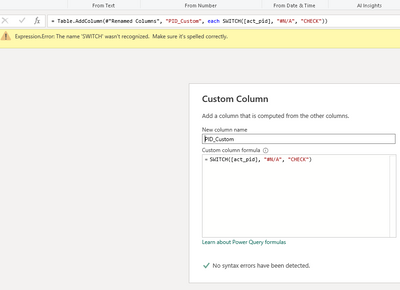
I would like to use a column with a SWITCH formula in PowerQuery to identify bad values and replace them. In this example I have only one case, "#N/A", and the word "CHECK" to flag these for now. The Custom Column box gives me a checkmark of approval that No syntax errors have been detected. When I hit enter, the formula bar gives me an Expression Error. How can I use  a SWITCH here?


PS I want to do this in the PowerQuery transformations, NOT after by adding a column, because there are additional tables derived from this one and I want the column included in them (without manually duplicating it for each derived table).


Brenden_0-1687447634721.png


1 ACCEPTED SOLUTION
Anonymous
Not applicable

Hi @Anonymous ,
You cannot use SWITCH in Power Query. Instead use the below formula:


each if [act_pid] = "#N/A" then "CHECK" else ""

Give a Thumbs Up if this post helped you in any way and Mark This Post as Solution if it solved your query !!!

View solution in original post

2 REPLIES 2
Anonymous
Not applicable

Hi @Anonymous ,
You cannot use SWITCH in Power Query. Instead use the below formula:


each if [act_pid] = "#N/A" then "CHECK" else ""

Give a Thumbs Up if this post helped you in any way and Mark This Post as Solution if it solved your query !!!

Anonymous
Not applicable

I'm not thrilled that I will have to write some elaborate nested if statement, but I really appreciate your (quick!) response. Thank you!

Helpful resources

Announcements
Power BI DataViz World Championships

Power BI Dataviz World Championships

The Power BI Data Visualization World Championships is back! Get ahead of the game and start preparing now!

November Power BI Update Carousel

Power BI Monthly Update - November 2025

Check out the November 2025 Power BI update to learn about new features.

FabCon Atlanta 2026 carousel

FabCon Atlanta 2026

Join us at FabCon Atlanta, March 16-20, for the ultimate Fabric, Power BI, AI and SQL community-led event. Save $200 with code FABCOMM.