Get certified for free when you join Fabric Data Days 2026 and dive into Fabric, Power BI, SQL, AI, and other essential data skills.
Join nowTry your skills in the Power BI Dataviz World Championship! Round one ends June 26. Join now
Hi Experts,
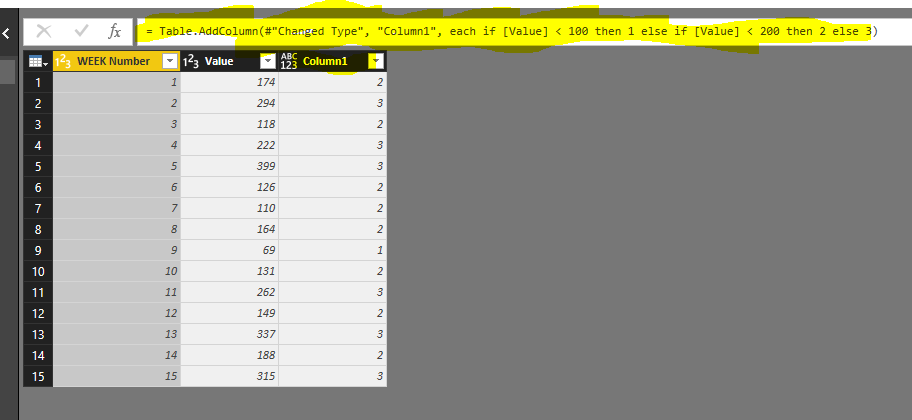
I have 3 fields in my data from which I want to Create 3 conditional Columns. The Conditions are same for all the 3 conditional columns to be created. I have created a Conditional Column as COLUMN1 as per the picture. Is there a way I can use the code in Formula Bar to create 2 more Conditional Columns from other 2 fields. I don't want to type in Conditions for other 2 Columns but want to use Highlighted code.
Thanks
Deepak
Deepak
Solved! Go to Solution.
Hi drrai66,
Based on your requirement, you want to add multiple columns in one function, right?
To achieve your requirement, you can write a custom function like below:
Table.AddColumns = (table as table, addedColumns as list) as table =>
List.Accumulate(
addedColumns,
table,
(t, d) => Table.AddColumn(t, d{0}, d{1}, d{2}?))
The result is like below and you can refer to my PBIX file here:
https://www.dropbox.com/s/4b3hk747pju86h9/For%20drrai66.pbix?dl=0
Regards,
Jimmy Tao
Hi drrai66,
Based on your requirement, you want to add multiple columns in one function, right?
To achieve your requirement, you can write a custom function like below:
Table.AddColumns = (table as table, addedColumns as list) as table =>
List.Accumulate(
addedColumns,
table,
(t, d) => Table.AddColumn(t, d{0}, d{1}, d{2}?))
The result is like below and you can refer to my PBIX file here:
https://www.dropbox.com/s/4b3hk747pju86h9/For%20drrai66.pbix?dl=0
Regards,
Jimmy Tao
| User | Count |
|---|---|
| 22 | |
| 22 | |
| 20 | |
| 19 | |
| 11 |
| User | Count |
|---|---|
| 66 | |
| 56 | |
| 46 | |
| 44 | |
| 31 |