cancel
Showing results for 
Search instead for 
Did you mean: 

July 7 - July 17 | Round 2 of the Power BI Dataviz World Championships. Don't miss your chance! Learn more

Reply
drrai66
Resolver I
Resolver I

Use Code from Formula Bar of One Conditional Column To create Other Conditional Columns

Hi Experts,

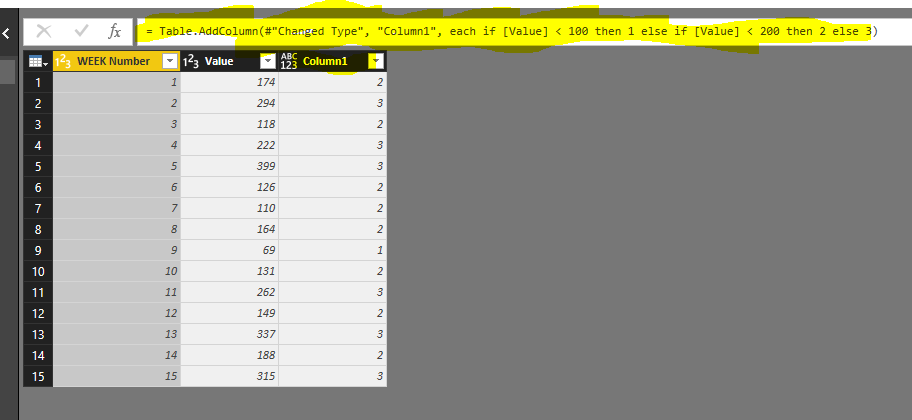
I have 3 fields in my data from which I want to Create 3 conditional Columns. The Conditions are same for all the 3 conditional columns to be created. I have created a Conditional Column as COLUMN1 as per the picture. Is there a way I can use the code in Formula Bar to create 2 more Conditional Columns from other 2 fields. I don't want to type in Conditions for other 2 Columns but want to use Highlighted code.

Thanks

Deepak


DeepakConditional.PNG

1 ACCEPTED SOLUTION
v-yuta-msft
Community Support
Community Support

Hi drrai66,


Based on your requirement, you want to add multiple columns in one function, right?


To achieve your requirement, you can write a custom function like below:


Table.AddColumns = (table as table, addedColumns as list) as table =>

        List.Accumulate(

            addedColumns,

            table,

            (t, d) => Table.AddColumn(t, d{0}, d{1}, d{2}?))


The result is like below and you can refer to my PBIX file here:

https://www.dropbox.com/s/4b3hk747pju86h9/For%20drrai66.pbix?dl=0

1.PNG 


Regards,

Jimmy Tao

View solution in original post

1 REPLY 1
v-yuta-msft
Community Support
Community Support

Hi drrai66,


Based on your requirement, you want to add multiple columns in one function, right?


To achieve your requirement, you can write a custom function like below:


Table.AddColumns = (table as table, addedColumns as list) as table =>

        List.Accumulate(

            addedColumns,

            table,

            (t, d) => Table.AddColumn(t, d{0}, d{1}, d{2}?))


The result is like below and you can refer to my PBIX file here:

https://www.dropbox.com/s/4b3hk747pju86h9/For%20drrai66.pbix?dl=0

1.PNG 


Regards,

Jimmy Tao

Helpful resources

Announcements
FabCon and SQLCon Barcelona 2026

FabCon & SQLCon – Barcelona 2026

Join us in Barcelona for FabCon and SQLCon, the Fabric, Power BI, SQL, and AI community event. Save €200 with code FABCMTY200.

60 days of Data Days Carousel

Data Days 2026

Join Fabric Data Days 2026: 60 days of free live/on-demand sessions, challenges, study groups, and certification opportunities.

Power BI DataViz World Championships carousel

Power BI DataViz World Championships - June 2026

A new Power BI DataViz World Championship is coming this June! Don't miss out on submitting your entry.