cancel
Showing results for 
Search instead for 
Did you mean: 

The Power BI Data Visualization World Championships is back! Get ahead of the game and start preparing now! Learn more

Reply
Syndicate_Admin
Administrator
Administrator

Use Case - Detail Page

Dear friends, good day! I have this use case that I can't solve, I'm going to try to summarize what I intend to do, so that I can be guided if and how.

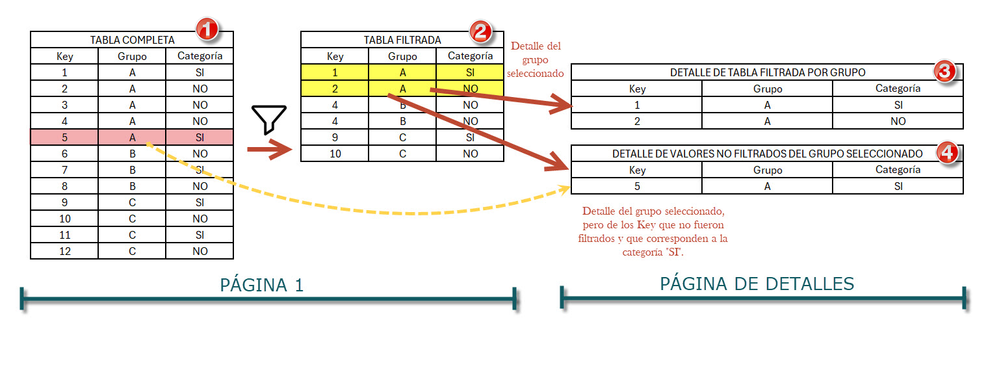
I have a power BI page with a table-like visual (Table 1 of the image), this visual is filtered by some data slicers obtaining a filtered table (Table 2 of the image). What I want to do is create a details page of the Group column (of the filtered table), which takes into account the values that were filtered from the main table and some that were NOT filtered. With obtaining the Group details of the filtered values (Table 3 of the image) I had no problems. The problem I'm facing is with table 4 of the image, where I need to show the values of the selected Group that were not filtered and that meet the "YES" criterion in the Category field. I tried to do it with measurements and calculated tables, but I was unsuccessful. The problem is that when I go to the details page I already inherit the filters from the other page and the logic is complicated. Any ideas?
nsalvay_1-1711118936262.png

Greetings and thank you in advance

1 ACCEPTED SOLUTION
lbendlin
Super User
Super User

This is a standard "shadow table"  pattern.  Create a separate copy of the table where your drilltrough filter are applied, and then use that table in the visuals on the drillthrough target page. You can then choose to project some of the drillthrough filters onto the shadow table while ignoring others.

View solution in original post

1 REPLY 1
lbendlin
Super User
Super User

This is a standard "shadow table"  pattern.  Create a separate copy of the table where your drilltrough filter are applied, and then use that table in the visuals on the drillthrough target page. You can then choose to project some of the drillthrough filters onto the shadow table while ignoring others.

Helpful resources

Announcements
Power BI DataViz World Championships

Power BI Dataviz World Championships

The Power BI Data Visualization World Championships is back! Get ahead of the game and start preparing now!

December 2025 Power BI Update Carousel

Power BI Monthly Update - December 2025

Check out the December 2025 Power BI Holiday Recap!

FabCon Atlanta 2026 carousel

FabCon Atlanta 2026

Join us at FabCon Atlanta, March 16-20, for the ultimate Fabric, Power BI, AI and SQL community-led event. Save $200 with code FABCOMM.