Join us at FabCon Atlanta from March 16 - 20, 2026, for the ultimate Fabric, Power BI, AI and SQL community-led event. Save $200 with code FABCOMM.
Register now!Learn from the best! Meet the four finalists headed to the FINALS of the Power BI Dataviz World Championships! Register now
Hey,
I can not wrap my head around on how to put the following Excel Formula in Power BI. The goal is to perform this calculation for each row in the Table (#rows =~200).
(COUNTBLANK(C2:GT2)/(COUNTA(C2:GT2)+COUNTBLANK(C2:GT2)-COUNTIF(C2:GT2;"N/A")))*100
Solved! Go to Solution.
Hi,
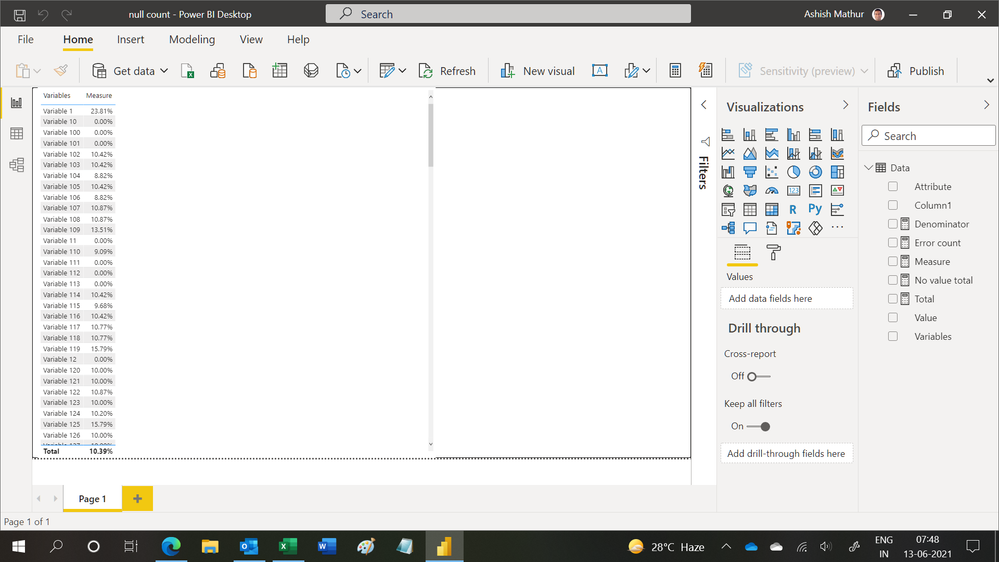
You may download the PBI file from here.
Hope this helps.
@Anonymous
Can you share a sample of your data and how it organized? is it in columns or rows in Power BI ?
⭕ Subscribe and learn Power BI from these videos
⚪ Website ⚪ LinkedIn ⚪ PBI User Group
It is in columns in Power BI, I have tried to pivot the columns but to no avail. This is the data set and expected outcome I am working with: Dataset Link
Hi,
You may download the PBI file from here.
Hope this helps.
Thanks that worked. I had tried this solution before but apparently my data model was not set correctly to receive the expected outcome.
You are welcome.
Share feedback directly with Fabric product managers, participate in targeted research studies and influence the Fabric roadmap.
Check out the February 2026 Power BI update to learn about new features.
| User | Count |
|---|---|
| 61 | |
| 54 | |
| 40 | |
| 17 | |
| 14 |
| User | Count |
|---|---|
| 96 | |
| 83 | |
| 36 | |
| 30 | |
| 25 |