FabCon is coming to Atlanta
Join us at FabCon Atlanta from March 16 - 20, 2026, for the ultimate Fabric, Power BI, AI and SQL community-led event. Save $200 with code FABCOMM.
Register now!- Power BI forums
- Get Help with Power BI
- Desktop
- Service
- Report Server
- Power Query
- Mobile Apps
- Developer
- DAX Commands and Tips
- Custom Visuals Development Discussion
- Health and Life Sciences
- Power BI Spanish forums
- Translated Spanish Desktop
- Training and Consulting
- Instructor Led Training
- Dashboard in a Day for Women, by Women
- Galleries
- Data Stories Gallery
- Themes Gallery
- Contests Gallery
- QuickViz Gallery
- Quick Measures Gallery
- Visual Calculations Gallery
- Notebook Gallery
- Translytical Task Flow Gallery
- TMDL Gallery
- R Script Showcase
- Webinars and Video Gallery
- Ideas
- Custom Visuals Ideas (read-only)
- Issues
- Issues
- Events
- Upcoming Events
The Power BI Data Visualization World Championships is back! Get ahead of the game and start preparing now! Learn more
- Power BI forums
- Forums
- Get Help with Power BI
- Desktop
- Re: Urgent help needed with groupby and distinct c...
- Subscribe to RSS Feed
- Mark Topic as New
- Mark Topic as Read
- Float this Topic for Current User
- Bookmark
- Subscribe
- Printer Friendly Page


- Mark as New
- Bookmark
- Subscribe
- Mute
- Subscribe to RSS Feed
- Permalink
- Report Inappropriate Content
Urgent help needed with groupby and distinct count
Hi All
Please, can anyone really help me to solve my issue. I have already posted my issue few time but no one could give me a solution.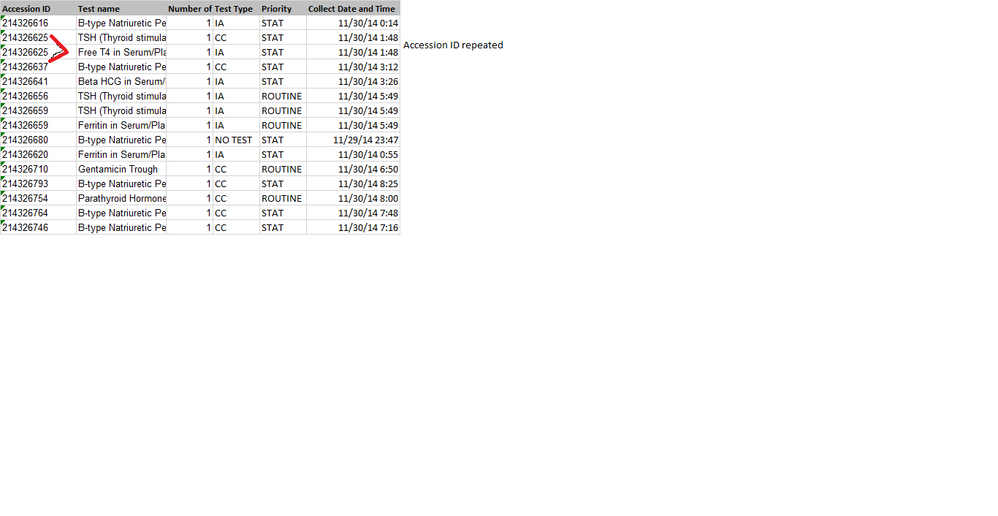

I have the records for a laboratory receiving two type of tests: CC or IA.
So each Accession ID can have:
- CC tests only
- IA tests only
- CC IA tests both
- No tests
So i want to unpivot the test type column but doing transpose doesnt help me.
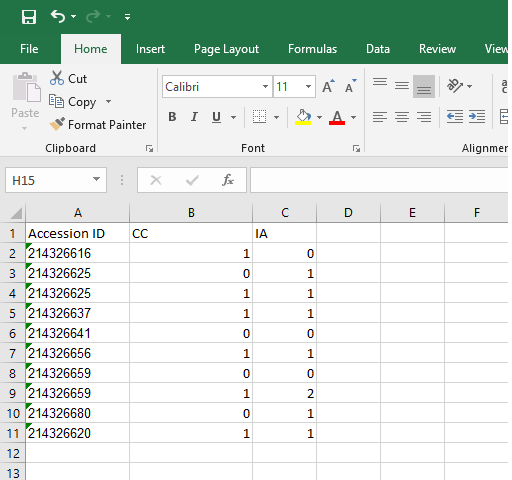
i tried to create a matrix table (Attached pic) so as you can see it returns the count of "CC" and "IA" tests, but my end goal is to
get a tabel with
Accession ID CC IA
and the columns CC and IA should have only binary number i.e if that accession ID has "CC" tests then return 1 else 0. Similarly with IA tests. I dont care about the number, all i care is whether the accession ID has the "CC" test ordered or not.
Solved! Go to Solution.
- Mark as New
- Bookmark
- Subscribe
- Mute
- Subscribe to RSS Feed
- Permalink
- Report Inappropriate Content
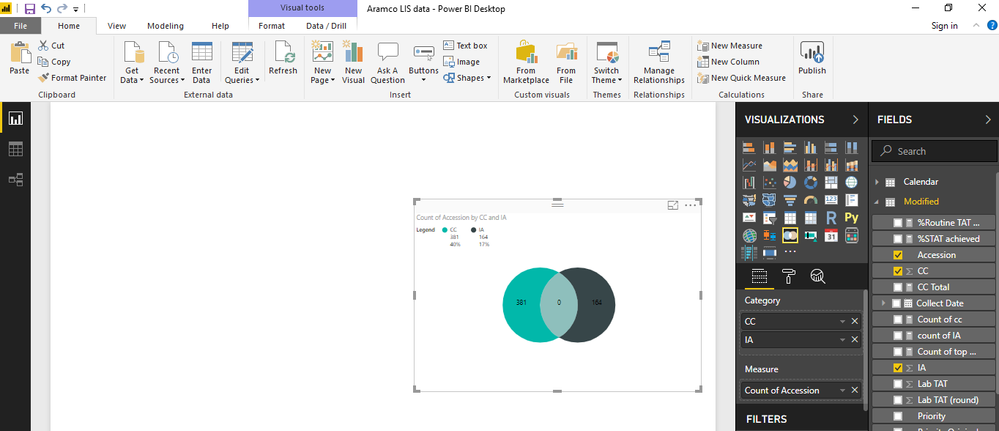
Also I had alreday creating the two columns CC and IA using If statements as you had suggested above but this was the result i got. As expected it was missing IA and CC common accesion id and returning it as zero
- Mark as New
- Bookmark
- Subscribe
- Mute
- Subscribe to RSS Feed
- Permalink
- Report Inappropriate Content
Okay. Then after creating the CC and IA columns, you create one calculated table called "FinalTable" with the following expression.
FinalTable = ADDCOLUMNS(DISTINCT(ActualData[AccessionID]),"CCS",sumx(RELATEDTABLE(ActualData),ActualData[CC]),"IAS",SUMX(RELATEDTABLE(ActualData),ActualData[IA]))
This will create the table as per your requirement.

- Mark as New
- Bookmark
- Subscribe
- Mute
- Subscribe to RSS Feed
- Permalink
- Report Inappropriate Content
Hi,
Based on what I have understood from your post, your issue can be solved as follows...
Your Table
| AccessionID | TestType |
| 214326616 | IA |
| 214326625 | CC |
| 214326625 | IA |
| 214326637 | CC |
| 214326641 | IA |
| 214326656 | IA |
First you have to add two calculated columns to Actual Data table as suggested below..
CC = IF(ActualData[TestType]="CC",1,0)
and
IA = IF(ActualData[TestType]="IA",1,0)
After adding these calculated columns, your table will look like this...
| AccessionID | TestType | CC | IA |
| 214326616 | IA | 0 | 1 |
| 214326625 | CC | 1 | 0 |
| 214326625 | IA | 0 | 1 |
| 214326637 | CC | 1 | 0 |
| 214326641 | IA | 0 | 1 |
| 214326656 | IA | 0 | 1 |
Now you may use either a Matrix or Table visualisation in Power BI Desktop and add AccessionID to the rows, CC and IA calculated columns to the values. which will give the following result.
| AccessionID | CC | IA |
| 214326616 | 0 | 1 |
| 214326625 | 1 | 1 |
| 214326637 | 1 | 0 |
| 214326641 | 0 | 1 |
| 214326656 | 0 | 1 |
| Grand Total | 2 | 4 |
Hope this solves your difficulty.
- Mark as New
- Bookmark
- Subscribe
- Mute
- Subscribe to RSS Feed
- Permalink
- Report Inappropriate Content
Hi shree
Thanks for your response but this doesnt help my solution. As you can clearly see in the solution you posted there are no common accession ID with IA and CC tests both.
I want a table like below:
| essionID | TestType | CC | IA |
| 214326616 | IA | 0 | 1 |
| 214326625 | CC | 1 | 1 |
| 214326637 | CC | 1 | 0 |
| 214326641 | IA | 0 | 1 |
| 214326656 | IA | 0 | 1 |
My aim is to create a venn diagram with sum(cc) and sum(ia) and sum(accession id).
Do you know how i can create a table like above? I could only think of groupby and then putting distinct count on accession id
- Mark as New
- Bookmark
- Subscribe
- Mute
- Subscribe to RSS Feed
- Permalink
- Report Inappropriate Content
In your example, the accessionID 214326625 has both IA and CC. So against that accession ID, 1 will appear under both IA and CC. Correct?
- Mark as New
- Bookmark
- Subscribe
- Mute
- Subscribe to RSS Feed
- Permalink
- Report Inappropriate Content
Yes, this is exactly what i want. Do you know how to do it?
- Mark as New
- Bookmark
- Subscribe
- Mute
- Subscribe to RSS Feed
- Permalink
- Report Inappropriate Content
Hi,
We have already did it. Please observe my first reply. The last table shows the result that you want.
- Mark as New
- Bookmark
- Subscribe
- Mute
- Subscribe to RSS Feed
- Permalink
- Report Inappropriate Content
Let me clarify, the table will show 2 rows for that Accession ID. One for IA and one for CC. But when you use this table's data in a visualisation like Matrix or Table, the result will be the desired one.
- Mark as New
- Bookmark
- Subscribe
- Mute
- Subscribe to RSS Feed
- Permalink
- Report Inappropriate Content
Hi Shree
Sorry if i couldnt explain in my previous reply so my final aim is to create a venn digram

and for that i need to load in catergory sum(CC) and Sum(IA) and CC and IA need to be in columns i.e why instead of having a matrix table or table visualization..i need an actual table to be created from my exsisting data
- Mark as New
- Bookmark
- Subscribe
- Mute
- Subscribe to RSS Feed
- Permalink
- Report Inappropriate Content
Also I had alreday creating the two columns CC and IA using If statements as you had suggested above but this was the result i got. As expected it was missing IA and CC common accesion id and returning it as zero
- Mark as New
- Bookmark
- Subscribe
- Mute
- Subscribe to RSS Feed
- Permalink
- Report Inappropriate Content
Okay. Then after creating the CC and IA columns, you create one calculated table called "FinalTable" with the following expression.
FinalTable = ADDCOLUMNS(DISTINCT(ActualData[AccessionID]),"CCS",sumx(RELATEDTABLE(ActualData),ActualData[CC]),"IAS",SUMX(RELATEDTABLE(ActualData),ActualData[IA]))
This will create the table as per your requirement.
- Mark as New
- Bookmark
- Subscribe
- Mute
- Subscribe to RSS Feed
- Permalink
- Report Inappropriate Content
Thanks a lot sree. It was a big help, i was struggling with it for past few days, If i want to extract another column from my original table (Called Priority) into my new table (Final table), how will your formula change.
That is i want:
Accession ID(From actual data) Priority(From actual data) CCS ICS
- Mark as New
- Bookmark
- Subscribe
- Mute
- Subscribe to RSS Feed
- Permalink
- Report Inappropriate Content
Hi, There is no need to add fields unnecessarily. I think you can just create a relationship between the Final Table's AccessionID and the original table's accession ID and use the Priority field in your reports. Just try and let me know.
By the way, please avoid thanks and acknowledgements. Just click the Kudos button if the post is helpful to you.
- Mark as New
- Bookmark
- Subscribe
- Mute
- Subscribe to RSS Feed
- Permalink
- Report Inappropriate Content
Hi do you think you can help me solve this issue?
- Mark as New
- Bookmark
- Subscribe
- Mute
- Subscribe to RSS Feed
- Permalink
- Report Inappropriate Content
The screen-shots are not really of any help. I am not able to figure-out what's wrong with these screenshots.
- Mark as New
- Bookmark
- Subscribe
- Mute
- Subscribe to RSS Feed
- Permalink
- Report Inappropriate Content
I cant find the table in the relationship tab.

Also can you help me why my pie chart is not picking the right data.


Helpful resources

Power BI Dataviz World Championships
The Power BI Data Visualization World Championships is back! Get ahead of the game and start preparing now!

Power BI Monthly Update - December 2025
Check out the December 2025 Power BI Holiday Recap!

FabCon Atlanta 2026
Join us at FabCon Atlanta, March 16-20, for the ultimate Fabric, Power BI, AI and SQL community-led event. Save $200 with code FABCOMM.

| User | Count |
|---|---|
| 38 | |
| 38 | |
| 37 | |
| 28 | |
| 28 |


| User | Count |
|---|---|
| 124 | |
| 89 | |
| 73 | |
| 66 | |
| 65 |


