Share feedback directly with Fabric product managers, participate in targeted research studies and influence the Fabric roadmap.
Sign up nowGet Fabric certified for FREE! Don't miss your chance! Learn more
HI All,
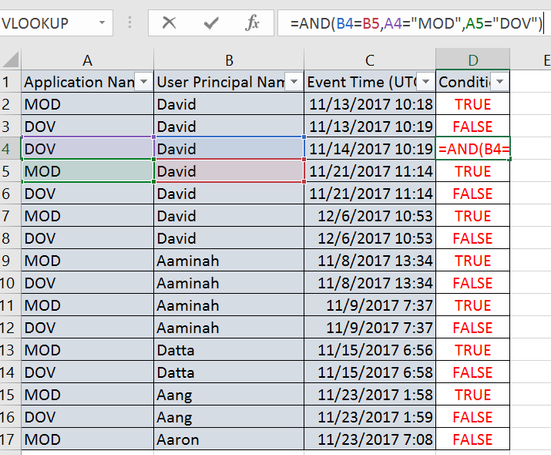
I need a help in comparing two cell values using AND Opertor in powerbi similar to the below image.
Formula i used in excel is: =AND(B2=B3,A2="MOD",A3="DOV"
Solved! Go to Solution.
Hi @prakash11440278,
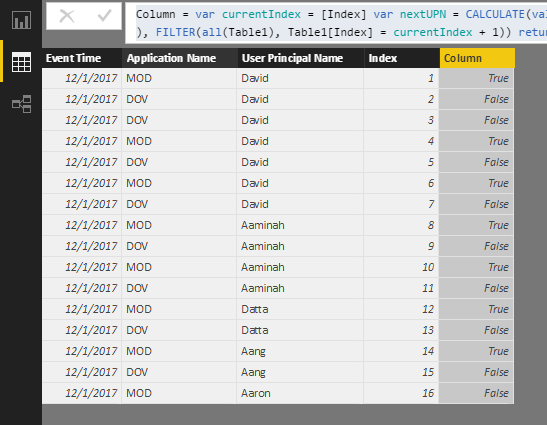
Rows in Power BI are different from them in Excel. So we need to add an index in the Query Editor first. You can check it out in this file.
Column =
VAR currentIndex = [Index]
VAR nextUPN =
CALCULATE (
VALUES ( Table1[User Principal Name] ),
FILTER ( ALL ( 'Table1' ), Table1[Index] = currentIndex + 1 )
)
VAR nextAN =
CALCULATE (
VALUES ( Table1[Application Name] ),
FILTER ( ALL ( Table1 ), Table1[Index] = currentIndex + 1 )
)
RETURN
IF (
[User Principal Name] = nextUPN
&& [Application Name] = "MOD"
&& nextAN = "DOV",
TRUE (),
FALSE ()
)
Best Regards,
Dale
Hi @prakash11440278,
Rows in Power BI are different from them in Excel. So we need to add an index in the Query Editor first. You can check it out in this file.
Column =
VAR currentIndex = [Index]
VAR nextUPN =
CALCULATE (
VALUES ( Table1[User Principal Name] ),
FILTER ( ALL ( 'Table1' ), Table1[Index] = currentIndex + 1 )
)
VAR nextAN =
CALCULATE (
VALUES ( Table1[Application Name] ),
FILTER ( ALL ( Table1 ), Table1[Index] = currentIndex + 1 )
)
RETURN
IF (
[User Principal Name] = nextUPN
&& [Application Name] = "MOD"
&& nextAN = "DOV",
TRUE (),
FALSE ()
)
Best Regards,
Dale
Hi Prakash,
Can't download image, can you please reattach screen shot
Thanks
Just uploaded a new image. Please check again, thanks for your help.
Share feedback directly with Fabric product managers, participate in targeted research studies and influence the Fabric roadmap.
| User | Count |
|---|---|
| 57 | |
| 53 | |
| 42 | |
| 18 | |
| 14 |
| User | Count |
|---|---|
| 111 | |
| 104 | |
| 36 | |
| 28 | |
| 27 |