cancel
Showing results for 
Search instead for 
Did you mean: 

Get Fabric Certified for FREE during Fabric Data Days. Don't miss your chance! Request now

Reply
katfd07
New Member

Updates to Excel not refreshing to PBI (desktop)

Using: 365, desktop PBI


Background: I am creating a master resource sheet that is filterable by need for the clientele we service. We have a massive and changing list of community contacts who help our members with education, housing, financial, legal, food, etc resources. This PBI form will allow for any staff member to filter by need and then provide a printed resource list to the individual. If possible, ideally all sources would be accessible/usable through OneDrive.


I started by compiling all data into an Excel workbook, separated into tabs by category. This way, future edits are easy to find and update. I then created a query to have all data from those tabs populate into a new sheet (same workbook), which will then update changes on the other sheets when I click "Refresh." Initially, I tried making a printable "report" in Excel, but it was horrendous. Then, I discovered PBI. But now there new issues.


I have the form created (in PBI), and can get the data in it! But updates from Excel will not populate when I click "refresh." It also does not by doing the refresh in the query editor AND "include in refresh report" is selected. However, I think I've come to discover that the newly updated PBI will not refresh updates to desktop Excel, only the online platform. Is that correct?


So, now I have uploaded my Excel sheet to OneDrive. If I select to "edit by opening the desktop app," everything on the website version updates. However, my query will still not refresh new updates to cells from the other tabs/sheets if I try to make the changes in the site version.


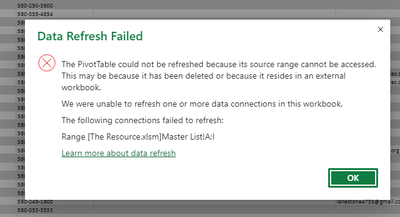
Is there a way to fix this? Am I wrong from using the query function? Am I stuck forever opening the desktop version, making the change(s) there, confirming those on the site and THEN updating the PBI? (Which I also still am not entirely sure how to pull the data from the online Excel sheet.) Included are two of the error messages that were popping up as I attempted all the different methods of trying to update the data on my own.Capture.PNG
 

Capture1.PNG

1 REPLY 1
danextian
Super User
Super User

Hi @katfd07 ,


Your query is pulling data from within the workbook? It appears to me that it is trying to connect to  an external path that doesn't exist either because the file has been renamed or moved to a different location. In the query editor, the formula should be using Excel.CurrentWorkbook if connected to the tables in the same workbook like below:

let
    Source = Excel.CurrentWorkbook(){[Name="MyDetails"]}[Content],
    #"Changed Type" = Table.TransformColumnTypes(Source,{{"CPCode", type text}, {"Account Description", type text}, {"Type", type text}, {"Location", type text}, {"Processing State", type text}, {"My Type", type text}, {"Sales Person", type text}, {"Opening Date", type any}, {"Termination Date", type datetime}, {"Number", Int64.Type}, {"Short Description", type text}, {"Column1", type text}, {"Column2", type text}})
in
    #"Changed Type"

The above code is pulling data from the table within the same workbook named MyDetails.


Dane Belarmino | Microsoft MVP | Proud to be a Super User!

Did I answer your question? Mark my post as a solution!


"Tell me and I’ll forget; show me and I may remember; involve me and I’ll understand."
Need Power BI consultation, get in touch with me on LinkedIn or hire me on UpWork.
Learn with me on YouTube @DAXJutsu or follow my page on Facebook @DAXJutsuPBI.

Helpful resources

Announcements
November Power BI Update Carousel

Power BI Monthly Update - November 2025

Check out the November 2025 Power BI update to learn about new features.

Fabric Data Days Carousel

Fabric Data Days

Advance your Data & AI career with 50 days of live learning, contests, hands-on challenges, study groups & certifications and more!

FabCon Atlanta 2026 carousel

FabCon Atlanta 2026

Join us at FabCon Atlanta, March 16-20, for the ultimate Fabric, Power BI, AI and SQL community-led event. Save $200 with code FABCOMM.

Top Solution Authors
Top Kudoed Authors