Don't miss your chance to take the Fabric Data Engineer (DP-600) exam for FREE! Find out how by attending the DP-600 session on April 23rd (pacific time), live or on-demand.
Learn moreNext up in the FabCon + SQLCon recap series: The roadmap for Microsoft SQL and Maximizing Developer experiences in Fabric. All sessions are available on-demand after the live show. Register now
Hi there,
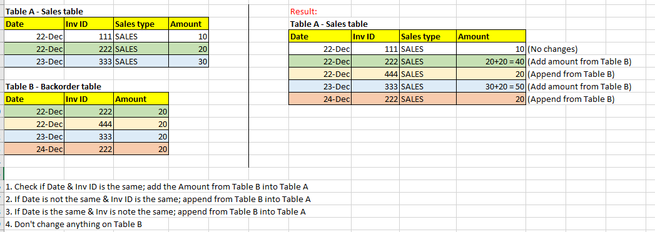
I have two tables, Sales table & Backorder table.
I will need to include Backorder table into Sales table based on Date & Inv ID:
1. Check if Date & Inv ID is the same; add the Amount from Table B into Table A
2. If Date is not the same & Inv ID is the same; append from Table B into Table A
3. If Date is the same & Inv is note the same; append from Table B into Table A
4. Don't change anything on Table B
What would be the best way to do it. e..g Power Query? DAX? and How to do it.
Thank you!
Solved! Go to Solution.
Hi,
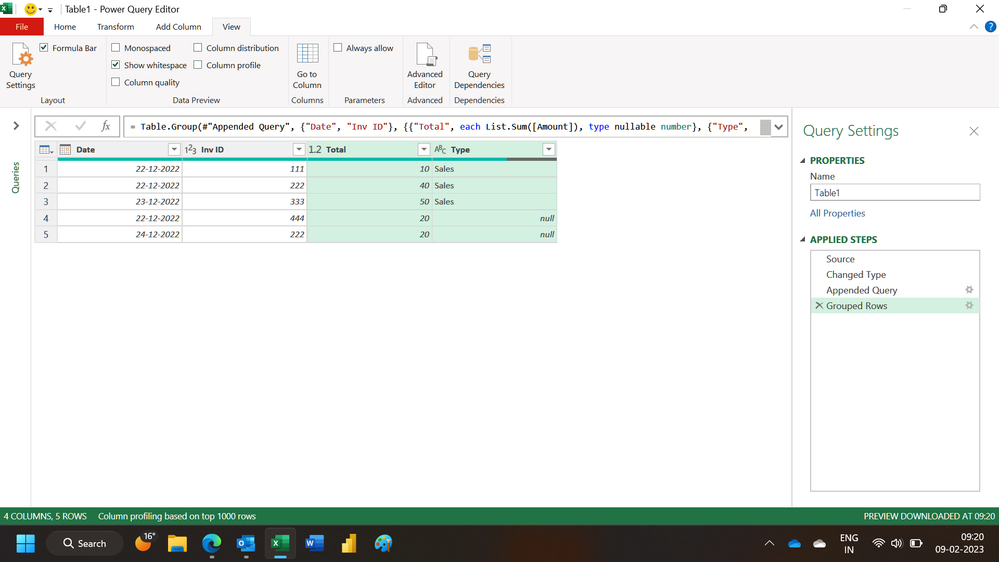
Does this M code work?
let
Source = Excel.CurrentWorkbook(){[Name="Table1"]}[Content],
#"Changed Type" = Table.TransformColumnTypes(Source,{{"Date", type date}, {"Inv ID", Int64.Type}, {"Sales type", type text}, {"Amount", Int64.Type}}),
#"Appended Query" = Table.Combine({#"Changed Type", Table2}),
#"Grouped Rows" = Table.Group(#"Appended Query", {"Date", "Inv ID"}, {{"Total", each List.Sum([Amount]), type nullable number}, {"Type", each List.Max([Sales type]), type nullable text}})
in
#"Grouped Rows"
Hope this helps.
Hi,
Append the two tables. Select Date and Inv ID columns, group by them and sum the numbers in the amount column.
Hope this helps.
Hi Ashish,
Thank you for reply. Can I know if it is possible if I would like to keep other columns from Table A when I group by.
For e.g., There is "Period" column in Table A and not in Table B, but end result, I would like to remain "Period" column as follow:
thank you
Hi,
Does this M code work?
let
Source = Excel.CurrentWorkbook(){[Name="Table1"]}[Content],
#"Changed Type" = Table.TransformColumnTypes(Source,{{"Date", type date}, {"Inv ID", Int64.Type}, {"Sales type", type text}, {"Amount", Int64.Type}}),
#"Appended Query" = Table.Combine({#"Changed Type", Table2}),
#"Grouped Rows" = Table.Group(#"Appended Query", {"Date", "Inv ID"}, {{"Total", each List.Sum([Amount]), type nullable number}, {"Type", each List.Max([Sales type]), type nullable text}})
in
#"Grouped Rows"
Hope this helps.
Hi Ashish,
Thank you so much! One last question...
What if I append the two tables as new query, how should I edit on the above M code to keep all other columns when I group by?
thank you
You are welcome. Everything should remain the same. Just try it through the UI yourself.
If you have recently started exploring Fabric, we'd love to hear how it's going. Your feedback can help with product improvements.
A new Power BI DataViz World Championship is coming this June! Don't miss out on submitting your entry.
Share feedback directly with Fabric product managers, participate in targeted research studies and influence the Fabric roadmap.
| User | Count |
|---|---|
| 44 | |
| 43 | |
| 38 | |
| 18 | |
| 16 |
| User | Count |
|---|---|
| 67 | |
| 63 | |
| 30 | |
| 30 | |
| 23 |