This time we’re going bigger than ever. Fabric, Power BI, SQL, AI and more. We're covering it all. You won't want to miss it.
Learn moreLevel up your Power BI skills this month - build one visual each week and tell better stories with data! Get started
Hi Team,
Thank you so much for your help, now I have another query...
How can I work on Trend Analysis/Line chart in the below one.

Thanks,
Kali
Solved! Go to Solution.
Hi Kalidass,
To create a trend chart, you have to unpivot the table.
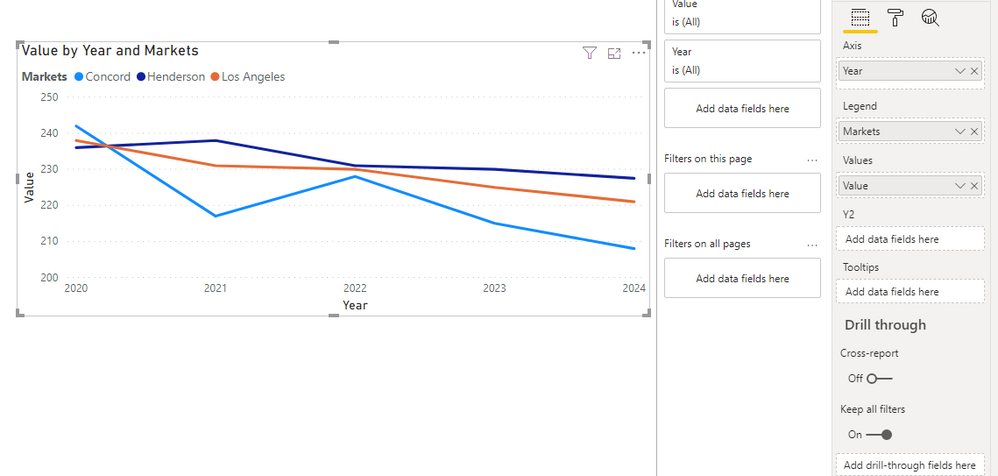
You will get this view and then use year and Value to build a trend line.
Result:
_______________
If I helped, please accept the solution and give kudos! 😀
Hi @Anonymous ,
Is this problem solved?
If it is solved, please always accept the replies making sense as solution to your question so that people who may have the same question can get the solution directly.
If not, please let me know.
Best Regards,
Icey
@Anonymous
Unpivot the data create tables/dimensions for the Market, Keys and year to create star schema model
https://radacad.com/pivot-and-unpivot-with-power-bi
Market = distinct(all(Table[Market]))
Keys= distinct(all(Table[Keys]))
Year= distinct(all(Table[Year])) //You will get after Unpivot
Join them back with table
Refer:https://docs.microsoft.com/en-us/power-bi/guidance/
Hi @Anonymous ,
Before generating any trend/line chart, you will have to modify the structure of the data, so that you can have a DATE column on your x-axis on the chart.
For this what you can do is following:
If this helps and resolves the issue, appreciate a Kudos and mark it as a Solution! 🙂
Thanks,
Pragati
Hi Kalidass,
To create a trend chart, you have to unpivot the table.
You will get this view and then use year and Value to build a trend line.
Result:
_______________
If I helped, please accept the solution and give kudos! 😀
Check out the April 2026 Power BI update to learn about new features.
Sign up to receive a private message when registration opens and key events begin.
If you have recently started exploring Fabric, we'd love to hear how it's going. Your feedback can help with product improvements.
| User | Count |
|---|---|
| 36 | |
| 33 | |
| 31 | |
| 24 | |
| 18 |
| User | Count |
|---|---|
| 66 | |
| 50 | |
| 33 | |
| 24 | |
| 24 |