Don't miss your chance to take the Fabric Data Engineer (DP-700) exam on us!
Learn moreThe FabCon + SQLCon recap series starts April 14th at 8am Pacific. If you’re tracking where AI is going inside Fabric, this first session is a can't miss. Register now
Hi Team,
I wanted to know for the question below, is there any solution for it? I have two filters with relationship on one report page (Customers and their list of Account Numbers). Whenever I select an account number 123 for Customer A, finish looking through the information, and want to go to the next Customer B - account number 123 is still selected when I select Customer B. The ideal solution will be that whenever I select a new customer ( in this case customer B), account number 123 will be cleared and accounts associated with Customer B will show up in the filter.
Is there any workaround on this issue? Thank you so much in advance!
Regards,
Phoebe
Hi , @Anonymous
According to your description, you wan to clear the slicer selection when you select another slicer.
I test it in my side and search , i do not find the configuration for this .
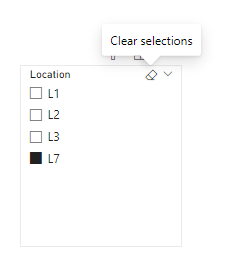
When you have selected a slicer , you want to clear it ,the first way is click the "CLear" button above it :
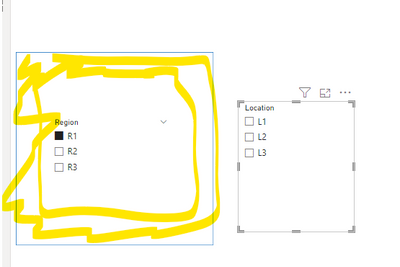
The another way is that you can create a bookmark like this:
Then we can create a shape under the 'Region' , but for this method , we also need to click the shape around the 'Region' to clear the selection of the "Location" to clear the Location's selection:
You can also give a kudo or post your ideas for this Power BI Idea to optimise this production:
Microsoft Idea
Thank you for your time and sharing, and thank you for your support and understanding of PowerBI!
Best Regards,
Aniya Zhang
If this post helps, then please consider Accept it as the solution to help the other members find it more quickly
If you have recently started exploring Fabric, we'd love to hear how it's going. Your feedback can help with product improvements.
A new Power BI DataViz World Championship is coming this June! Don't miss out on submitting your entry.
Share feedback directly with Fabric product managers, participate in targeted research studies and influence the Fabric roadmap.
| User | Count |
|---|---|
| 51 | |
| 40 | |
| 38 | |
| 19 | |
| 18 |
| User | Count |
|---|---|
| 70 | |
| 69 | |
| 34 | |
| 33 | |
| 30 |