

Join us at FabCon Atlanta from March 16 - 20, 2026, for the ultimate Fabric, Power BI, AI and SQL community-led event. Save $200 with code FABCOMM.
Register now!The Power BI Data Visualization World Championships is back! Get ahead of the game and start preparing now! Learn more
Hi Team,
I have a data with the following structure.
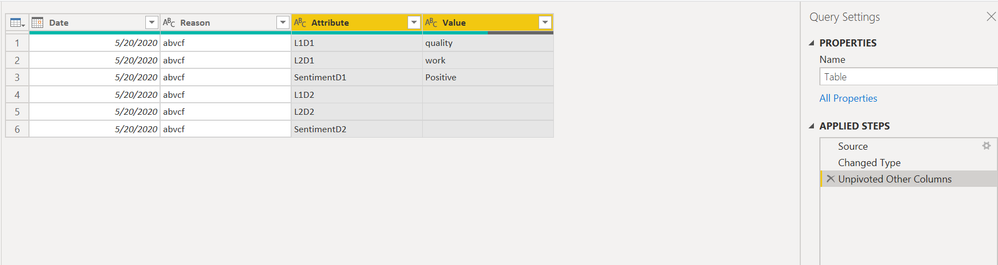
I unpivoted the columns as follows,
then I split the Attribute column by number of characters
Next I did pivoting the Attribute 1 column with Value column which gave me the following table.
The expected table should only contain 2 rows. Can anyone please explain what did go wrong ?
Thanks,
Jos
Solved! Go to Solution.
Hi, @Jos13
Can you show me the result you want?
If this is the expected result your want ,you can check if the following sample file helps.
Best Regards,
Community Support Team _ Eason
Hi, @Jos13
Can you show me the result you want?
If this is the expected result your want ,you can check if the following sample file helps.
Best Regards,
Community Support Team _ Eason
@Jos13 , your post is not complete.
for unpivot refer
https://radacad.com/pivot-and-unpivot-with-power-bi
Transpose : https://yodalearning.com/tutorials/power-query-helps-transposing-data/
The Power BI Data Visualization World Championships is back! Get ahead of the game and start preparing now!
Check out the November 2025 Power BI update to learn about new features.
| User | Count |
|---|---|
| 59 | |
| 46 | |
| 42 | |
| 23 | |
| 17 |
| User | Count |
|---|---|
| 190 | |
| 122 | |
| 96 | |
| 66 | |
| 47 |