Join us at FabCon Atlanta from March 16 - 20, 2026, for the ultimate Fabric, Power BI, AI and SQL community-led event. Save $200 with code FABCOMM.
Register now!The Power BI Data Visualization World Championships is back! It's time to submit your entry. Live now!
Here is the PBIX file: https://drive.google.com/file/d/1J0i2NMmk-efpok0KYCmCRT5pSGaYsklT/view?usp=sharing
In the file I have a simple report. With the table showing all values and 3 filters on top which filter the 3 columns matching name. Also hava a card showing the measure value. I want a measure that will calculate the rows of Column1 independent of filter 2 and/or 3.
Curr measure = CALCULATE(COUNT('Table'[Col1]), REMOVEFILTERS('Table'[Filter3], 'Table'[Filter 2]))
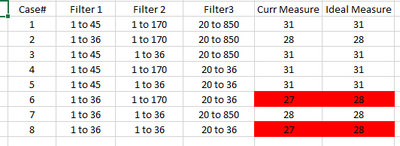
Below are the different conditions I tried on the filters to see the measurements.
I have 2 main questions:
1. For case 6 and 8, my curr measure does NOT match ideal. Why not? Why is this happening?
2. How can I modify my measure formula so I can get all the values in ideal measure column for all these test cases?
Thanks!
Solved! Go to Solution.
Hi @Chris1300 ,
Please try:
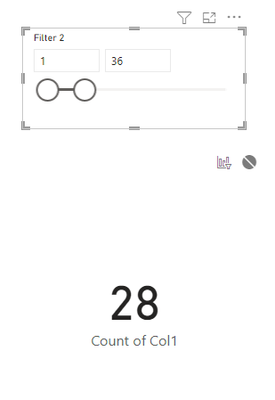
Turn off the interactions between the card visual and the slicers of filter 2,3:
Then you can get the result directly!
Best Regards,
Jianbo Li
If this post helps, then please consider Accept it as the solution to help the other members find it more quickly.
Hi @Chris1300 ,
Please try:
Turn off the interactions between the card visual and the slicers of filter 2,3:
Then you can get the result directly!
Best Regards,
Jianbo Li
If this post helps, then please consider Accept it as the solution to help the other members find it more quickly.
try this:
measure =
CALCULATE(
COUNT('Table'[Col1]),
REMOVEFILTERS('Table'[Filter3]),
REMOVEFILTERS('Table'[Filter 2])
)
Nope. That does not work. Case 6 and 8 still dont work.
The Power BI Data Visualization World Championships is back! It's time to submit your entry.
Check out the January 2026 Power BI update to learn about new features.
| User | Count |
|---|---|
| 60 | |
| 46 | |
| 30 | |
| 24 | |
| 23 |
| User | Count |
|---|---|
| 145 | |
| 111 | |
| 64 | |
| 38 | |
| 32 |