Join us at FabCon Atlanta from March 16 - 20, 2026, for the ultimate Fabric, Power BI, AI and SQL community-led event. Save $200 with code FABCOMM.
Register now!The Power BI Data Visualization World Championships is back! Get ahead of the game and start preparing now! Learn more
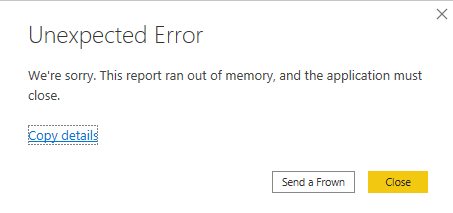
I am getting constant report crashes due to the following error:
Unexpected Error: We're sorry. This report ran out of memory, and the application must close.
Send a Frown.
This is super annoying and a productivity limiter. Any insights for the root cause?
@Anonymous
You may take a look at Optimization guide for Power BI.
@Anonymous
Refer, if these can help.
https://www.youtube.com/watch?v=IRPEAIgZeY8
https://community.powerbi.com/t5/Desktop/High-RAM-Consumption/td-p/631339
I think the root cause is a lack of memory! 🙂
You could check the Issues forum here:
https://community.powerbi.com/t5/Issues/idb-p/Issues
And if it is not there, then you could post it.
If you have Pro account you could try to open a support ticket. If you have a Pro account it is free. Go to https://support.powerbi.com. Scroll down and click "CREATE SUPPORT TICKET".
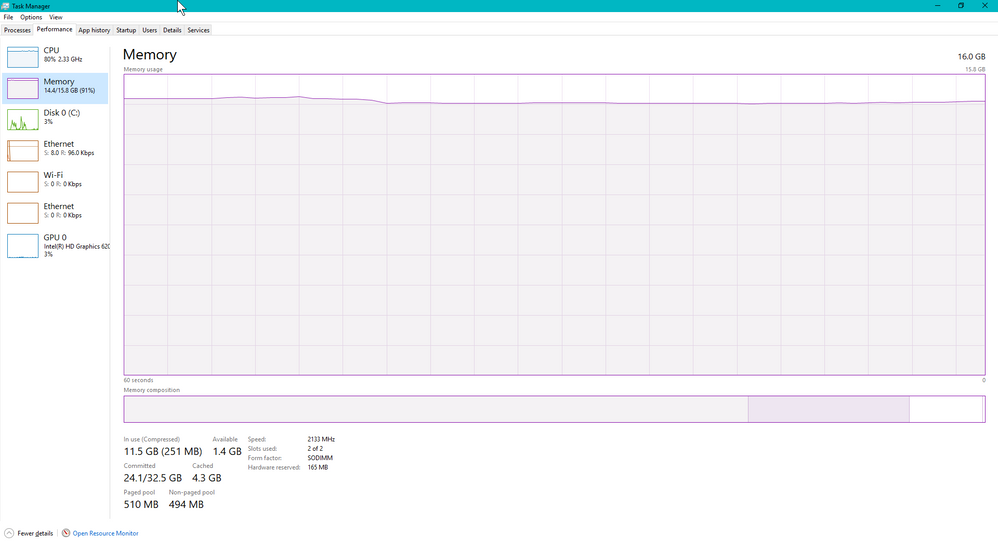
Is it due to the RAM capacity? I have 16GB, but I see that its used at a high level when reports are refreshing or being saved.
What is the recommended RAM capacity for a report that is ~100MB?
No, I have 16GB of data on my machine and I have run 100MB models without much issue. I mean, I have run data models way larger than that as well like up to 1 GB without an issue.
So, File | Options and settings | Options | Diagnostics, which version are you on? Is it 32-bit or 64-bit? What is your OS?
Check out the November 2025 Power BI update to learn about new features.
Advance your Data & AI career with 50 days of live learning, contests, hands-on challenges, study groups & certifications and more!