cancel
Showing results for 
Search instead for 
Did you mean: 

The Power BI Data Visualization World Championships is back! Get ahead of the game and start preparing now! Learn more

Reply
Anonymous
Not applicable

Understanding how to format DAX code for readability

Hi Community Champions,

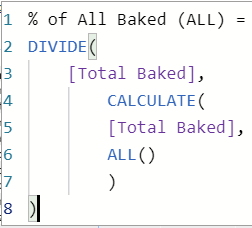
I have a simple DAX code, and i wrote it as shown below:

Gguliani_0-1622752139248.png

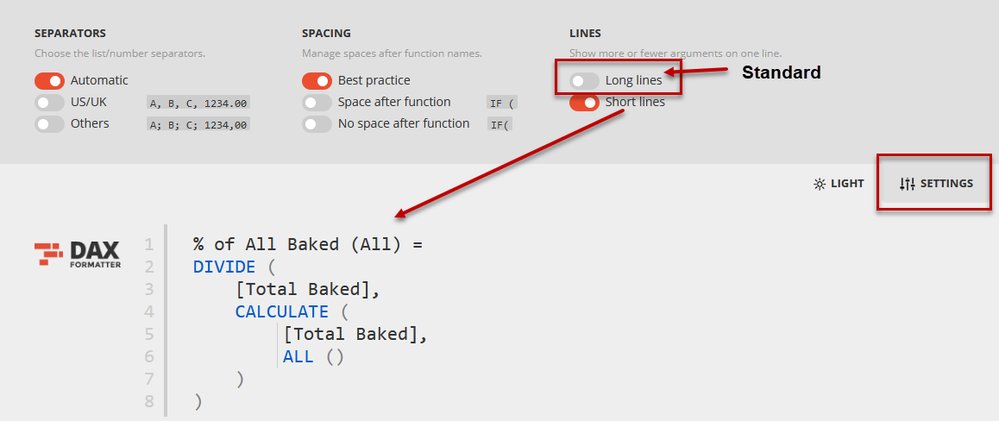
And I thought I was doing okay with formatting here until i went to DAXFORMATTER.COM and it suggested this code be formatted as below:

Gguliani_1-1622752191623.png

I am really interested to understand why DaxFormatter thinks their way is better. Actually, I feel the same too since it is easier on eyes and facilitate comprehension- but want to understand why is it that sometime we should indent using Shift + Enter and sometimes not as in this case. 

I was researching more about formatting tips and found this on SQLBI
"Write a function inline only if it has a single argument that is not a function call"

Does this line explain what I am looking for? These words inline & function call went above my head- can somebody explains this and what I am looking for in easier words? However, at the same site I also read a contradictory statement, atleast for my case here:

"Always put arguments on a new line if the function call has 2 or more arguments"

1 ACCEPTED SOLUTION
FrankAT
Community Champion
Community Champion

Hi @Anonymous ,

at daxformatter.com you have the possibility to use your own settings (see figure):


03-06-_2021_23-06-13.png

With kind regards from the town where the legend of the 'Pied Piper of Hamelin' is at home
FrankAT (Proud to be a Datanaut)

View solution in original post

4 REPLIES 4
Anonymous
Not applicable

@FrankAT - Great catch there- that's why I love seeking inputs from professionals like you'll.

However, if by default- the DAX formatter showed a long line for this code- should I assume that as a standard best practice? (I know it's personal choice and that's why so many options in settings too)

I would like to know if the way SQLBI formatted had anything to do with the formatting rules SQLBI has on their site as I mentioned: 
"Write a function inline only if it has a single argument that is not a function call"

And then this contrasting statement (I thought, not sure)
"Always put arguments on a new line if the function call has 2 or more arguments"


Hi @Anonymous ,

when creating a formula, whether a DAX formula, Excel formula or programming code, several important aspects are in the foreground for me:

  1. The good readability
  2. A simple order and clear structure 
  3. The easiest possible traceability of the formula
  4. And a good maintainability.

Marco Russo and Alberto Ferrari have done a valuable job with their rules for the formal writing of a DAX formula. Those who adhere to it will be able to work much more easily with DAX formulas. That is to their credit.

Everyone can choose for themselves whether they adhere very closely to this set of rules or acquire their own style in writing DAX formulas.


With kind regards from the town where the legend of the 'Pied Piper of Hamelin' is at home
FrankAT (Proud to be a Datanaut)

Hi @Anonymous ,


If no one asks you which format you must use explicitly , you can write DAX according to personal habits, but the formula is best to have indentation, so that it is more readable.


Best regards,
Lionel Chen

If this post helps, then please consider Accept it as the solution to help the other members find it more quickly.

FrankAT
Community Champion
Community Champion

Hi @Anonymous ,

at daxformatter.com you have the possibility to use your own settings (see figure):


03-06-_2021_23-06-13.png

With kind regards from the town where the legend of the 'Pied Piper of Hamelin' is at home
FrankAT (Proud to be a Datanaut)

Helpful resources

Announcements
Power BI DataViz World Championships

Power BI Dataviz World Championships

The Power BI Data Visualization World Championships is back! Get ahead of the game and start preparing now!

December 2025 Power BI Update Carousel

Power BI Monthly Update - December 2025

Check out the December 2025 Power BI Holiday Recap!

FabCon Atlanta 2026 carousel

FabCon Atlanta 2026

Join us at FabCon Atlanta, March 16-20, for the ultimate Fabric, Power BI, AI and SQL community-led event. Save $200 with code FABCOMM.