

Join us at FabCon Atlanta from March 16 - 20, 2026, for the ultimate Fabric, Power BI, AI and SQL community-led event. Save $200 with code FABCOMM.
Register now!The Power BI Data Visualization World Championships is back! Get ahead of the game and start preparing now! Learn more
Please help with the sorting of Day name in Tile, we have 2 options sort Ascending or Descending but none is helping me achieve the 1st tile to be starting either Sunday or Monday.
Solved! Go to Solution.
@RajuRoy ,
In this case ascending and descending won't work. So follow the below steps,
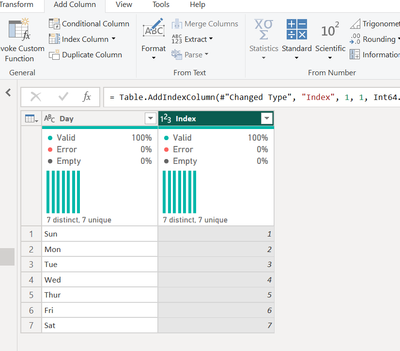
Go to Power query editor, create a index column and load the data into Power BI.
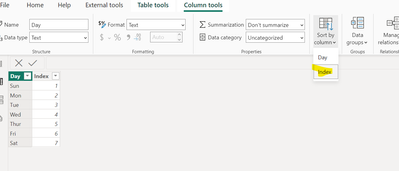
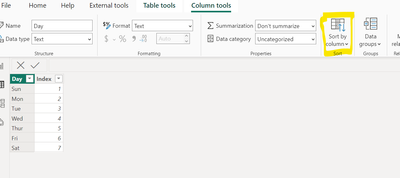
Then use custom sorting option available by selecting the days column, click the icon highlighted in the below image, then select index rom the dropdown.
Once did this now you can see the column values got sorted at visual level.
@RajuRoy ,
In this case ascending and descending won't work. So follow the below steps,
Go to Power query editor, create a index column and load the data into Power BI.
Then use custom sorting option available by selecting the days column, click the icon highlighted in the below image, then select index rom the dropdown.
Once did this now you can see the column values got sorted at visual level.
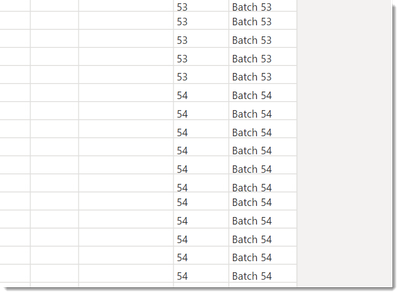
@Arul It would work except each batch number occurs multiple times so an Index doesn't let me sort as the batch value isn't unique.
Like so...
Thank you for the Solution. Helpful indeed.
The Power BI Data Visualization World Championships is back! Get ahead of the game and start preparing now!
| User | Count |
|---|---|
| 38 | |
| 38 | |
| 36 | |
| 28 | |
| 28 |
| User | Count |
|---|---|
| 124 | |
| 89 | |
| 73 | |
| 66 | |
| 65 |