Get certified for free when you join Fabric Data Days 2026 and dive into Fabric, Power BI, SQL, AI, and other essential data skills.
Join nowTry your skills in the Power BI Dataviz World Championship! Round one ends June 26. Join now
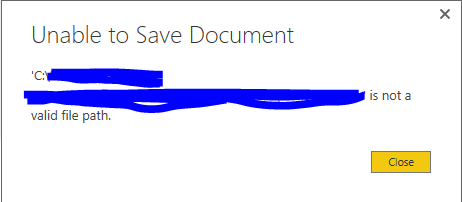
Suddenly I'm having trouble saving a pbix file. Same dataset I've used before. The size is around 295MB, far smaller than 1GB. I think the only difference now is that I'm using images (PNGs, a couple of kb's each) and trying a different page size (Letter format).
I can create the file and it saves fine for a while, but then it starts giving me an error. I can't figure out why but it happens every time I try to make this particular report, I've rebuilt it three times today.
Hi @hammerblue,
What's the version of the Power BI Dekstop do you run? Please update it to the latest one then check if you can save the .PBIX file.
Also please check if the issue related to images and letter format page. You can delete the images then save the report. If it can be saved, then add each image separately and save it. If not, please remove the letter format page to see if it can be saved.
Best Regards,
Qiuyun Yu
I'm facing exactly the same problem as the user hammerblue and it's totally unclear why this happens since the path is totally valid and there is enough space on the harddrive.
I'm using the German version
Version: 2.36.4434.381 64-bit (Juni 2016)
I'm facing exactly the same problem as the user hammerblue.
I had been able to save the pbix file for a couple of days but then all of a sudden saving is not possible anymore with the same message that hammerblue gets.
If there is a solution to this issue that would be highly appreciated.
Thanks in advance.
| User | Count |
|---|---|
| 24 | |
| 22 | |
| 22 | |
| 18 | |
| 13 |
| User | Count |
|---|---|
| 67 | |
| 56 | |
| 45 | |
| 42 | |
| 30 |