Join us at FabCon Atlanta from March 16 - 20, 2026, for the ultimate Fabric, Power BI, AI and SQL community-led event. Save $200 with code FABCOMM.
Register now!Get Fabric Certified for FREE during Fabric Data Days. Don't miss your chance! Request now
Hi all,
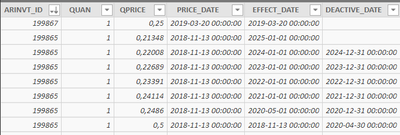
I'm trying to retrieve the good price for a specific Item in our Database. We have a Price_break table with Effective_Date and Deactive_Date. I'm trying to create a lookupvalue with a filter, but i'm stuck.
For a Item(ARINVT), i need to select the correct price for the currentday. I've created a column with today's date in order to that(Probably can do it automatically in a formula, but i don't know yet how).
I have created a measure, but the output is not what i'm looking for.
Solved! Go to Solution.
Hi @DGodQc ,
From your description, you want to create a measure or column to get ARINVT_BREAKS[PrixConverti] while complying with specific conditions( one condition is
ARINVT_BREAKS[ARINVT_ID]=ARINVT[ID] , the other is to filter date),it is right? If yes, you can create a column using DAX below, readjust the formula to make it effective.
PrixCOnv = CALCULATE(SELECTEDVALUE ( ARINVT_BREAKS[PrixConverti] ),
FILTER (ARINVT_BREAKS, AND(ARINVT_BREAKS[EFFECT_DATE]<ARINVT_BREAKS[Today],or(ARINVT_BREAKS[DEACTIVE_DATE]>ARINVT_BREAKS[Today],ARINVT_BREAKS[DEACTIVE_DATE]=blank()))
&&ARINVT_BREAKS[ARINVT_ID]=ARINVT[ID] ))
Or you can share your sample data or screenshots for further analysis, upload sample pbix to OneDrive and post the link here. Do mask sensitive data before uploading.
Best Regards,
Amy
If this post helps, then please consider Accept it as the solution to help the other members find it more quickly.
Hi @DGodQc ,
Does that make sense? If so, kindly mark my answer as a solution to help others having the similar issue and close the case.
Best regards
Amy Cai
Hi @DGodQc ,
From your description, you want to create a measure or column to get ARINVT_BREAKS[PrixConverti] while complying with specific conditions( one condition is
ARINVT_BREAKS[ARINVT_ID]=ARINVT[ID] , the other is to filter date),it is right? If yes, you can create a column using DAX below, readjust the formula to make it effective.
PrixCOnv = CALCULATE(SELECTEDVALUE ( ARINVT_BREAKS[PrixConverti] ),
FILTER (ARINVT_BREAKS, AND(ARINVT_BREAKS[EFFECT_DATE]<ARINVT_BREAKS[Today],or(ARINVT_BREAKS[DEACTIVE_DATE]>ARINVT_BREAKS[Today],ARINVT_BREAKS[DEACTIVE_DATE]=blank()))
&&ARINVT_BREAKS[ARINVT_ID]=ARINVT[ID] ))
Or you can share your sample data or screenshots for further analysis, upload sample pbix to OneDrive and post the link here. Do mask sensitive data before uploading.
Best Regards,
Amy
If this post helps, then please consider Accept it as the solution to help the other members find it more quickly.
Check out the November 2025 Power BI update to learn about new features.
Advance your Data & AI career with 50 days of live learning, contests, hands-on challenges, study groups & certifications and more!