cancel
Showing results for 
Search instead for 
Did you mean: 

View all the Fabric Data Days sessions on demand. View schedule

Reply
PriyankaJhaTheA
Helper III
Helper III

Unable to get distinct row id for the table - DAX

Hello Power BI enthusiasts,


This is the YouTube Tutorial I followed to create a Power App. 

https://www.youtube.com/watch?v=-dRDKbm-v6Y 

The step where I'm stuck is the Row ID for my multi-category table.

Note: Also why do I have to use this workaround this Data Appended table I'm using is from Excel and write the changes back to excel.


Then I used these 2 tutorials to calculate the row ID:

Index = CALCULATE(DISTINCTCOUNT('End Market Projections'[Geography]), FILTER('End Market Projections', 'End Market Projections'[WRK Parent node]=EARLIER('End Market Projections'[WRK Parent node]) && 'End Market Projections'[Geography]<=EARLIER('End Market Projections'[Geography])))
 
Row ID = RANKX(FILTER('End Market Projections', 'End Market Projections'[WRK Parent node] = EARLIER('End Market Projections'[WRK Parent node])), 'End Market Projections'[WRK parent category ])


I faced a few problems:

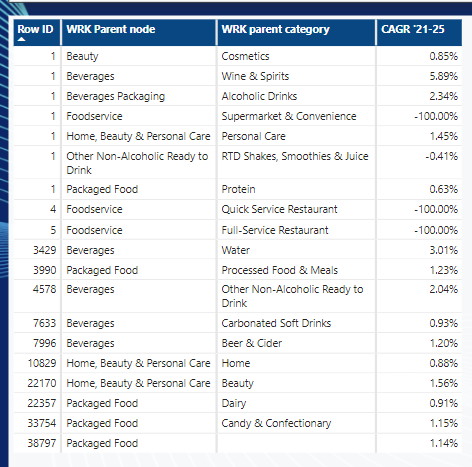
Problem 1: You can see the problem that the Row ID is not unique for the categories.

I want the expected row numbers to be like just a unique 1-3 digit number.
 

Screenshot 2022-06-11 144719.png


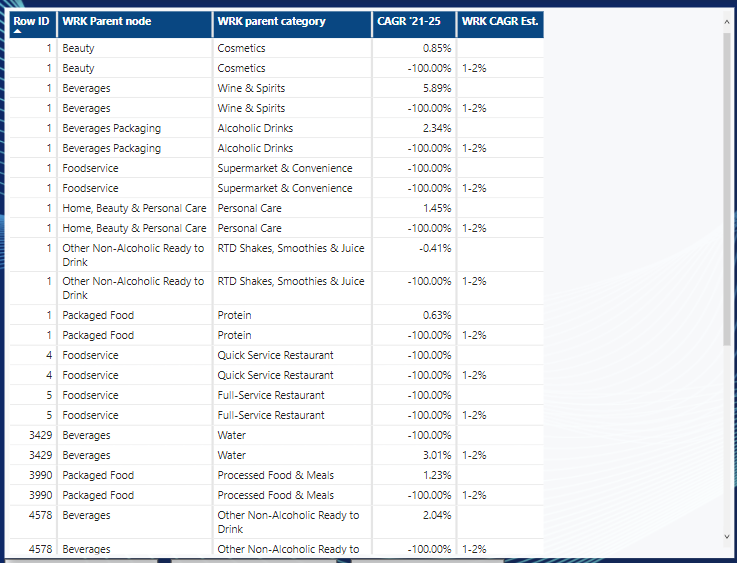
Problem 2: Also, the most important aspect of this app is to show the 'WRK CAGR Est.' beside the CAGR '21-25. But when I add this to the existing table it replicates the table entries into 2. 
Screenshot 2022-06-11 145706.png


PLEASE TRY TO FIND A SOLUTION TO THIS PROBLEM!!


I'm sharing the .pbix file that has the OG report:

https://drive.google.com/file/d/1vWWg52y7WC7_CYgkatbj_5eaMx7soLZt/view?usp=sharing 


P.S.: I will be very grateful if you are able to provide some solution/guide to this problem before Monday. I have to show this to my client.

1 ACCEPTED SOLUTION

Thank you for spending your time creating a solution. But, in this case, this is not useful for me, because there has to be a relationship between table 'wrk cagr' and table 'End Market Projection' for the 'Row ID' fields.


Anyways I was able to find a solution. I'm attaching the .pbix file for anyone who wants to see for themselves.


https://drive.google.com/file/d/1nRa7FE7uhnyf4zNHMjtj9g6tvhrtd4ti/view?usp=sharing


What did I do to solve this?

Note: For numbers 1 & 2 I followed the tutorials mentioned in my question above.

  1. Create Index for the Data: 
    Index = CALCULATE(DISTINCTCOUNT('End Market Projections'[WRK Parent node]), FILTER('End Market Projections', 'End Market Projections'[WRK Parent node]<=EARLIER('End Market Projections'[WRK Parent node])))
  2. Create Row Number for the subcategories for your Data:
    Row Number = RANKX(FILTER('End Market Projections', 'End Market Projections'[WRK Parent node] = EARLIER('End Market Projections'[WRK Parent node])), 'End Market Projections'[2021])
  3. Concatenate both the Index and Row ID to create a unique row number for each row of your data:
    Row ID = CONCATENATE('End Market Projections'[Row Number], 'End Market Projections'[Index])

In this way I was able to have to be a relationship between table 'wrk cagr' and table 'End Market Projection' for the 'Row ID' fields. 


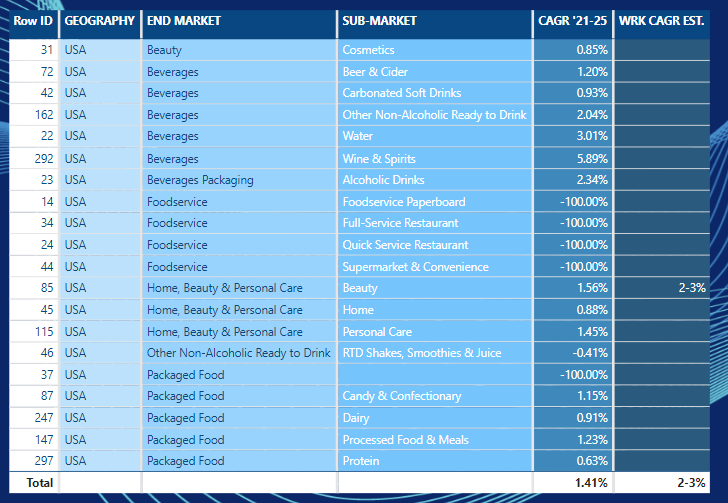
Final Table Look:

Screenshot 2022-06-16 135604.png


Warm regards, 

Priyanka Jha.


View solution in original post

2 REPLIES 2
v-henryk-mstf
Community Support
Community Support

Hi @PriyankaJhaTheA ,


Where are you now, and are you still stuck in the above questions? Looking forward to your reply.


Best Regards,
Henry


Thank you for spending your time creating a solution. But, in this case, this is not useful for me, because there has to be a relationship between table 'wrk cagr' and table 'End Market Projection' for the 'Row ID' fields.


Anyways I was able to find a solution. I'm attaching the .pbix file for anyone who wants to see for themselves.


https://drive.google.com/file/d/1nRa7FE7uhnyf4zNHMjtj9g6tvhrtd4ti/view?usp=sharing


What did I do to solve this?

Note: For numbers 1 & 2 I followed the tutorials mentioned in my question above.

  1. Create Index for the Data: 
    Index = CALCULATE(DISTINCTCOUNT('End Market Projections'[WRK Parent node]), FILTER('End Market Projections', 'End Market Projections'[WRK Parent node]<=EARLIER('End Market Projections'[WRK Parent node])))
  2. Create Row Number for the subcategories for your Data:
    Row Number = RANKX(FILTER('End Market Projections', 'End Market Projections'[WRK Parent node] = EARLIER('End Market Projections'[WRK Parent node])), 'End Market Projections'[2021])
  3. Concatenate both the Index and Row ID to create a unique row number for each row of your data:
    Row ID = CONCATENATE('End Market Projections'[Row Number], 'End Market Projections'[Index])

In this way I was able to have to be a relationship between table 'wrk cagr' and table 'End Market Projection' for the 'Row ID' fields. 


Final Table Look:

Screenshot 2022-06-16 135604.png


Warm regards, 

Priyanka Jha.


Helpful resources

Announcements
November Power BI Update Carousel

Power BI Monthly Update - November 2025

Check out the November 2025 Power BI update to learn about new features.

Fabric Data Days Carousel

Fabric Data Days

Advance your Data & AI career with 50 days of live learning, contests, hands-on challenges, study groups & certifications and more!

FabCon Atlanta 2026 carousel

FabCon Atlanta 2026

Join us at FabCon Atlanta, March 16-20, for the ultimate Fabric, Power BI, AI and SQL community-led event. Save $200 with code FABCOMM.

Top Solution Authors
Top Kudoed Authors