cancel
Showing results for 
Search instead for 
Did you mean: 

The Power BI Data Visualization World Championships is back! Get ahead of the game and start preparing now! Learn more

Reply
TomBI
Frequent Visitor

Unable to delete column in Power BI desktop

Hi all, 


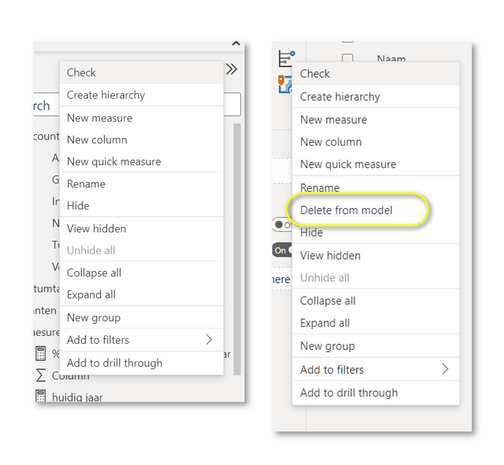
When I work in Power BI desktop I can delete columns from the tables that I have loaded (Import mode). A client of mine (from another organization) is not able to do this, the option "Delete from model" is not visible when opening the menu for this particular column. See the difference below. I see this every now and then with other people. Can someone tell me why this is, and how to tackle this? 

Menu on the left misses "Delete from model"Menu on the left misses "Delete from model"

Thanks a lot!


1 ACCEPTED SOLUTION
Anonymous
Not applicable

Hi @TomBI ,


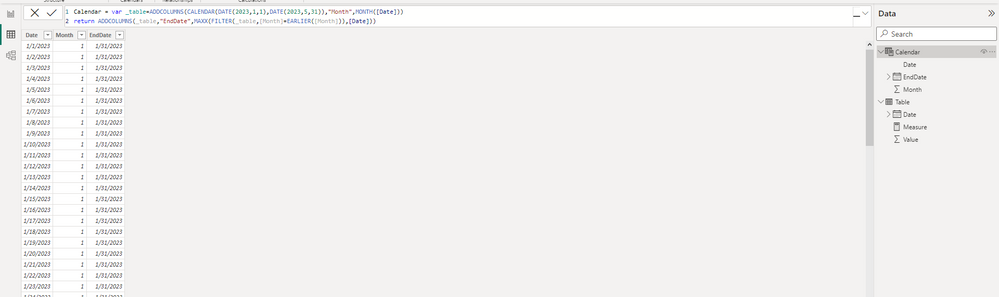
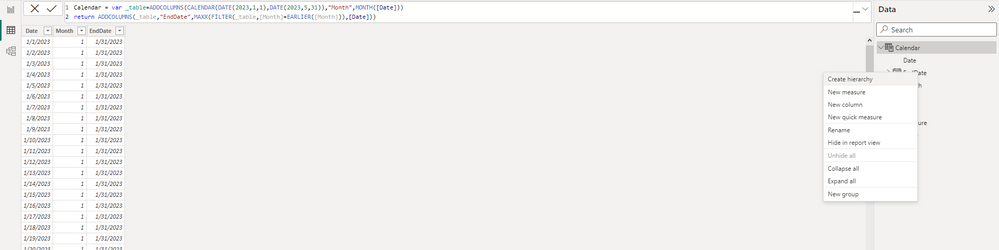
One possibility is that the field she wants to delete was created from a complete calculated table.

For example, the three fields of the following calendar table are generated by only a piece of DAX code, so you can't delete one of the fields individually.

vstephenmsft_0-1681181859304.png

vstephenmsft_1-1681181936429.png


Best Regards,

Stephen Tao


If this post helps, then please consider Accept it as the solution to help the other members find it more quickly.           

View solution in original post

3 REPLIES 3
joaoribeiro
Impactful Individual

Hi, which connection mode is he using (import, live connection, direct query)? Live connection and Direct Query have limited data modelling options on Power BI side.

Hi Joao, 


She is using import, so as far as I'm concerned it should be possible. In fact both screenshots in my post are from the same file. On my computer it does show the option, on her computer it does not. 

Anonymous
Not applicable

Hi @TomBI ,


One possibility is that the field she wants to delete was created from a complete calculated table.

For example, the three fields of the following calendar table are generated by only a piece of DAX code, so you can't delete one of the fields individually.

vstephenmsft_0-1681181859304.png

vstephenmsft_1-1681181936429.png


Best Regards,

Stephen Tao


If this post helps, then please consider Accept it as the solution to help the other members find it more quickly.           

Helpful resources

Announcements
November Power BI Update Carousel

Power BI Monthly Update - November 2025

Check out the November 2025 Power BI update to learn about new features.

Fabric Data Days Carousel

Fabric Data Days

Advance your Data & AI career with 50 days of live learning, contests, hands-on challenges, study groups & certifications and more!

FabCon Atlanta 2026 carousel

FabCon Atlanta 2026

Join us at FabCon Atlanta, March 16-20, for the ultimate Fabric, Power BI, AI and SQL community-led event. Save $200 with code FABCOMM.

Top Solution Authors
Top Kudoed Authors