Join us at FabCon Atlanta from March 16 - 20, 2026, for the ultimate Fabric, Power BI, AI and SQL community-led event. Save $200 with code FABCOMM.
Register now!The Power BI Data Visualization World Championships is back! Get ahead of the game and start preparing now! Learn more
Hi,
I have two PWBI desktop reports both using the same two source data sets and one is allowing a one-to-many relationship between the 2 files, while the other is not. I can't determine why that would be the case. I am using Requsition IDs as my primary and secondary key from both files to create the relationship and in the first file I have a line of code to remove any duplicates in the Req ID column to ensure that there are only unique values. Any advice or tricks because PWBI will only let me use the Many to Many relationship which is not what I need.
Solved! Go to Solution.
Hi @aschuster ,
Please ensure the values are unique in the Req ID column. The problem is usually caused by not unique values. And there is a blog you can reference.
If it still don't work, can you please share the screshoot or the dummy file? Then we can help you as soon as possible.
Best Regards,
Xue
If this post helps, then please consider Accept it as the solution to help the other members find it more quickly.
Hi @aschuster ,
Please ensure the values are unique in the Req ID column. The problem is usually caused by not unique values. And there is a blog you can reference.
If it still don't work, can you please share the screshoot or the dummy file? Then we can help you as soon as possible.
Best Regards,
Xue
If this post helps, then please consider Accept it as the solution to help the other members find it more quickly.
Hi all,
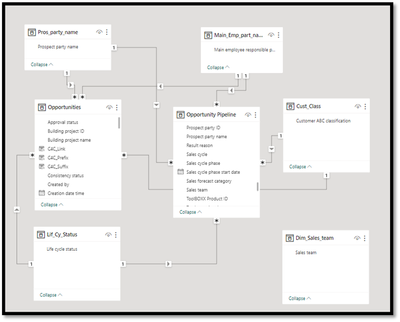
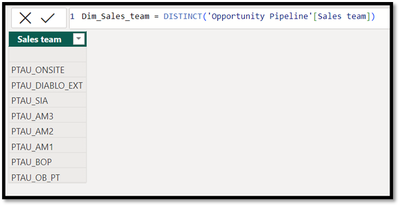
I have Dim Table (used Distinct Function) and fact table When try to make a relationship between these 2 table , PowerBI Suggested only Many to many.
How to Fix this , there is no Duplicate in Dim_Table also I have used DISTINCT function
Please help on this
Dim Table
Fact Table
The remove duplicates has been hit and miss for me for whatever reason. But make sure you dont have any blank rows that may have been imported in without you knowing.
The Power BI Data Visualization World Championships is back! Get ahead of the game and start preparing now!
Check out the November 2025 Power BI update to learn about new features.
| User | Count |
|---|---|
| 59 | |
| 43 | |
| 42 | |
| 23 | |
| 17 |
| User | Count |
|---|---|
| 190 | |
| 122 | |
| 96 | |
| 66 | |
| 47 |