Get certified for free when you join Fabric Data Days 2026 and dive into Fabric, Power BI, SQL, AI, and other essential data skills.
Join nowData Days is here! Join us now for 60+ days of learning, challenges, and connection. Learn more
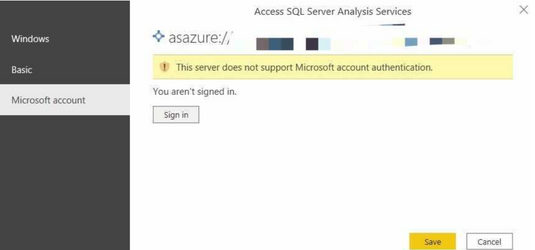
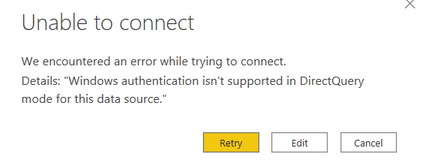
Our Power BI files are connected to Azure analysis services, it's a live connection. It stopped working this morning due to credential issues, not sure what's going on with Power BI but we cannot authenticate using Microsoft account nor windows authentication. Please see screenshots:
Anyone experiencing the same issue?
Any help is appreciated. Thanks!
Solved! Go to Solution.
Turned out to be an internal permissions issue
Hi, @Anonymous
Here are some references that might help:
Please try Microsoft account authentication
Can't Connect to AAS - This server does not support Microsoft account authentication
Cant access my Azure Analysis Services Database - This server does not support Windows credentials.
Direct Query On SQL Server on Windows Authentication
Azure Analysis Services authentication
Best Regards,
Community Support Team _ Zeon Zheng
If this post helps, then please consider Accept it as the solution to help the other members find it more quickly.
@Anonymous , I can see some issues related power bi portal, but not azure as of now.
Please log an issue :https://community.powerbi.com/t5/Issues/idb-p/Issues
Don't miss out on Data Days, June 15 through August 7. Learn Fabric, Power BI, SQL, AI and more.
Check out the May 2026 Power BI update to learn about new features.
| User | Count |
|---|---|
| 23 | |
| 23 | |
| 20 | |
| 18 | |
| 14 |
| User | Count |
|---|---|
| 58 | |
| 51 | |
| 41 | |
| 30 | |
| 24 |