cancel
Showing results for 
Search instead for 
Did you mean: 

Get Fabric Certified for FREE during Fabric Data Days. Don't miss your chance! Request now

Reply
valsdott
New Member

Unable to apply query changes - OLE DB or ODBC error

Hello,


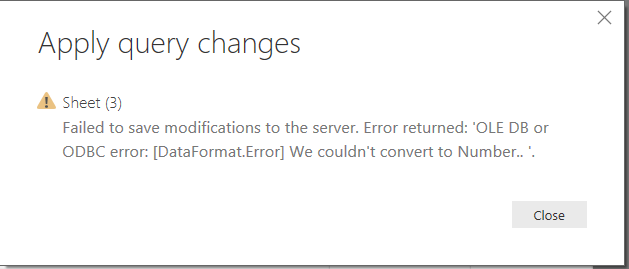
I am preparing a Power BI file and I have connected to a xlsx or csv file on my local hard drive server to import a data table. I go through all the steps and prepare my table without problems. But when I want to apply and close the query editor the following error comes up:


"Failed to save modifications to the server. Error returned: 'OLE DB or ODBC error: [DataFormar.Error] We couldn't convert to Number..'."


Can anyone give me an idea of what the issue is? The xlsx or csv files are downloaded results from a surveyMonkey survey. They do not contain a lot of data.


Thanks,


OLE DB or ODBC error.PNG


3 REPLIES 3
v-danhe-msft
Microsoft Employee
Microsoft Employee

Hi @valsdott,

Could you please tell me if your problem has been solved? If it is, could you please mark the helpful replies as Answered?


Regards,

Daniel He

Community Support Team _ Daniel He
If this post helps, then please consider Accept it as the solution to help the other members find it more quickly.

Hi Daniel,


no the problem still persists. In my final table there are no numerical columns, I have converted all to text.

What I ended up doing was import the data from the Excel file into another Power Bi file which contains other data as well. And for some strange reason it didn't cause the error even if I made the exact same conversions to the table.


How can I sent you the files to look into this?


Thank you,


Rebekka


v-danhe-msft
Microsoft Employee
Microsoft Employee

Hi @valsdott,

For your description, it sounds like there is some non-numeric data in some of the rows that you were previously converting to number. I'd recommend you examine the source data to determine where the errors are coming from, remove or fix up the problematic rows, and then re-apply the number conversion or could you please share the xlsx or csv file if possible?


Regards,

Daniel He

Community Support Team _ Daniel He
If this post helps, then please consider Accept it as the solution to help the other members find it more quickly.

Helpful resources

Announcements
November Power BI Update Carousel

Power BI Monthly Update - November 2025

Check out the November 2025 Power BI update to learn about new features.

Fabric Data Days Carousel

Fabric Data Days

Advance your Data & AI career with 50 days of live learning, contests, hands-on challenges, study groups & certifications and more!

FabCon Atlanta 2026 carousel

FabCon Atlanta 2026

Join us at FabCon Atlanta, March 16-20, for the ultimate Fabric, Power BI, AI and SQL community-led event. Save $200 with code FABCOMM.

Top Solution Authors
Top Kudoed Authors