Don't miss your chance to take the Fabric Data Engineer (DP-600) exam for FREE! Find out how by attending the DP-600 session on April 23rd (pacific time), live or on-demand.
Learn moreJoin the FabCon + SQLCon recap series. Up next: Power BI, Real-Time Intelligence, IQ and AI, and Data Factory take center stage. All sessions are available on-demand after the live show. Register now
I'm using PostgreSQL data (directly from Improvado) that gives me a connection to Power BI using a host, port, database, username, and password. I used all of the information to get the data into the Power BI Desktop with no issues and published it to the server.
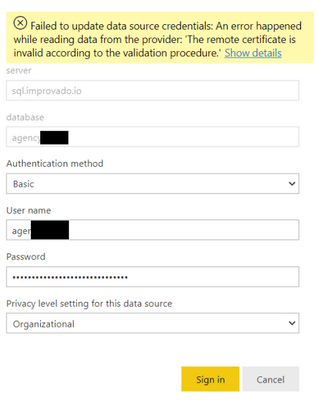
Now that the report is in the server, I can't set up a scheduled refresh because of the credentials. Here is the error I'm getting:
I know that the username and password are correct, but I can't figure out why it won't accept the credentials. I'm guessing it's because the port number isn't included anywhere? How do I add in the port number to the credential validation?
Thanks!
No luck there. I tried Server:port as well as server/port in the server name field but neither worked. I have also tried a few other iterations with no success.
look for the server domain name and in the user put somethinlike:
domain/username
Proud to be a Super User!
some times the source request a domain to be specify to get in line with the credential for that server
Proud to be a Super User!
Check out the April 2026 Power BI update to learn about new features.
If you have recently started exploring Fabric, we'd love to hear how it's going. Your feedback can help with product improvements.
A new Power BI DataViz World Championship is coming this June! Don't miss out on submitting your entry.
| User | Count |
|---|---|
| 48 | |
| 46 | |
| 41 | |
| 20 | |
| 17 |
| User | Count |
|---|---|
| 70 | |
| 69 | |
| 32 | |
| 27 | |
| 26 |