Join us at FabCon Atlanta from March 16 - 20, 2026, for the ultimate Fabric, Power BI, AI and SQL community-led event. Save $200 with code FABCOMM.
Register now!The Power BI Data Visualization World Championships is back! Get ahead of the game and start preparing now! Learn more
Hi all,
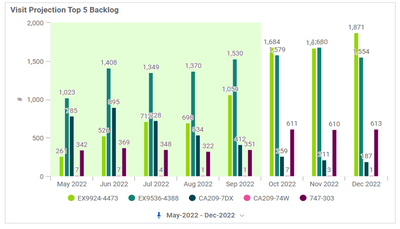
I am trying to add this green background to the visual but i am not able to do this....Please Help!!
Thanks!
Solved! Go to Solution.
Hi @Bhavya98 ,
If you are open to custom visuals and do not like solution suggested by djurecicK2, you may wish to try https://pbivizedit.com service to create this custom visual. This is a combination of clustered bars and area chart.
Thanks
Hi @Bhavya98 ,
If you are open to custom visuals and do not like solution suggested by djurecicK2, you may wish to try https://pbivizedit.com service to create this custom visual. This is a combination of clustered bars and area chart.
Thanks
Hi @Bhavya98 ,
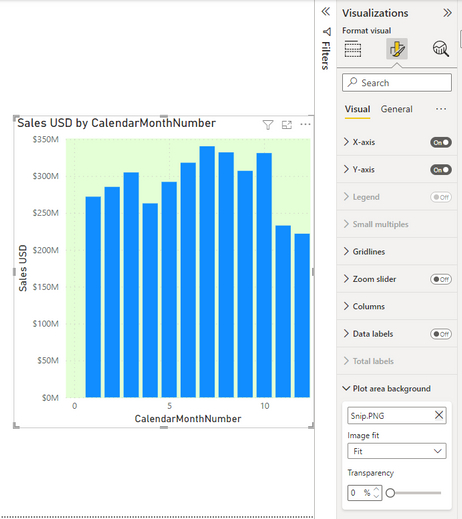
If this is a stacked column chart, then you can make an image with your background color. Then set the image as "Plot area background" like in the screenshot below:
Please consider accepting as solution if this has answered the question.
Hi @djurecicK2 , this is a clustered column chart and we want to make that background dynamic not static.
The Power BI Data Visualization World Championships is back! Get ahead of the game and start preparing now!
| User | Count |
|---|---|
| 41 | |
| 38 | |
| 36 | |
| 30 | |
| 28 |
| User | Count |
|---|---|
| 128 | |
| 88 | |
| 79 | |
| 67 | |
| 62 |