FabCon is coming to Atlanta
Join us at FabCon Atlanta from March 16 - 20, 2026, for the ultimate Fabric, Power BI, AI and SQL community-led event. Save $200 with code FABCOMM.
Register now!- Power BI forums
- Get Help with Power BI
- Desktop
- Service
- Report Server
- Power Query
- Mobile Apps
- Developer
- DAX Commands and Tips
- Custom Visuals Development Discussion
- Health and Life Sciences
- Power BI Spanish forums
- Translated Spanish Desktop
- Training and Consulting
- Instructor Led Training
- Dashboard in a Day for Women, by Women
- Galleries
- Data Stories Gallery
- Themes Gallery
- Contests Gallery
- QuickViz Gallery
- Quick Measures Gallery
- Visual Calculations Gallery
- Notebook Gallery
- Translytical Task Flow Gallery
- TMDL Gallery
- R Script Showcase
- Webinars and Video Gallery
- Ideas
- Custom Visuals Ideas (read-only)
- Issues
- Issues
- Events
- Upcoming Events
The Power BI Data Visualization World Championships is back! Get ahead of the game and start preparing now! Learn more
- Power BI forums
- Forums
- Get Help with Power BI
- Desktop
- Re: URL Images Won't Display in PowerBI Online
- Subscribe to RSS Feed
- Mark Topic as New
- Mark Topic as Read
- Float this Topic for Current User
- Bookmark
- Subscribe
- Printer Friendly Page


- Mark as New
- Bookmark
- Subscribe
- Mute
- Subscribe to RSS Feed
- Permalink
- Report Inappropriate Content
URL Images Won't Display in PowerBI Online
Images added to my Power BI report will not appear for all users online. We all have the same permission level to the .png image files stored in a library on a SharePoint site. Additionally, I've granted everyone "Read" access in addition to the few of us who have Site Collection Admin access. In Power BI I have set the image URL column to the type URL. Any input or help here is much appreciated as I'll have to rebuild elements of my report since half of my team can't see the images when the report loads in Power BI online.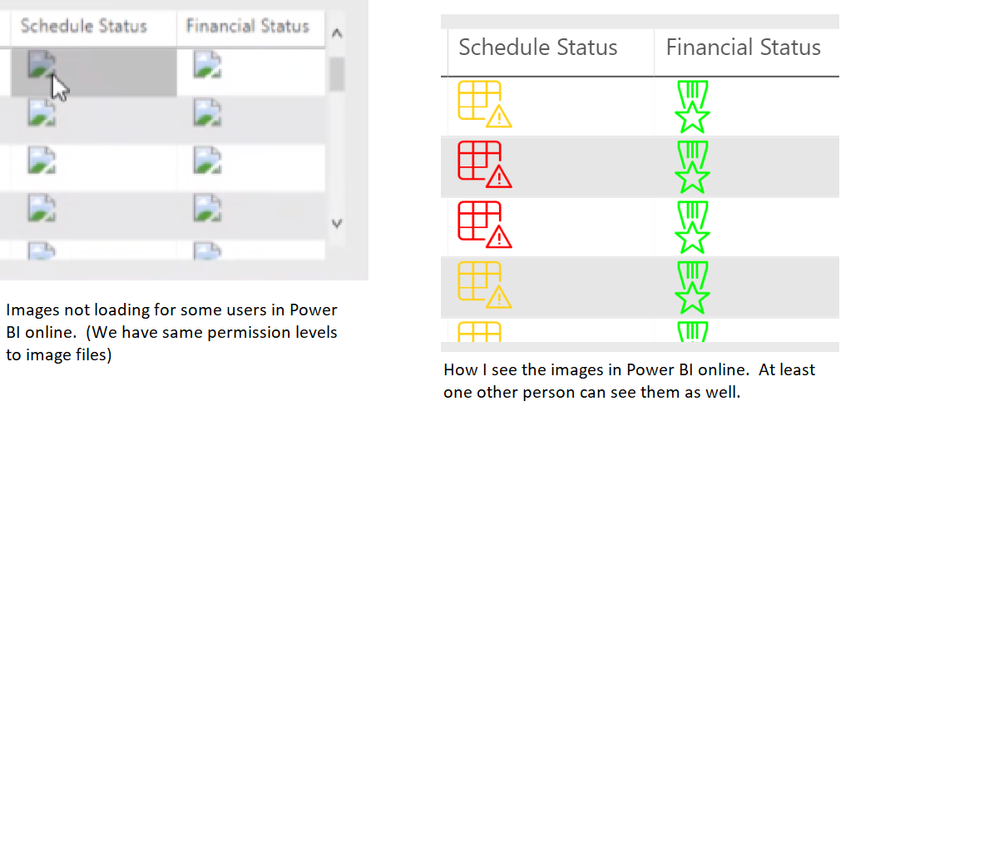
Thanks!
Solved! Go to Solution.
- Mark as New
- Bookmark
- Subscribe
- Mute
- Subscribe to RSS Feed
- Permalink
- Report Inappropriate Content
Thank you for both of your responses @mwegener @amitchandak . Unfortunately those suggestions did not solve my issue but I'll tell you what did...
My images were stored in a SharePoint library, everyone on my team had Read access in addition to the permission level "Everyone, except external users" which was the widest permission level allowed in my environment. I discovered that even though those users couldn't view the images in Power BI online, they could when I embedded the report in a Modern UI page on my SharePoint site. So it seems like an order of operations issue with the page load. On the SharePoint page, the user is already logged in by the time the page is starting to load, then the Power BI report renders. In Power BI online, the report loaded first then the images and it seemed as though the browser wasnt able to fully connect to them before load completed. Unfortunately, I don't have the option of storing my images on a public site or using the "anonymous" access level in my environment which would eliminate this issue.
My work around & solution:
Converting my images to Base64 instead of using images stored in SharePoint. I found this tutorial on how to Convert Images to Base64 for use in Power BI which solved my problem. I do know there are some character limits (approx 32k) but I need to do further testing to see how large/detailed of an image I can use before I hit that threshhold. I hope this helps other people who have this same issue because I spent more time than I'd like to admin troubleshooting this one.
CC: @EStieg @v-gizhi-msft @v-alq-msft


- Mark as New
- Bookmark
- Subscribe
- Mute
- Subscribe to RSS Feed
- Permalink
- Report Inappropriate Content
Hi @MichelleACN ,
look at this.
https://docs.microsoft.com/en-us/power-bi/power-bi-images-tables
Considerations
- The image needs to be in one of these file formats: .bmp, .jpg, .jpeg, .gif, .png, or .svg
- The URL needs to be anonymously accessible, not on a site that requires a sign-in, such as SharePoint. However, if images are hosted on SharePoint or OneDrive, you may be able to get an embed code that points directly to them.
Regards,
Marcus
Dortmund - Germany
If I answered your question, please mark my post as solution, this will also help others.
Please give Kudos for support.
Please mark my post as solution, this will also help others.
Please give Kudos for support.
Marcus Wegener works as Full Stack Power BI Engineer at BI or DIE.
His mission is clear: "Get the most out of data, with Power BI."
twitter - LinkedIn - YouTube - website - podcast - Power BI Tutorials
- Mark as New
- Bookmark
- Subscribe
- Mute
- Subscribe to RSS Feed
- Permalink
- Report Inappropriate Content
Thank you for both of your responses @mwegener @amitchandak . Unfortunately those suggestions did not solve my issue but I'll tell you what did...
My images were stored in a SharePoint library, everyone on my team had Read access in addition to the permission level "Everyone, except external users" which was the widest permission level allowed in my environment. I discovered that even though those users couldn't view the images in Power BI online, they could when I embedded the report in a Modern UI page on my SharePoint site. So it seems like an order of operations issue with the page load. On the SharePoint page, the user is already logged in by the time the page is starting to load, then the Power BI report renders. In Power BI online, the report loaded first then the images and it seemed as though the browser wasnt able to fully connect to them before load completed. Unfortunately, I don't have the option of storing my images on a public site or using the "anonymous" access level in my environment which would eliminate this issue.
My work around & solution:
Converting my images to Base64 instead of using images stored in SharePoint. I found this tutorial on how to Convert Images to Base64 for use in Power BI which solved my problem. I do know there are some character limits (approx 32k) but I need to do further testing to see how large/detailed of an image I can use before I hit that threshhold. I hope this helps other people who have this same issue because I spent more time than I'd like to admin troubleshooting this one.
CC: @EStieg @v-gizhi-msft @v-alq-msft

- Mark as New
- Bookmark
- Subscribe
- Mute
- Subscribe to RSS Feed
- Permalink
- Report Inappropriate Content
I have this problem you do not need to use base 64. You just have to ensure the powerbi they login in TEAM is the Correct permission to see the picture. this is one strange solution but it work. My user have multiple account!
- Mark as New
- Bookmark
- Subscribe
- Mute
- Subscribe to RSS Feed
- Permalink
- Report Inappropriate Content
Hello,
Isn't there an easier way to do this? How can I show pictures taken in share point in the PBI report 😞


- Mark as New
- Bookmark
- Subscribe
- Mute
- Subscribe to RSS Feed
- Permalink
- Report Inappropriate Content

Helpful resources

Power BI Dataviz World Championships
The Power BI Data Visualization World Championships is back! Get ahead of the game and start preparing now!

Power BI Monthly Update - December 2025
Check out the December 2025 Power BI Holiday Recap!

FabCon Atlanta 2026
Join us at FabCon Atlanta, March 16-20, for the ultimate Fabric, Power BI, AI and SQL community-led event. Save $200 with code FABCOMM.

| User | Count |
|---|---|
| 38 | |
| 38 | |
| 36 | |
| 28 | |
| 28 |


| User | Count |
|---|---|
| 124 | |
| 89 | |
| 73 | |
| 66 | |
| 65 |


