cancel
Showing results for 
Search instead for 
Did you mean: 

The Power BI Data Visualization World Championships is back! It's time to submit your entry. Live now!

Reply
Anonymous
Not applicable

URL Icon Toggle Not Working in Matrix Visual

Hello,


Prior to December 2017, the URL Icon toggle worked correctly - it would change fields with the data category "Web URL" from a text string to the little "link" icon (the URL was being used as a Row Header in a matrix visual).


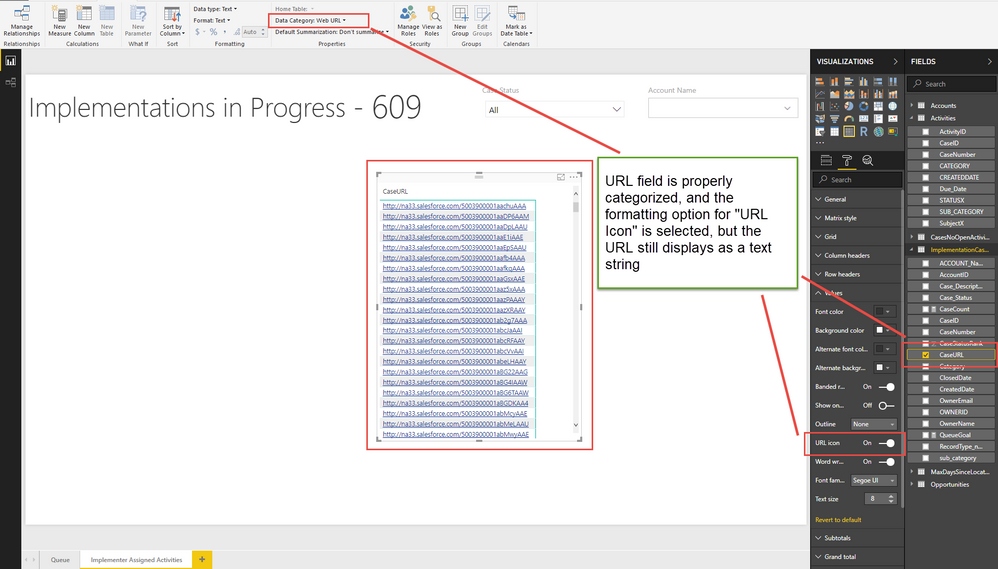
In one of the releases since, that functionality has broken. New Matrix visuals with properly-categorized fields can't be toggled to show the link icon. The switch in the formatting pane exists and can be flipped on and off, but the visual will only ever show the url text string, never the icon. See screenshot for an example of a visual set up to show the icon, but that still shows the text string.
 

URL_Icon_Issue.png


1 ACCEPTED SOLUTION
v-qiuyu-msft
Community Support
Community Support

Hi @Anonymous,


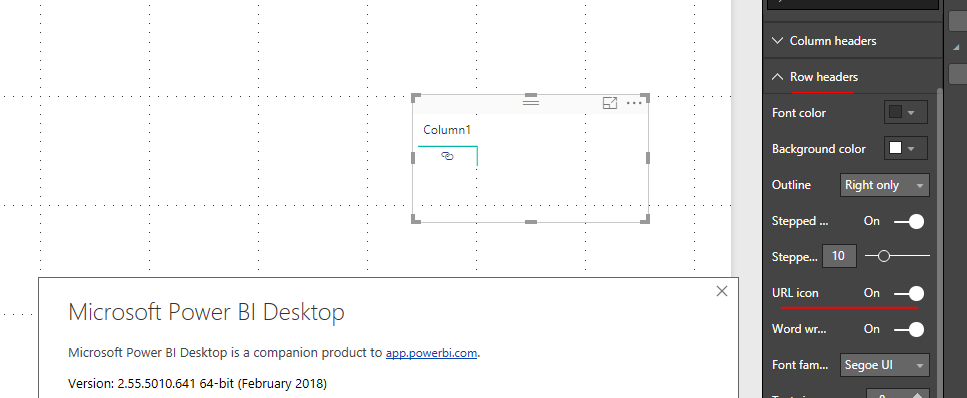
Based on my test in the latest Power BI desktop version 2.55.5010.641 64-bit (February 2018), the URL can display as URL icon in matrix row headers. You can enable this feature under Row Header tab. 


w3.PNG


Best Regards,
Qiuyun Yu 

Community Support Team _ Qiuyun Yu
If this post helps, then please consider Accept it as the solution to help the other members find it more quickly.

View solution in original post

1 REPLY 1
v-qiuyu-msft
Community Support
Community Support

Hi @Anonymous,


Based on my test in the latest Power BI desktop version 2.55.5010.641 64-bit (February 2018), the URL can display as URL icon in matrix row headers. You can enable this feature under Row Header tab. 


w3.PNG


Best Regards,
Qiuyun Yu 

Community Support Team _ Qiuyun Yu
If this post helps, then please consider Accept it as the solution to help the other members find it more quickly.

Helpful resources

Announcements
FabCon Atlanta 2026 carousel

FabCon Atlanta 2026

Join us at FabCon Atlanta, March 16-20, for the ultimate Fabric, Power BI, AI and SQL community-led event. Save $200 with code FABCOMM.