This time we’re going bigger than ever. Fabric, Power BI, SQL, AI and more. We're covering it all. You won't want to miss it.
Learn moreGet Fabric Certified for FREE during AI Skills Fest. This week only. Secure your voucher now.
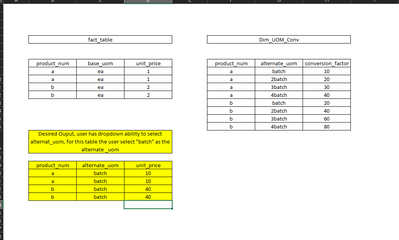
I have a main fact table and dim_uom table shown below. Highlighted in yellow below is my desired output showing that the user has the ability to select from a dropdown "alternate_uom" so I am in need of creating the relationship between my fact table and dim_uom table with the issue of many to many.
Solved! Go to Solution.
@Anonymous , Try a measure like
Sumx(Fact , Fact[Unit Price] * maxx(filter(DIM_UOM, DIM_UOM[Product_Num] = fact[Product_num] && DIM_UOM[Batch] = selectedvalue(Batch[Batch])), DIM_UOM[Conversion_factor]))
Hi @Anonymous ,
Create a Many to Many relationship and create a measure like below:
Measure = SELECTEDVALUE(fact_table[unit_price])*SELECTEDVALUE(Dim_UOM_Conv[conversion_factor])
Best Regards,
Jay
@Anonymous , Try a measure like
Sumx(Fact , Fact[Unit Price] * maxx(filter(DIM_UOM, DIM_UOM[Product_Num] = fact[Product_num] && DIM_UOM[Batch] = selectedvalue(Batch[Batch])), DIM_UOM[Conversion_factor]))
Thanks so much, this worked great. Can you explain why you need to use maxx for this situation?
Check out the May 2026 Power BI update to learn about new features.
Sign up to receive a private message when registration opens and key events begin.
If you have recently started exploring Fabric, we'd love to hear how it's going. Your feedback can help with product improvements.
| User | Count |
|---|---|
| 25 | |
| 24 | |
| 22 | |
| 21 | |
| 19 |
| User | Count |
|---|---|
| 56 | |
| 52 | |
| 49 | |
| 25 | |
| 25 |