cancel
Showing results for 
Search instead for 
Did you mean: 

Get Fabric Certified for FREE during Fabric Data Days. Don't miss your chance! Request now

Reply
willatkinson
Helper II
Helper II

Types of refresh in Power BI

Hi all,


Just trying to get a grasp on the different methods of refreshing data in Power BI, was wondering if I could have some help with the following scenarios in terms of setting up refreshes in Power BI desktop and in the Power BI Service. 


- Importing data with Direct Query from data models and other sources

- Importing data with Import Mode from sources from things like One drive and sharepoint

- Importing data with Import Mode from local files 

- Importating data from Azure active directory from either Import Mode or Direct Query 


Plus any other tips such as why you can't set up automatic refresh in the desktop version for certain methods of import.


Cheers


1 ACCEPTED SOLUTION
Anonymous
Not applicable

Hi, @willatkinson 

Here are answers to your questions:
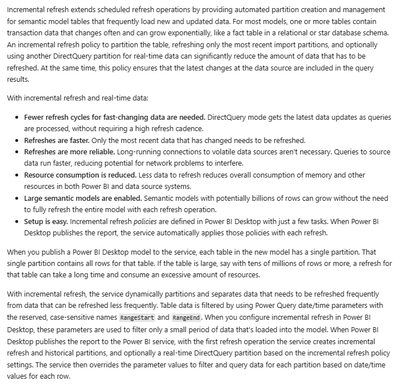
1.Importing data with Direct Query from data models and other sources
In this scenario, if your data source supports query folding, you can configure incremental refresh. In addition, you can configure scheduled refreshes.

Incremental refresh: Incremental refresh for semantic models and real-time data in Power BI - Power BI | Microsoft Learn
vjianpengmsft_0-1712626168842.png


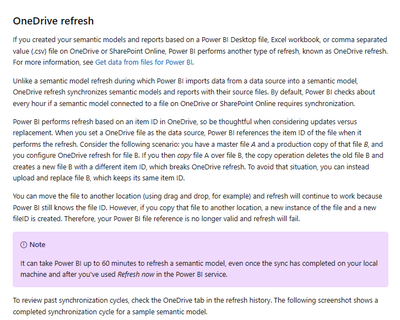
2.Importing data with Import Mode from sources from things like One drive and sharepoint
In this scenario, you can configure scheduled refresh and OneDrive refresh. Onedrive refreshes automatically every hour.

Onedrive refresh document: Data refresh in Power BI - Power BI | Microsoft Learn
vjianpengmsft_1-1712626241049.png


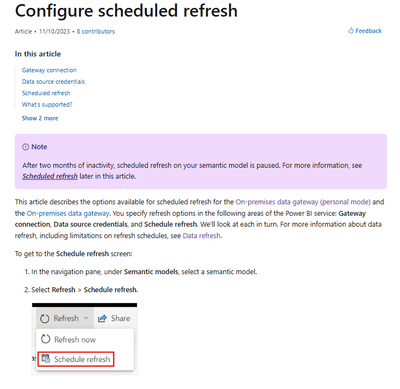
3.Importing data with Import Mode from local files
In this case, you can configure a scheduled refresh.

Scheduled refresh document: Configure scheduled refresh - Power BI | Microsoft Learn
vjianpengmsft_2-1712626308054.png


4.Importating data from Azure active directory from either Import Mode or Direct Query
In this case, you can still configure scheduled refresh for your semantic model.
In the above refresh scenario, you need to publish your PBIX file to the Power BI Service and refresh it in the Service. If your data source is on-premises or a database, then you'll need to install an on-premises data gateway and configure the gateway link in Power BI Service.

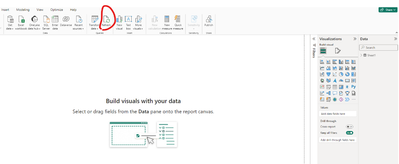
5.Why you can't set up automatic refresh in the desktop version for certain methods of import?
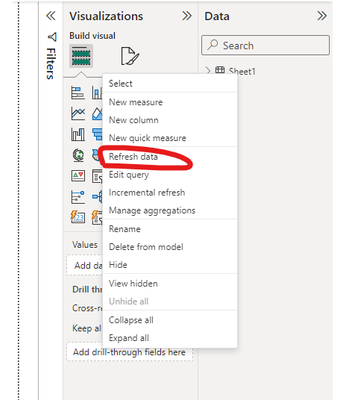
In Power BI Desktop, if you choose to connect to import, you can manually click the Refresh button in the top navigation bar to refresh your semantic model.
vjianpengmsft_3-1712626543171.png

vjianpengmsft_4-1712626562630.png

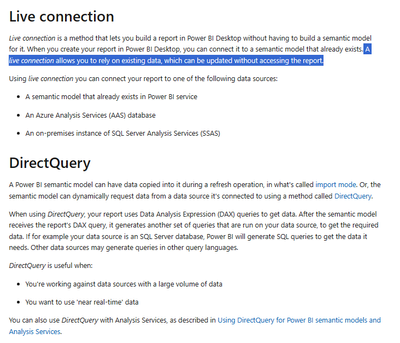
 If you need real-time data, then you can opt for Live Connection. A live connection allows you to rely on existing data, which can be updated without accessing the report.
vjianpengmsft_5-1712626841875.png

Document link: What's the difference between live connections and DirectQuery? - Power BI | Microsoft Learn


How to Get Your Question Answered Quickly

If it does not help, please provide more details with your desired output and pbix file without privacy information (or some sample data) .

Best Regards

Jianpeng Li

If this post helps, then please consider Accept it as the solution to help the other members find it more quickly.


View solution in original post

1 REPLY 1
Anonymous
Not applicable

Hi, @willatkinson 

Here are answers to your questions:
1.Importing data with Direct Query from data models and other sources
In this scenario, if your data source supports query folding, you can configure incremental refresh. In addition, you can configure scheduled refreshes.

Incremental refresh: Incremental refresh for semantic models and real-time data in Power BI - Power BI | Microsoft Learn

vjianpengmsft_0-1712626168842.png


2.Importing data with Import Mode from sources from things like One drive and sharepoint
In this scenario, you can configure scheduled refresh and OneDrive refresh. Onedrive refreshes automatically every hour.

Onedrive refresh document: Data refresh in Power BI - Power BI | Microsoft Learn

vjianpengmsft_1-1712626241049.png


3.Importing data with Import Mode from local files
In this case, you can configure a scheduled refresh.

Scheduled refresh document: Configure scheduled refresh - Power BI | Microsoft Learn

vjianpengmsft_2-1712626308054.png


4.Importating data from Azure active directory from either Import Mode or Direct Query
In this case, you can still configure scheduled refresh for your semantic model.
In the above refresh scenario, you need to publish your PBIX file to the Power BI Service and refresh it in the Service. If your data source is on-premises or a database, then you'll need to install an on-premises data gateway and configure the gateway link in Power BI Service.

5.Why you can't set up automatic refresh in the desktop version for certain methods of import?
In Power BI Desktop, if you choose to connect to import, you can manually click the Refresh button in the top navigation bar to refresh your semantic model.

vjianpengmsft_3-1712626543171.png

vjianpengmsft_4-1712626562630.png

 If you need real-time data, then you can opt for Live Connection. A live connection allows you to rely on existing data, which can be updated without accessing the report.

vjianpengmsft_5-1712626841875.png

Document link: What's the difference between live connections and DirectQuery? - Power BI | Microsoft Learn


How to Get Your Question Answered Quickly

If it does not help, please provide more details with your desired output and pbix file without privacy information (or some sample data) .

Best Regards

Jianpeng Li

If this post helps, then please consider Accept it as the solution to help the other members find it more quickly.


Helpful resources

Announcements
November Power BI Update Carousel

Power BI Monthly Update - November 2025

Check out the November 2025 Power BI update to learn about new features.

Fabric Data Days Carousel

Fabric Data Days

Advance your Data & AI career with 50 days of live learning, contests, hands-on challenges, study groups & certifications and more!

FabCon Atlanta 2026 carousel

FabCon Atlanta 2026

Join us at FabCon Atlanta, March 16-20, for the ultimate Fabric, Power BI, AI and SQL community-led event. Save $200 with code FABCOMM.

Top Solution Authors
Top Kudoed Authors