Join us at FabCon Atlanta from March 16 - 20, 2026, for the ultimate Fabric, Power BI, AI and SQL community-led event. Save $200 with code FABCOMM.
Register now!The Power BI Data Visualization World Championships is back! It's time to submit your entry. Live now!
Hi,
Two fields of project table, ProjectIntitator and ProjectManager has values of WorkerId from WorkerTable.
I need to display names of ProjectInitiator and ProjectManager, but the name field from Worker table will always display only one value...
I created a new table as WorkerTableMgr(WorkerTable) and pointed ProjectManager of project table to WorkerId in new table.
But I am trying to figure out if we can have any other way to achieve this instead of duplicating the whole table..
Solved! Go to Solution.
Hi @BrianSK,
Based on my assumption, I created two sample tables like below:
ProjectTable WorkerTable
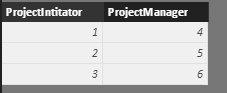
You want to display corresponding name from WorkerTable in ProjectTable, right? If so, please create calculated columns in ProjectTable as below:
Name of Intitator = LOOKUPVALUE('Worker Table'[Name],'Worker Table'[WorkerId],'Project Table'[ProjectIntitator])
Name of Manager = LOOKUPVALUE('Worker Table'[Name],'Worker Table'[WorkerId],'Project Table'[ProjectManager])
Best regards,
Yuliana Gu
Hi @BrianSK,
Based on my assumption, I created two sample tables like below:
ProjectTable WorkerTable
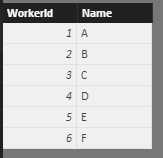
You want to display corresponding name from WorkerTable in ProjectTable, right? If so, please create calculated columns in ProjectTable as below:
Name of Intitator = LOOKUPVALUE('Worker Table'[Name],'Worker Table'[WorkerId],'Project Table'[ProjectIntitator])
Name of Manager = LOOKUPVALUE('Worker Table'[Name],'Worker Table'[WorkerId],'Project Table'[ProjectManager])
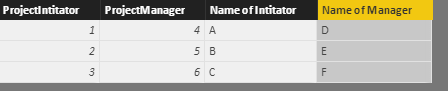
Best regards,
Yuliana Gu
Thanks a lot Yuliana !
Here's one approach to get you thinking ... https://powerpivotpro0-my.sharepoint.com/personal/austin_powerpivotpro_com/_layouts/15/guestaccess.a...
The relationship between projects and workers is complex, it's many to many.
Hi,
Share a sample dataset and show the expected result.
The Power BI Data Visualization World Championships is back! It's time to submit your entry.
Check out the January 2026 Power BI update to learn about new features.
| User | Count |
|---|---|
| 56 | |
| 40 | |
| 38 | |
| 21 | |
| 20 |
| User | Count |
|---|---|
| 141 | |
| 105 | |
| 63 | |
| 36 | |
| 35 |