cancel
Showing results for 
Search instead for 
Did you mean: 

Get Fabric Certified for FREE during Fabric Data Days. Don't miss your chance! Request now

Reply
Anonymous
Not applicable

Two Slicers with User defined value

Hi,


I have two slicers. One slicer is SUM(A) and the other one is SUM(B)

What i want is to filter using the condition


SUM(A) > Userenteredvalue OR SUM(B) > UserEnteredvalue2

I want two values which the user of the dashboard will be able to input. If it's not possible i can use the greater than slicer option but still want the user selected value in the slicer to be taken in the expression.


4 REPLIES 4
v-robertq-msft
Community Support
Community Support

Hi, @Anonymous 

According to your description, I think you can use the GENERATESERIES() function in DAX to create two new calculated tables in custom to place into a vale range slicer to slice the data, you can try my steps:

  1. Create a calculated table like this:
Slicer = GENERATESERIES(1,999999999,1)
Slicer2 = GENERATESERIES(1,999999999,1)
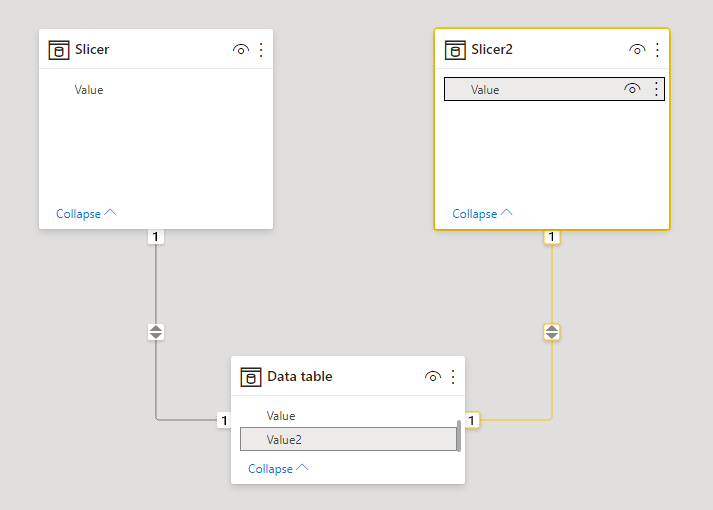
  1. Create a relationship between the two tables:

vrobertqmsft_0-1623832825751.png


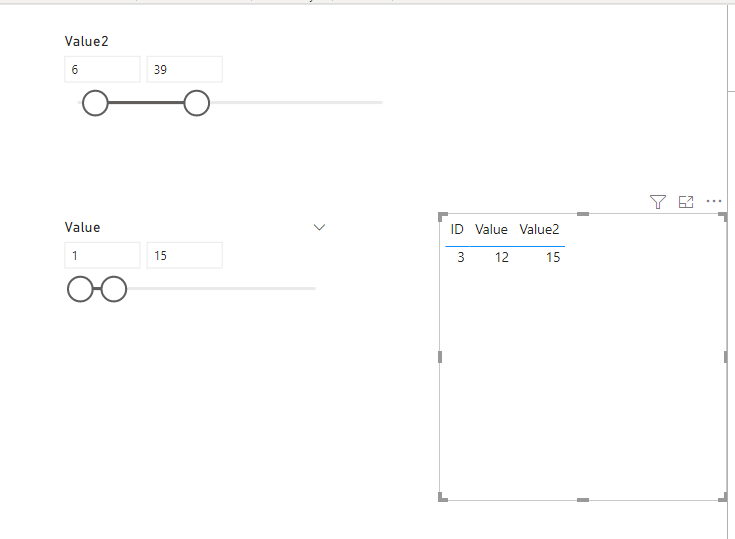
  1. Create a slicer to slice the data table, then you can try if the function can work in the big data condition

vrobertqmsft_1-1623832825753.png


More info about the GENERATESERIES() function in DAX

Thank you very much!


Best Regards,

Community Support Team _Robert Qin

If this post helps, then please consider Accept it as the solution to help the other members find it more quickly.

amitchandak
Super User
Super User

@Anonymous , I think you can use what if the parameter for that


measure =

var _val = maxx(allselected(whatif), whatid[param])

return

sumx(values(Table[id]) , if(sum(Table[A]) >_val, Sum(Table[A]),0))


you need to group data at a level to filter measure (values, id)

https://docs.microsoft.com/en-us/power-bi/desktop-what-if

Share with Power BI Enthusiasts: Full Power BI Video (20 Hours) YouTube
Microsoft Fabric Series 60+ Videos YouTube
Microsoft Fabric Hindi End to End YouTube
Anonymous
Not applicable

Thank you for the response, however I am quite new to powerbi.


I saw the whatif parameter but it only allows values upto 9999. My numbers can go in billions since it is a amount i am dealing with.


So lets say the range of a particular value lies from 0 to 999,999,999

and i want sum of only those values which lie above 100,000  it doesn't seem to work.


Can you guide me if at all possible

@Anonymous , you can use generate series and create manual parameter. but equal to value is only available with what if

https://docs.microsoft.com/en-us/dax/generateseries-function

Share with Power BI Enthusiasts: Full Power BI Video (20 Hours) YouTube
Microsoft Fabric Series 60+ Videos YouTube
Microsoft Fabric Hindi End to End YouTube

Helpful resources

Announcements
November Power BI Update Carousel

Power BI Monthly Update - November 2025

Check out the November 2025 Power BI update to learn about new features.

Fabric Data Days Carousel

Fabric Data Days

Advance your Data & AI career with 50 days of live learning, contests, hands-on challenges, study groups & certifications and more!

FabCon Atlanta 2026 carousel

FabCon Atlanta 2026

Join us at FabCon Atlanta, March 16-20, for the ultimate Fabric, Power BI, AI and SQL community-led event. Save $200 with code FABCOMM.

Top Solution Authors
Top Kudoed Authors