Join us at FabCon Atlanta from March 16 - 20, 2026, for the ultimate Fabric, Power BI, AI and SQL community-led event. Save $200 with code FABCOMM.
Register now!The Power BI Data Visualization World Championships is back! Get ahead of the game and start preparing now! Learn more
Hello,
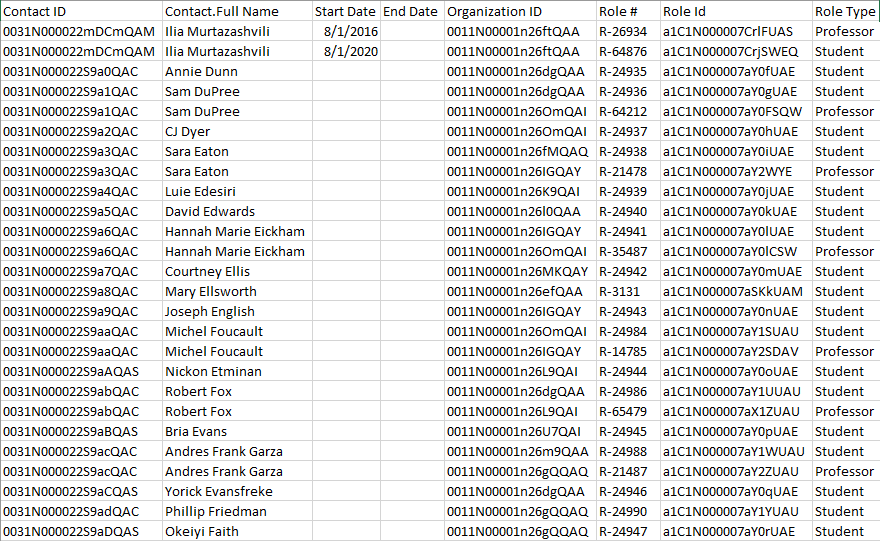
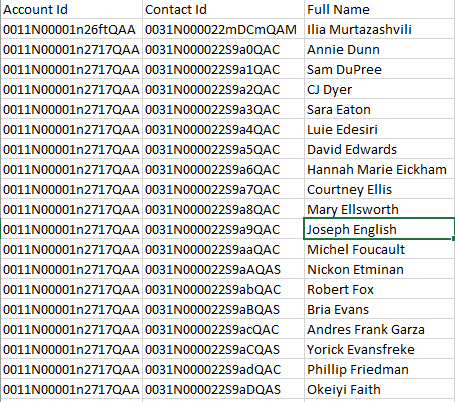
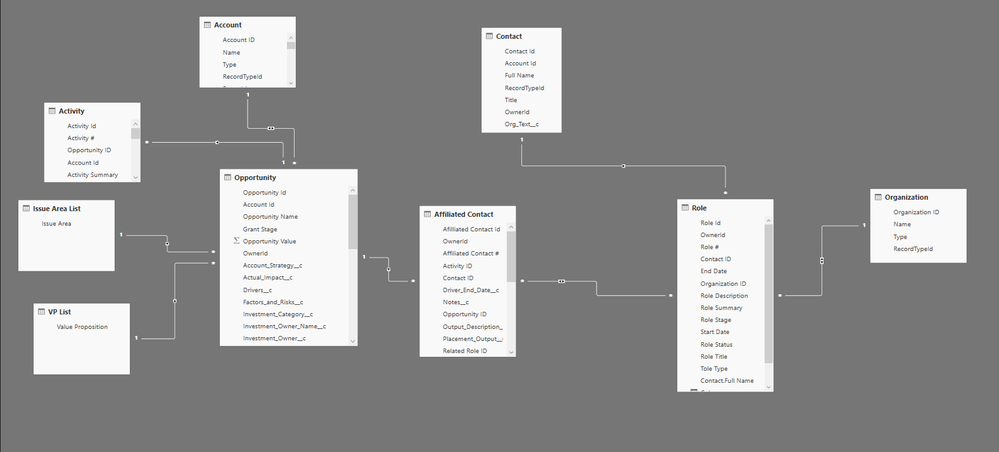
I am trying to identify contacts that have multiple roles where one role type = Professor and one role type = Student. I have included some pictures of my sample data and relationships below.
Link to sample data:
https://www.dropbox.com/s/1tgcuxrn2rtso6x/test.xlsx?dl=0
I think this needs to be a calculated column because I need row by row data not aggregate but I am not sure how to link multiple rows of related data in a formula. Below is what I have tried so far.
Column =
VAR RoleType = Role[Role Type]
Return
IF(
RoleType = "Professor" && RoleType = "Student",
"True",
"False"
)I've also created a measure that counts roles and works at the contact level
Role Count =
CALCULATE(
COUNTROWS(Role))Any help is greatly appreciated!
Solved! Go to Solution.
I'm sure there are lots of ways to do this. If you want a table ..
Table = INTERSECT(
SUMMARIZECOLUMNS
( 'Role Data'[Contact.Full Name] ,
FILTER('Role Data', 'Role Data'[Role Type] = "Professor")),
SUMMARIZECOLUMNS
( 'Role Data'[Contact.Full Name] ,
FILTER('Role Data', 'Role Data'[Role Type] = "Student")))
I'm sure there are lots of ways to do this. If you want a table ..
Table = INTERSECT(
SUMMARIZECOLUMNS
( 'Role Data'[Contact.Full Name] ,
FILTER('Role Data', 'Role Data'[Role Type] = "Professor")),
SUMMARIZECOLUMNS
( 'Role Data'[Contact.Full Name] ,
FILTER('Role Data', 'Role Data'[Role Type] = "Student")))
Thanks @HotChilli ! Just tried this out and it works like a charm. I was also able to create two measures to count the roles per contact that worked when I displayed it data in a visual table.
Professor Role Count =
CALCULATE(
COUNTX(Role, Role[Tole Type]),
FILTER(Role, Role[Tole Type] = "Professor"))
Student Role Count =
CALCULATE(
COUNTX(Role, Role[Tole Type]),
FILTER(Role, Role[Tole Type] = "Student"))
The Power BI Data Visualization World Championships is back! Get ahead of the game and start preparing now!
| User | Count |
|---|---|
| 39 | |
| 37 | |
| 33 | |
| 32 | |
| 29 |
| User | Count |
|---|---|
| 132 | |
| 88 | |
| 82 | |
| 68 | |
| 64 |