Join us at FabCon Atlanta from March 16 - 20, 2026, for the ultimate Fabric, Power BI, AI and SQL community-led event. Save $200 with code FABCOMM.
Register now!The Power BI Data Visualization World Championships is back! Get ahead of the game and start preparing now! Learn more
Hello,
I have 2 tables. The first has employee information, including their hierarchy (ID1|ID2|ID3|ID4). The second table has an ID column with each of our 5 regions' ID and the name of the region. I'm trying to categorize each employee into a region.
Example:
Let's say Jill has PATH (B1045|B7645|B3428|B8954)
| ID | Region |
| B8765 | Central |
| B7645 | North |
| B9743 | South |
| B2902 | East |
| B1327 | West |
Since ID "B7645" is in Jill's hierarchy and listed in the table for Region "North", I'd like the formula to return "North", but not sure how to search the path for an ID that's also in the Region Table. (FYI - while it's possible a hierarchy will not contain any of the ID's in the Region table, it will never contain more than one).
Solved! Go to Solution.
Hi @jhartranft60 ,
According to your sample data, you can use LOOKUPVALUE() funcation, please refer to below measure and see if the result achieve your expectation:
Measure =
var d1 = LOOKUPVALUE('Table'[Region],'Table'[ID],MID(MAX(employee[PATH ]),1,5))
var d2 = LOOKUPVALUE('Table'[Region],'Table'[ID],MID(MAX(employee[PATH ]),7,5))
var d3 = LOOKUPVALUE('Table'[Region],'Table'[ID],MID(MAX(employee[PATH ]),13,5))
var d4 = LOOKUPVALUE('Table'[Region],'Table'[ID],MID(MAX(employee[PATH ]),19,5))
return
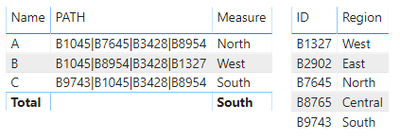
IF(d1<>BLANK(),d1,IF(d2<>BLANK(),d2,IF(d3<>BLANK(),d3,IF(d4<>BLANK(),d4,"NA"))))Result would be shown as below:
Best Regards,
Jay
Community Support Team _ Jay Wang
If this post helps, then please consider Accept it as the solution to help the other members find it more quickly.
Hi @jhartranft60 ,
According to your sample data, you can use LOOKUPVALUE() funcation, please refer to below measure and see if the result achieve your expectation:
Measure =
var d1 = LOOKUPVALUE('Table'[Region],'Table'[ID],MID(MAX(employee[PATH ]),1,5))
var d2 = LOOKUPVALUE('Table'[Region],'Table'[ID],MID(MAX(employee[PATH ]),7,5))
var d3 = LOOKUPVALUE('Table'[Region],'Table'[ID],MID(MAX(employee[PATH ]),13,5))
var d4 = LOOKUPVALUE('Table'[Region],'Table'[ID],MID(MAX(employee[PATH ]),19,5))
return
IF(d1<>BLANK(),d1,IF(d2<>BLANK(),d2,IF(d3<>BLANK(),d3,IF(d4<>BLANK(),d4,"NA"))))Result would be shown as below:
Best Regards,
Jay
Community Support Team _ Jay Wang
If this post helps, then please consider Accept it as the solution to help the other members find it more quickly.
Check out the November 2025 Power BI update to learn about new features.
Advance your Data & AI career with 50 days of live learning, contests, hands-on challenges, study groups & certifications and more!
| User | Count |
|---|---|
| 57 | |
| 43 | |
| 41 | |
| 22 | |
| 17 |
| User | Count |
|---|---|
| 183 | |
| 114 | |
| 93 | |
| 62 | |
| 45 |