
Join us at FabCon Atlanta from March 16 - 20, 2026, for the ultimate Fabric, Power BI, AI and SQL community-led event. Save $200 with code FABCOMM.
Register now!The Power BI Data Visualization World Championships is back! Get ahead of the game and start preparing now! Learn more
Hello everyone!
I have a table created with amazing information over people's performances on spams. I also have some slicers created for users to drill down between specific things. Such as the company they work for, the date a spam was sent, the specific title of a spammed message, and the amount of times a person clicked on the spammed message. All of the slicers work on the table... however for some reason they do not all work together. The only slicer that doesn't work dynamically is the click count slicer. The click count slicer only works correctly if no other slicer is used. Is there a way I can get them all to work together?
I think you using a count slicer. My Advice to you is that you can use count distinct as value count then your problem will be solved
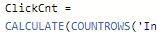
This is what the field is for the slicer. Is it possible to like fix this???
Distinctcount ( )
One thing though with Distinct Count in my case is it is based off of Yes and No Answers. So the distinct count here would be 3 for everyone. Unless a person didn't receive one which would be blank.
The Power BI Data Visualization World Championships is back! Get ahead of the game and start preparing now!
Check out the November 2025 Power BI update to learn about new features.
| User | Count |
|---|---|
| 59 | |
| 46 | |
| 42 | |
| 23 | |
| 18 |
| User | Count |
|---|---|
| 193 | |
| 123 | |
| 99 | |
| 67 | |
| 49 |