
Join us at FabCon Atlanta from March 16 - 20, 2026, for the ultimate Fabric, Power BI, AI and SQL community-led event. Save $200 with code FABCOMM.
Register now!The Power BI Data Visualization World Championships is back! Get ahead of the game and start preparing now! Learn more
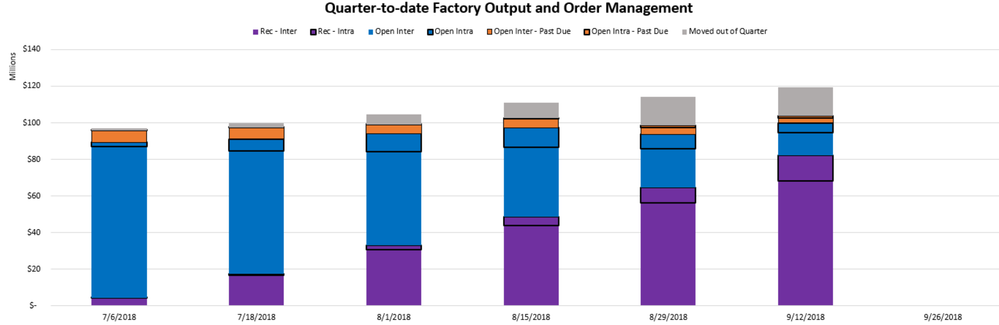
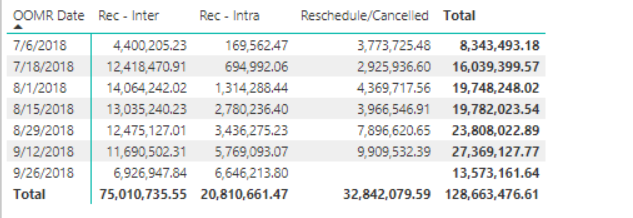
To create this chart in excel, I had to create 2 pivots filtered on different column values because one pivot has a running total for the column values while the other pivot shows the snapshot in time for that column value. How do I create a measure in DAX so that if that row belongs to Category(Rec-Inter,Rec-Intra,Rescheduled) then do a running total of transaction $ or else just return the transaction $ for the date.
I have figured out one half of the DAX query i.e.Measure = CALCULATE([Total Transaction $],FILTER('Union Query',('Union Query'[Final Output]="Rec - Inter"||'Union Query'[Final Output]="Rec - Intra"||'Union Query'[Final Output]="Reschedule/Cancelled")),FILTER('Union Query','Union Query'[OOMR Date]<=MAX('Union Query'[OOMR Date]))) which gives the running total pivot above, but the next half i.e.e where it is any other category how do i get it retunr the transaction $.
Thanks,
Venu
hi, @venucr9
After my test, In your formula, this condition limits your choice must in the category is "Rec - Intra" or "Rec - Inter" or "Reschedule/Cancelled" and other category could be calculated.
so I think it is not necessary for this formula.
If it is not your case, please share pbix file or some data sample and expected output . You can upload it to OneDrive or Dropbox and post the link here. Do mask sensitive data before uploading.
Best Regards,
Lin
Check out the November 2025 Power BI update to learn about new features.
Advance your Data & AI career with 50 days of live learning, contests, hands-on challenges, study groups & certifications and more!
| User | Count |
|---|---|
| 57 | |
| 43 | |
| 40 | |
| 21 | |
| 17 |