FabCon is coming to Atlanta
Join us at FabCon Atlanta from March 16 - 20, 2026, for the ultimate Fabric, Power BI, AI and SQL community-led event. Save $200 with code FABCOMM.
Register now!- Power BI forums
- Get Help with Power BI
- Desktop
- Service
- Report Server
- Power Query
- Mobile Apps
- Developer
- DAX Commands and Tips
- Custom Visuals Development Discussion
- Health and Life Sciences
- Power BI Spanish forums
- Translated Spanish Desktop
- Training and Consulting
- Instructor Led Training
- Dashboard in a Day for Women, by Women
- Galleries
- Data Stories Gallery
- Themes Gallery
- Contests Gallery
- QuickViz Gallery
- Quick Measures Gallery
- Visual Calculations Gallery
- Notebook Gallery
- Translytical Task Flow Gallery
- TMDL Gallery
- R Script Showcase
- Webinars and Video Gallery
- Ideas
- Custom Visuals Ideas (read-only)
- Issues
- Issues
- Events
- Upcoming Events
The Power BI Data Visualization World Championships is back! Get ahead of the game and start preparing now! Learn more
- Power BI forums
- Forums
- Get Help with Power BI
- Desktop
- Trying to calculate SAMEPERIODLASTYEAR
- Subscribe to RSS Feed
- Mark Topic as New
- Mark Topic as Read
- Float this Topic for Current User
- Bookmark
- Subscribe
- Printer Friendly Page


- Mark as New
- Bookmark
- Subscribe
- Mute
- Subscribe to RSS Feed
- Permalink
- Report Inappropriate Content
Trying to calculate SAMEPERIODLASTYEAR
Hi all, I recieve weekly sales data every saturday. I am looking for a way to compare this weekly data with the same weeknum from last year. SAMEPERIODLASTYEAR on a date table isn't doing the trick. This article: https://www.sqlbi.com/articles/previous-year-up-to-a-certain-date/ partially worked and I modified it slightly like so:
I'm still having issues getting the measure to return the correct data:
| period_date | net_sales_retail | wk | IsPast | net_sales_retail_ly |
| 1/5/2019 | $235,764 | 1 | TRUE | |
| 1/5/2019 | 2 | TRUE | $235,764 | |
| 1/12/2019 | $198,276 | 2 | TRUE | |
| 1/12/2019 | 3 | TRUE | $198,276 | |
| 1/19/2019 | $235,199 | 3 | TRUE | |
| 1/19/2019 | 4 | TRUE | $235,199 | |
| 1/26/2019 | $221,923 | 4 | TRUE | |
| 1/26/2019 | 5 | TRUE | $221,923 | |
| 2/2/2019 | $208,851 | 5 | TRUE | |
| 2/2/2019 | 6 | TRUE | $208,851 | |
| 2/9/2019 | $265,560 | 6 | TRUE | |
| 2/9/2019 | 7 | TRUE | $265,560 | |
| 2/16/2019 | $285,295 | 7 | TRUE | |
| 2/16/2019 | 8 | TRUE | $285,295 | |
| 2/23/2019 | $287,557 | 8 | TRUE | |
| 2/23/2019 | 9 | TRUE | $287,557 | |
| 3/2/2019 | $324,874 | 9 | TRUE | |
| 3/2/2019 | 10 | TRUE | $324,874 | |
| 3/9/2019 | $412,761 | 10 | TRUE | |
| 3/9/2019 | 11 | TRUE | $412,761 | |
| 3/16/2019 | $537,963 | 11 | TRUE | |
| 3/16/2019 | 12 | FALSE | $537,963 | |
| 3/23/2019 | $489,689 | 12 | FALSE | |
| 3/30/2019 | $533,817 | 13 | FALSE | |
| 4/6/2019 | $568,525 | 14 | FALSE | |
| 4/13/2019 | $627,685 | 15 | FALSE | |
| 4/20/2019 | $444,760 | 16 | FALSE | |
| 4/27/2019 | $419,781 | 17 | FALSE | |
| 5/4/2019 | $462,331 | 18 | FALSE | |
| 5/11/2019 | $463,292 | 19 | FALSE | |
| 5/18/2019 | $810,196 | 20 | FALSE | |
| 5/25/2019 | ######## | 21 | FALSE | |
| 6/1/2019 | ######## | 22 | FALSE | |
| 6/8/2019 | $604,104 | 23 | FALSE | |
| 6/15/2019 | $681,881 | 24 | FALSE | |
| 6/22/2019 | $682,165 | 25 | FALSE | |
| 6/29/2019 | $757,041 | 26 | FALSE | |
| 7/6/2019 | $856,812 | 27 | FALSE | |
| 7/13/2019 | $727,922 | 28 | FALSE | |
| 7/20/2019 | $747,420 | 29 | FALSE | |
| 7/27/2019 | $696,061 | 30 | FALSE | |
| 8/3/2019 | $718,801 | 31 | FALSE | |
| 8/10/2019 | $688,788 | 32 | FALSE | |
| 8/17/2019 | $596,897 | 33 | FALSE | |
| 8/24/2019 | $618,758 | 34 | FALSE | |
| 8/31/2019 | $741,475 | 35 | FALSE | |
| 9/7/2019 | $597,327 | 36 | FALSE | |
| 9/14/2019 | $450,736 | 37 | FALSE | |
| 9/21/2019 | $406,754 | 38 | FALSE | |
| 9/28/2019 | $366,959 | 39 | FALSE | |
| 10/5/2019 | $341,108 | 40 | FALSE | |
| 10/12/2019 | $352,801 | 41 | FALSE | |
| 10/19/2019 | $301,742 | 42 | FALSE | |
| 10/26/2019 | $235,722 | 43 | FALSE | |
| 11/2/2019 | $232,711 | 44 | FALSE | |
| 11/9/2019 | $218,767 | 45 | FALSE | |
| 11/16/2019 | $227,202 | 46 | FALSE | |
| 11/23/2019 | $270,260 | 47 | FALSE | |
| 11/30/2019 | $250,796 | 48 | FALSE | |
| 12/7/2019 | $291,345 | 49 | FALSE | |
| 12/14/2019 | $390,511 | 50 | FALSE | |
| 12/21/2019 | $543,003 | 51 | FALSE | |
| 12/28/2019 | $403,678 | 52 | FALSE | |
| 1/4/2020 | $251,974 | 1 | TRUE | |
| 1/11/2020 | $211,196 | 2 | TRUE | |
| 1/18/2020 | $238,814 | 3 | TRUE | |
| 1/25/2020 | $220,463 | 4 | TRUE | |
| 2/1/2020 | $217,777 | 5 | TRUE | |
| 2/8/2020 | $224,533 | 6 | TRUE | |
| 2/15/2020 | $273,171 | 7 | TRUE | |
| 2/22/2020 | $264,800 | 8 | TRUE | |
| 2/29/2020 | $274,437 | 9 | TRUE | |
| 3/7/2020 | $345,535 | 10 | TRUE | |
| 3/14/2020 | $336,763 | 11 | TRUE |
Solved! Go to Solution.


- Mark as New
- Bookmark
- Subscribe
- Mute
- Subscribe to RSS Feed
- Permalink
- Report Inappropriate Content
Hi,
Please try this measure:
Measure =
VAR LastYearSales =
    CALCULATE (
        SUM ( 'Table'[net_sales_retail] ),
        FILTER (
            ALLSELECTED ( 'Table' ),
            'Table'[wk] = SELECTEDVALUE ( 'Table'[wk] )
                && YEAR ( 'Table'[period_date] )
                    = YEAR ( SELECTEDVALUE ( 'Table'[period_date] ) ) - 1
        )
    )
RETURN
    IF (
        YEAR ( MIN ( 'Table'[period_date] ) )
            = YEAR ( MINX ( ALLSELECTED ( 'Table' ), 'Table'[period_date] ) ),
        BLANK (),
        ( MAX ( 'Table'[net_sales_retail] ) - LastYearSales ) / LastYearSales
    )
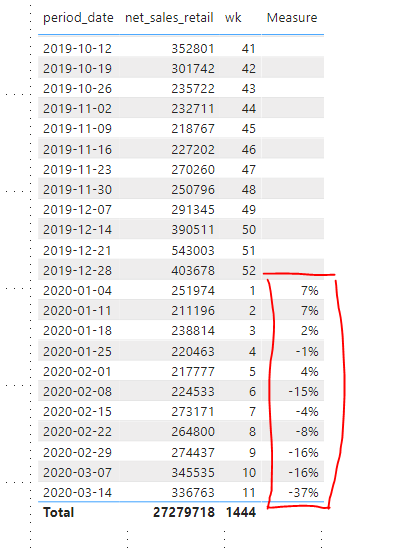
The result shows the increase/descrese compared with the last year same weekNo data:
Best Regards,
Giotto Zhi
- Mark as New
- Bookmark
- Subscribe
- Mute
- Subscribe to RSS Feed
- Permalink
- Report Inappropriate Content
Hi,
Please try this measure:
Measure =
VAR LastYearSales =
    CALCULATE (
        SUM ( 'Table'[net_sales_retail] ),
        FILTER (
            ALLSELECTED ( 'Table' ),
            'Table'[wk] = SELECTEDVALUE ( 'Table'[wk] )
                && YEAR ( 'Table'[period_date] )
                    = YEAR ( SELECTEDVALUE ( 'Table'[period_date] ) ) - 1
        )
    )
RETURN
    IF (
        YEAR ( MIN ( 'Table'[period_date] ) )
            = YEAR ( MINX ( ALLSELECTED ( 'Table' ), 'Table'[period_date] ) ),
        BLANK (),
        ( MAX ( 'Table'[net_sales_retail] ) - LastYearSales ) / LastYearSales
    )
The result shows the increase/descrese compared with the last year same weekNo data:
Best Regards,
Giotto Zhi
- Mark as New
- Bookmark
- Subscribe
- Mute
- Subscribe to RSS Feed
- Permalink
- Report Inappropriate Content
Let me illustrate the problem in the report.
Please refer to the data table in my original post for the values needed.
I currently have it setup to show the correct amount in my previous year measure (highlighted):
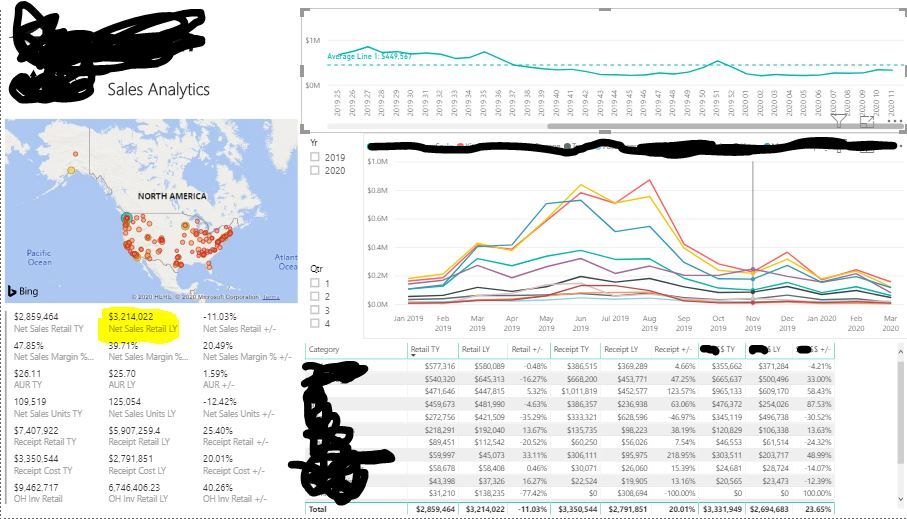
When I select the last reported week on the upper right line graph it cross filters the measure to the wrong week (highlighted). The value should be the $537,963 from week 11 2019:


- Mark as New
- Bookmark
- Subscribe
- Mute
- Subscribe to RSS Feed
- Permalink
- Report Inappropriate Content
Hi @STS_Joshua ,
Try this code:
Did I answer your question? Mark my post as a solution!
Proud to be a Super User!
- Mark as New
- Bookmark
- Subscribe
- Mute
- Subscribe to RSS Feed
- Permalink
- Report Inappropriate Content
Thanks for the suggestion. What this formula does is returns the value for ONLY the same week of last year. I need something that will give me week 1 of 2019 when week 1 of 2020 is selected and so on.


- Mark as New
- Bookmark
- Subscribe
- Mute
- Subscribe to RSS Feed
- Permalink
- Report Inappropriate Content
@STS_Joshua , 364 days behind measure should do, as long ad week is coming from date calendar
- Mark as New
- Bookmark
- Subscribe
- Mute
- Subscribe to RSS Feed
- Permalink
- Report Inappropriate Content
Week year is 364 days behind with date calendar you can use
Week Year behind Sales = CALCULATE(SUM(Sales[Sales Amount]),dateadd('Date'[Date],-364,DAY))
To get the best of the time intelligence function. Make sure you have a date calendar and it has been marked as the date in model view. Also, join it with the date column of your fact/s. Refer :
https://radacad.com/creating-calendar-table-in-power-bi-using-dax-functions
https://www.archerpoint.com/blog/Posts/creating-date-table-power-bi
https://www.sqlbi.com/articles/creating-a-simple-date-table-in-dax/
- Mark as New
- Bookmark
- Subscribe
- Mute
- Subscribe to RSS Feed
- Permalink
- Report Inappropriate Content
That will not work because I want to compare the value I have for 3/14/2020 with the value I have for 3/16/2019.
- Mark as New
- Bookmark
- Subscribe
- Mute
- Subscribe to RSS Feed
- Permalink
- Report Inappropriate Content
If you need the see 1 year ahead, just change to:
Did I answer your question? Mark my post as a solution!
Proud to be a Super User!

Helpful resources

Power BI Dataviz World Championships
The Power BI Data Visualization World Championships is back! Get ahead of the game and start preparing now!

Power BI Monthly Update - November 2025
Check out the November 2025 Power BI update to learn about new features.

FabCon Atlanta 2026
Join us at FabCon Atlanta, March 16-20, for the ultimate Fabric, Power BI, AI and SQL community-led event. Save $200 with code FABCOMM.

| User | Count |
|---|---|
| 59 | |
| 43 | |
| 42 | |
| 23 | |
| 17 |


| User | Count |
|---|---|
| 190 | |
| 122 | |
| 96 | |
| 66 | |
| 47 |


