cancel
Showing results for 
Search instead for 
Did you mean: 

The Power BI Data Visualization World Championships is back! Get ahead of the game and start preparing now! Learn more

Reply
jonnyA
Responsive Resident
Responsive Resident

Trying to add a "fx" title in Power BI, but not letting me choose my measure I created

Hey!

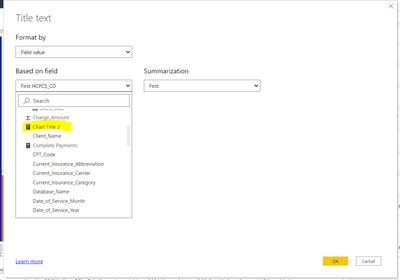
I am trying to add a fx title to my report, but the report is not letting me choose my calculated measure.

Here is my formula ...

Chart Title 2 = "GENLLC Provider: " & SELECTEDVALUE(GENLLC_Charge_Dataset[Provider_Name])
I am trying to choose "Chart Title", but it wont let me click it.
Any suggestions?
I use the same formula on another report and it works great.
jonnyA_0-1624393670078.png


1 ACCEPTED SOLUTION
jonnyA
Responsive Resident
Responsive Resident

Changing the format of a measure

  1. Click on the measure that was created 
  2. Go to "Measure tools" at the top of Power BI in headings 
  3. Go to "Data Type" and click on the drop down and choose "Text" 

Reason for doing this: I was trying to add a Title using the "fx" aka conditional formatting, but when I was in the Conditional formatting pop up box, it would not let me click on the measure.  That is why I had to do the steps I mentioned above. 

View solution in original post

3 REPLIES 3
jonnyA
Responsive Resident
Responsive Resident

Changing the format of a measure

  1. Click on the measure that was created 
  2. Go to "Measure tools" at the top of Power BI in headings 
  3. Go to "Data Type" and click on the drop down and choose "Text" 

Reason for doing this: I was trying to add a Title using the "fx" aka conditional formatting, but when I was in the Conditional formatting pop up box, it would not let me click on the measure.  That is why I had to do the steps I mentioned above. 

jonnyA
Responsive Resident
Responsive Resident

Changing the format of a measure. 

  1. Click on the measure that was created 
  2. Go to "Measure tools" at the top of Power BI in headings 
  3. Go to "Data Type" and click on the drop down and choose "Text" 


Reason for doing this: I was trying to add a Title using the "fx" aka conditional formatting, but when I was in the Conditional formatting pop up box, it would not let me click on the measure.  That is why I had to do the steps I mentioned above. 

AlexisOlson
Super User
Super User

I've noticed it won't let you choose a numeric measure for a title. Double-check that the measure you want is formatted as text and try saving and reopening the file in case this is a random bug.

Helpful resources

Announcements
Power BI DataViz World Championships

Power BI Dataviz World Championships

The Power BI Data Visualization World Championships is back! Get ahead of the game and start preparing now!

November Power BI Update Carousel

Power BI Monthly Update - November 2025

Check out the November 2025 Power BI update to learn about new features.

FabCon Atlanta 2026 carousel

FabCon Atlanta 2026

Join us at FabCon Atlanta, March 16-20, for the ultimate Fabric, Power BI, AI and SQL community-led event. Save $200 with code FABCOMM.