Join us at FabCon Atlanta from March 16 - 20, 2026, for the ultimate Fabric, Power BI, AI and SQL community-led event. Save $200 with code FABCOMM.
Register now!The Power BI Data Visualization World Championships is back! Get ahead of the game and start preparing now! Learn more
Hey!
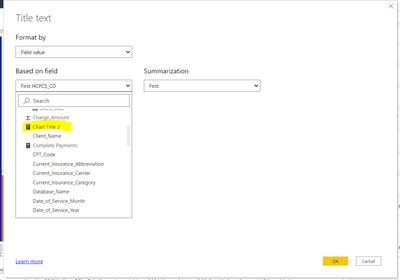
I am trying to add a fx title to my report, but the report is not letting me choose my calculated measure.
Here is my formula ...
Solved! Go to Solution.
Changing the format of a measure.
Reason for doing this: I was trying to add a Title using the "fx" aka conditional formatting, but when I was in the Conditional formatting pop up box, it would not let me click on the measure. That is why I had to do the steps I mentioned above.
Changing the format of a measure.
Reason for doing this: I was trying to add a Title using the "fx" aka conditional formatting, but when I was in the Conditional formatting pop up box, it would not let me click on the measure. That is why I had to do the steps I mentioned above.
Changing the format of a measure.
Reason for doing this: I was trying to add a Title using the "fx" aka conditional formatting, but when I was in the Conditional formatting pop up box, it would not let me click on the measure. That is why I had to do the steps I mentioned above.
I've noticed it won't let you choose a numeric measure for a title. Double-check that the measure you want is formatted as text and try saving and reopening the file in case this is a random bug.
The Power BI Data Visualization World Championships is back! Get ahead of the game and start preparing now!
| User | Count |
|---|---|
| 38 | |
| 38 | |
| 37 | |
| 28 | |
| 28 |
| User | Count |
|---|---|
| 124 | |
| 89 | |
| 73 | |
| 66 | |
| 65 |